Every device. One tool. Pay once.Modbus · BACnet · Siemens S7 · one-time licence · also from us: ModbusManager ↗
// bacnet/ip & ms/tp → mqtt
BACnet to MQTT & Home Assistant
BACManager's gateway reads BACnet objects — from BACnet/IP controllers, and from MS/TP devices through the RS-485 port — and publishes each present value to an MQTT broker as its own retained topic. With Home Assistant discovery on, Home Assistant creates the entities by itself, with units and device classes. A setpoint changed in Home Assistant goes back to the BACnet object at the priority you choose, not as a blind overwrite. No Node-RED flow, no Python, no second box.
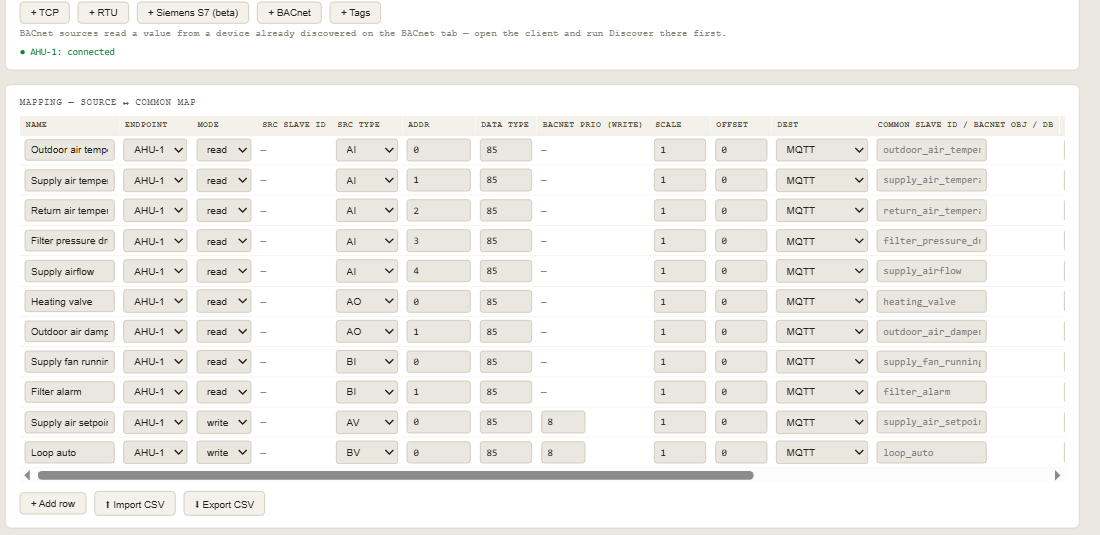
Each gateway row names a BACnet object (type and instance on a device you discovered on the BACnet tab) and sends it to MQTT. Read rows publish; write rows also take commands.
The free workspace: an air handling unit's temperatures, valve, damper, fan and filter status to MQTT; the supply air setpoint and the loop's auto/manual switch writable from Home Assistant
This is what a subscriber to ahu1/# received from that workspace:
Values are published when they change and again every 60 seconds, retained, so anything that subscribes later gets the current state at once. Energy rows (device class energy) are announced as total_increasing for Home Assistant's Energy dashboard. A row you delete disappears from Home Assistant, and when Home Assistant restarts the gateway announces everything again.
// writes that respect the building
Home Assistant writes at a priority, not over everything
A commandable BACnet object has a 16-level priority array. The value that counts is the one at the strongest priority that holds something.
🎯
Your priority, per row
Each write row has its own BACnet priority — 8, Manual Operator, unless you choose another. A setpoint set in Home Assistant goes into that slot and nowhere else.
🕐
Schedules stay in charge
If the controller's own logic writes at a stronger priority, it keeps control and Home Assistant shows the value that actually applies — the row is read back after every write.
📝
Every write logged
Each command from MQTT appears in the gateway log with the object, the value and the priority it was written at; text that is not a number writes nothing.
Writing at priority 8 leaves the value there until something relinquishes it. See the priority array explained for how relinquish and the relinquish default work, and pick the priority with the site's controls engineer.
// step by step
From a BACnet device to Home Assistant
1
Discover the device
On the BACnet tab open BACnet/IP (or MS/TP on a COM port) and run Discover. Note the device instance and the objects you want from the object list.
2
Add the BACnet endpoint and rows
On the Gateway tab add a + BACnet endpoint with the device instance, then a row per object: type, instance, Dest MQTT, a topic, the unit and the Home Assistant class.
3
Broker and start
Enter the broker (Home Assistant's Mosquitto add-on, port 1883), user and password, keep discovery on, and press Start gateway. The device appears in Home Assistant under MQTT.
// free download
The air handling unit workspace
Eleven rows for a typical AHU: outdoor, supply and return air temperature, filter pressure drop, supply airflow, heating valve, outdoor air damper, fan running and filter alarm — plus the supply air setpoint (AV 0) and the loop's auto/manual switch (BV 0) writable from Home Assistant at priority 8. Base topic ahu1, discovery on.
Change the device instance on the endpoint and the object instances to your controller's, enter the broker, and start. The workspace matches the simulated AHU in BACManager's test set, so it also runs as-is against that simulator.
Yes. The gateway reads any BACnet object you add as a row — from BACnet/IP or MS/TP devices — and publishes its present value to an MQTT broker as a retained topic, <base>/<topic>/state.
How do I get BACnet into Home Assistant?+
Point BACManager's gateway at Home Assistant's MQTT broker with discovery on. Every row is announced with its name, unit and device class, and Home Assistant creates the entities under one device — no YAML and no custom integration.
Does it work with BACnet MS/TP devices?+
Yes. BACManager opens MS/TP on an RS-485 port of the PC; once the devices are discovered, their objects are used in gateway rows exactly like BACnet/IP objects.
Can Home Assistant change a BACnet setpoint?+
Yes. A row in write mode appears as a number (or a switch for a binary object). What you set is written to the object at the row's BACnet priority, 8 by default, and read back so Home Assistant shows the value that applies.
Can the same values also go to a PLC or a BMS?+
Yes. Other rows of the same gateway can serve a Modbus TCP map, expose values as a BACnet/IP device, or fill a Siemens S7 data block — see the gateway page.
Is the MQTT output an extra-cost module?+
No. The gateway with MQTT and Home Assistant discovery is part of the standard $149 one-time BACManager license, version 1.4.5 or newer.
Get your BACnet points into Home Assistant
Download the free trial, load the AHU workspace, point it at your broker — the entities appear by themselves. No credit card.