Every device. One tool. Pay once. Modbus · BACnet · Siemens S7 · one-time licence · also from us: ModbusManager ↗
// aaon · vccx2 rooftop controller · bacnet ms/tp

AAON VCCX2
BACnet Points List & Integration

How to bring an AAON rooftop unit with a VCCX2 controller onto a BMS over BACnet MS/TP: the three LCD settings, which RS-485 port is BACnet and which is not, the points a BMS uses — including why HVAC mode is an analog input — and the economizer override that quietly locks out the compressors. With a free BACManager workspace for the unit.

Download free trial Free VCCX2 workspace

Source: AAON VCCX2 Controller Technical Guide (G115820 Rev. AA, 2025), Appendix C · BTL listed

// before you start

No BACnet card, but two RS-485 networks

🔌

BACnet is on board

The VCCX2 has its own BACnet MS/TP port — there is no AAON BACnet card to order. It is BTL listed as a B-ASC. For BACnet/IP there is the VCCX-IP controller, which has an Ethernet port as well as MS/TP terminals.

⚠

Not the “485” loop

The VCCX2 also has AAON's own communication loop (Unit ID 1–59, for Prism 2, MiniLink and CommLink). That loop is not BACnet. Wire the BMS to the BACnet port; a BACnet tool sees nothing on the other one.

🔢

Set on the LCD

The controller's 2×8 display and four buttons hold the BACnet settings: MAC address, device ID and baud rate, in the Settings screens.

// setup

VCCX2 BACnet settings

LCD screenRangeDefault and notes
MAC Addr0–1271 — change it, or every new AAON unit on the trunk collides
DeviceIDup to 7 digitsEntered digit by digit; AAON does not give a default, so set one per unit and keep a list
MSTPBaud9600, 19200, 38400, 57600, 7680038400 — match the trunk
Unit ID#1–59AAON's own comm loop address, not BACnet

Use 18-gauge shielded twisted pair, plenum rated where required (AAON names Belden 82760), daisy-chained with a termination at each end of the trunk. The VCCX2 does not support segmentation, so a tool or BMS must keep its ReadPropertyMultiple requests small enough to fit one MS/TP frame — BACManager reads in chunks of ten objects. If the trunk misbehaves, see the MS/TP troubleshooting guide.

// points list

The VCCX2 points a BMS uses

AAON's rule is short: AI objects are read-only, AV objects are read/write. Three AIs carry numbers that stand for states — Control Mode, Control Status and HVAC Mode — so map them to text in the BMS. Names below are the guide's parameter names.

ObjectParameterAccessWhat it is
AI:2Control ModeRConfigured application: 0 Supply Air Cooling Only, 1 Supply Air Tempering, 2 Outdoor Temperature Control, 3 Return Air CV, 4 Space Temp CV, 5 Space Temp w/ High OA, 6 Single Zone VAV
AI:3Control StatusR0 Unoccupied, 1 Occupied, 2 Override, 3/4 Holiday Unocc/Occ, 5 Forced Occupied, 6 Forced Unoccupied, 7 Remote Contact Occupied, 11 OA Damper Calibration
AI:4HVAC ModeR0 Off, 1 Vent, 2 Cooling, 3 Heating, 4–6 Vent/Cooling/Heating RH, 7 Warm Up, 8 Purge, 9 Defrost, 10 Cool Down
AI:5Control TemperatureRThe temperature the unit controls to (space, return or outdoor, by Control Mode)
AI:6 / AI:7Mode Cooling / Heating SetpointRCooling and heating enable setpoints in force, after slide adjust and night setback
AI:9 / AI:10Supply Air Temperature / Supply Air SetpointRSupply air, and the supply air setpoint in force (after reset)
AI:12, AI:14, AI:16Space / Return Air / Outdoor Air TemperatureRSensors
AI:21 / AI:22Duct Static Pressure / Duct Static Control SignalRDuct static, and the signal to the supply fan VFD
AI:29Carbon DioxideRIndoor CO2
AI:30Desired Economizer PositionRSignal to the economizer damper
AI:144Alarm StatusR0 no alarms, 1 alarm(s) present — the BIs say which
AV:1 / AV:2Occupied Cooling / Heating SetpointWMode enable setpoints
AV:10 / AV:11Supply Air Cooling / Heating SetpointWSupply air setpoints
AV:49Minimum Economizer PositionWMinimum outdoor air — the safe way to set the damper (see below)
AV:67Schedule ForceW0 Auto (own schedule), 1 Forced Occupied, 2 Forced Unoccupied
AV:68HVAC Mode OverrideW0 Auto, 1 Vent, 2 Cool, 3 Heat, 4–6 Vent/Cool/Heat Dehum
AV:69 / AV:70Fan VFD Override / Outdoor Air Damper OverrideW0–100 %; 65535 = Auto releases the override
AV:71Supply Setpoint OverrideWSupply air setpoint override, 0 = no override
AV:72, AV:78Space / Outdoor Air Temperature ValueWSensor values from the BMS — only if the controller is configured to take them (also AV:73, 76–79)
AV:98Emergency Compressor LockoutW1 locks out the compressors
BI:1 / BI:3Cooling / Economizer Enabled StatusRCooling allowed by its lockout; economizer enabled by its setpoint
BI:6 / BI:47Fan Proof of Airflow Status / On Board Relay 1 Main FanRAirflow proven; supply fan relay
BI:24, BI:25, BI:26Fan Proving / Dirty Filter / Emergency Shutdown AlarmRAlarms (BI:12–35 cover sensors, cooling, heating and economizer faults)
BI:77, BI:78A1 / A2 Compressor EnableRCompressor outputs; BI:79/80 their alarms

The complete list — per-compressor suction and head pressure, superheat and EEV position, airflows, Title 24 economizer faults, preheat and the RSMZ modules — is Appendix C of AAON's VCCX2 Controller Technical Guide.
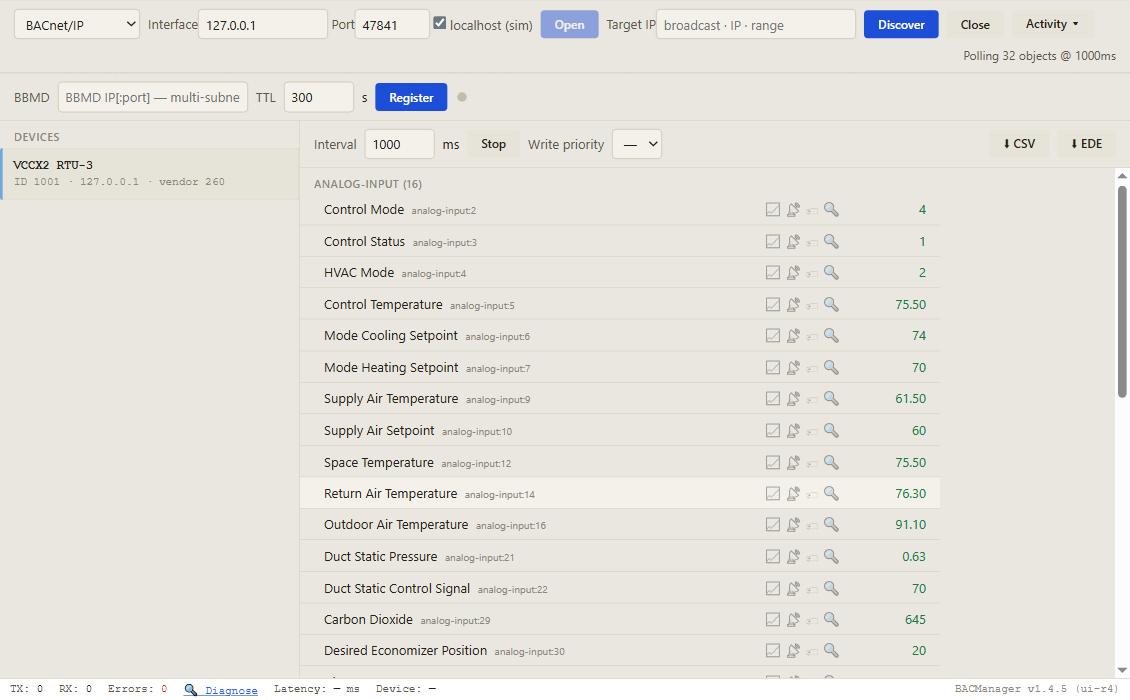
BACManager BACnet tab: device VCCX2 RTU-3, device ID 1001, with its objects listed by name, Control Mode, Control Status, HVAC Mode, Supply Air Temperature, Space Temperature and more, polled every second
Discover, click the unit, and its objects come up by name with live values. Pictured: a simulated VCCX2 built from AAON's points list
// writing to the unit

Last write wins, and Auto is 65535

=

No priority array

The VCCX2's AVs are plain read/write values: a write replaces the value, whatever priority it was sent at, and stays after the BMS is gone. Two systems writing the same AV simply overwrite each other.

↺

Release overrides with Auto

An override stays until you write Auto back: 65535 for the fan VFD, the OA damper and the relief fan, 0 for Schedule Force, HVAC Mode Override and the supply setpoint override.

❄

The damper trap

Writing anything between 0 and 100 % to the OA Damper Override (AV:70) makes the controller treat the economizer as running short of 100 % — and it locks the compressors out. Set a minimum with Minimum Economizer Position (AV:49) instead.

// free download

The VCCX2 rooftop workspace

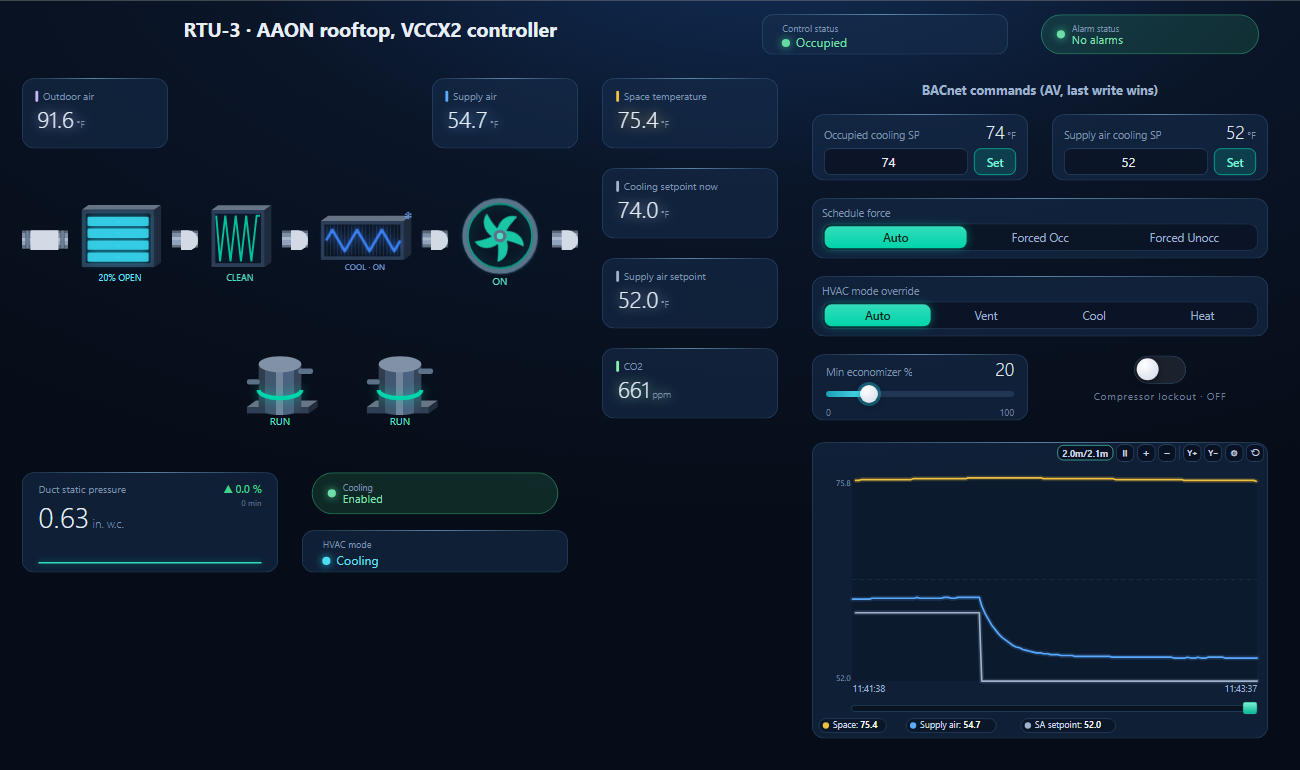
One dashboard page for the unit: outdoor, supply and space temperature, economizer, filter, DX coil, supply fan, two compressors, duct static, CO2, control status and HVAC mode shown by name, cooling lockout and alarm status — with the occupied cooling and supply air setpoints, schedule force, HVAC mode override, minimum economizer position and compressor lockout writable.

BACManager dashboard for an AAON rooftop unit with a VCCX2 controller: air path from outdoor air through economizer, filter, DX coil and supply fan, compressors A1 and A2, duct static pressure, space temperature, control status and HVAC mode by name, BACnet commands and a trend of space, supply air and its setpoint
The supply air cooling setpoint written from the page; the unit stages compressors A1 and A2 to follow (simulated controller)
1

Discover the unit

Connect the PC's RS-485 adapter to the BACnet trunk, open MS/TP on the BACnet tab at the trunk's baud rate and press Discover — or reach it through a BACnet router over IP.

2

Open the workspace

Workspace → Open. The file reads device 1001; with your unit's device ID different, BACManager asks which discovered device takes its place and moves every point over.

3

Run

BACManager starts reading the unit by itself. On the Dashboard press Run: the controls write only in Run mode, and only after the unit has answered.

Download workspace
// when it does not work

Typical problems

What you seeWhyWhat to do
Compressors never start, cooling calledAn OA damper override between 0 and 100 %, or Emergency Compressor Lockout = 1Write 65535 to AV:70 (use AV:49 for a minimum); write 0 to AV:98
Unit stuck in one mode or occupancyAn override left in place by a BMS that is goneWrite Auto: 0 to AV:67, AV:68 and AV:71, 65535 to AV:69 and AV:70
A written space temperature has no effectThe controller is not configured to take that sensor value from the networkConfigure it at the unit; only AV:72, 73 and 76–79 accept sensor values
New unit not found, another one drops offMAC address left at 1 on more than one unitGive each unit its own MAC on the LCD
Nothing answers at allWired to the AAON comm loop, not the BACnet portMove the BMS pair to the BACnet MS/TP terminals
Reads fail with an abort, single reads workA request too large for one frame — the VCCX2 cannot segmentFewer objects per ReadPropertyMultiple
HVAC mode shows 2The VCCX2 reports its states as numbers on AIsMap them to text in the BMS (2 = Cooling)
// questions

AAON VCCX2 BACnet — FAQ

Where is the AAON BACnet points list?+
For units with the VCCX2 controller it is Appendix C, BACnet Guide, of AAON's VCCX2 Controller Technical Guide on aaon.com. The table on this page lists the points a BMS uses most.
Do I need an AAON BACnet card?+
No. The VCCX2 has an on-board BACnet MS/TP port. For BACnet/IP, AAON's VCCX-IP controller has an Ethernet port, or the MS/TP trunk can go through a BACnet router.
What are the VCCX2's default BACnet settings?+
MAC address 1 and 38400 baud. The device ID is entered on the LCD; AAON's guide gives no default, so set one per unit.
Why are the HVAC mode and occupancy analog inputs?+
That is how the VCCX2 reports them: AI:4 HVAC Mode, AI:3 Control Status and AI:2 Control Mode carry a number for each state, listed in the guide's enumeration tables (for example HVAC Mode 2 = Cooling).
How do I release a VCCX2 override from BACnet?+
Write Auto: 65535 to the fan VFD, OA damper and relief fan overrides, 0 to Schedule Force, HVAC Mode Override and the supply setpoint override.
Does the VCCX2 support COV?+
Not according to its published PICS (software 1.90 and earlier), which lists ReadProperty, ReadPropertyMultiple, WriteProperty and device management only, and no segmentation No. Its PICS lists ReadProperty, ReadPropertyMultiple, WriteProperty and device management only, and no segmentation, so a BMS polls it in small requests.mdash; so a BMS polls it in small requests.
// sources

Where this comes from

AAON: VCCX2 Controller Technical Guide, G115820 Rev. AA (January 2025), with Appendix C BACnet Guide and the PICS, on aaon.com; BACnet International's BTL listings for the VCCX2. Check the guide for your controller's software version before commissioning. AAON and VCCX2 are trademarks of AAON, Inc.; BACManager is not affiliated with AAON. The pictures on this page are from BACManager connected to a simulated controller built from the published points list.

// more device guides

Other BACnet devices

Chillers and rooftop units
Daikin MicroTech III chiller
Trane Symbio 700
Lennox CORE
Boilers
Lochinvar Crest boiler
VRF and split systems
Daikin iTM (VRV)
Mitsubishi AE-200
Drives
ABB ACH580
Schneider ATV600
Pumps and valves
Grundfos MAGNA3 (CIM)
Wilo Stratos MAXO (CIF)
Belimo Energy Valve
Routers
BASrouter (MS/TP to IP)

All BACnet device guides →

Commission the AAON unit from your laptop

Download the free trial, discover the unit and open the VCCX2 workspace — every point by name, states shown as text. No credit card.

Download free trial See pricing

Windows 10/11 · $149 one-time