Every device. One tool. Pay once.Modbus · BACnet · Siemens S7 · one-time licence · also from us: ModbusManager ↗
// lochinvar · crest boiler · mtr-01 bacnet ms/tp
Lochinvar Crest BACnet Points List & Setup
How to put a Lochinvar Crest condensing boiler on BACnet MS/TP: the DIP switches on the MTR-01 BACnet board, the device instance it makes up, the Configuration bits that decide which values the boiler takes from the BMS — and the BAS timer that hands control back to the boiler when the writes stop. With a free BACManager workspace that writes them again every 10 seconds.
Source: Lochinvar 100161012_2000020084 Rev X, ModBus and BACnet Communication Instructions
// before you start
One board, two settings on the boiler
🔌
The MTR-01 board
The Crest's communication board sits in the control panel and comes in a ModBus and a BACnet version. The BACnet one is an MS/TP master on RS-485 (A, B, shield). For BACnet/IP put a BACnet router in front of it, or read the trunk directly from a PC's RS-485 port — see BACnet MS/TP over RS-485.
⚙
Two menus
Main Menu → Setup → BMS sets the demand configuration: whether the enable, the BMS rate or setpoint, or both come over the network. Main Menu → Setup → BAS sets the BAS timer, 5–120 s.
°F
°C or °F
DIP switch 8 on the board picks the unit: off is Celsius, on is Fahrenheit. The memory map gives every range in °C, so a Fahrenheit job reads different numbers from the ones in the tables.
// setup
MTR-01 BACnet board settings
Setting
Where
Values
MS/TP MAC address
DIP 1–7
Binary: 1, 2, 4, 8, 16, 32, 64. A master, so 1–127. MAC 50 = DIP 2, 5 and 6 on
610000 for FB 751–2001, 670000 for FB 2501–6001, 680000 for FCB1000–6000 (and Regent IWH500–1000). FB 1001 with MAC 50 = 610050
Device name
BACnet
MTR-01 BACnet by default; the integrator can change it
BAS timer
Main Menu → Setup → BAS
5–120 s; Lochinvar recommends the shortest you can keep up with
The base (610000 and so on) can be set by the integrator to anything from 0 to 4194048; the device instance is still base + MAC. Two boilers of the same model with the same MAC on two trunks therefore collide — give one of them another base. To go back to the factory base: power off the board, set DIP 1–8 on, power on, wait a few seconds, power off, set the address on DIP 1–7, power on. The green LED D7 tells you the board's state: 1 s bright / 1 s dim is normal, 1.5 s on / 0.5 s off means no BACnet communication, 0.5 s on / 1.5 s off no communication with the burner control, steady on a controller fault. D5 and D6 flash on transmit and receive.
// the bits that decide
Configuration (AV:0): which values come from the BMS
Each bit set to 1 tells the boiler to ignore its own input for that value and take the one the BMS writes. Nothing you write to AV:1–AV:7 counts until its bit is set. Lochinvar asks for the configuration to be sent again before every command.
Bit
Value
Takes from the BMS
Written to
0
1
Boiler Enable
AV:1 Coils, bit 0
1
2
Tank Thermostat
AV:1 Coils, bit 4
2
4
Rate / 0–10 V input / setpoint command
AV:2
3
8
Tank Setpoint
AV:3
4
16
System Supply Temperature
AV:6
5
32
Outdoor Temperature
AV:5
6
64
Tank Temperature
AV:4
7
128
System Return Temperature
AV:7
1
Enable only
Setpoints stay on the boiler, the BMS only switches it. AV:0 = 1, AV:1 = 1 to enable, 0 to disable. Demand configuration ENABLE active, BMS inactive.
4
Rate or setpoint only
The BMS sends a firing rate or a setpoint on AV:2, all sensors stay wired to the boiler. AV:0 = 4. Demand configuration ENABLE inactive, BMS active.
5
Enable and setpoint
Both: AV:0 = 5, AV:1 bit 0 enables, AV:2 sets the rate or setpoint. Both ENABLE and BMS active. This is what the free workspace does.
// the rule that bites
The BAS timer: write again, or the boiler takes over
⏱
Temperatures: seconds
When the BMS provides the system supply or tank temperature, it has to update it every few seconds. If no new value arrives within the BAS timer (5–120 s), the boiler goes back to its own sensors, if it has them.
4
Commands: 4 minutes
When the BMS sends no temperatures but does control the boiler — an enable, a rate or a setpoint — Lochinvar's section 6 asks for the commands to be written again at least every 4 minutes. Its section 10 says every write of a command resets the BAS timer, and that the timer itself hands control back when it runs out.
↻
So: write faster than the timer
Write the configuration and the commands again well inside the BAS timer. Set the timer to, say, 30–60 s and write every 10 s: a missed write is retried twice before the boiler gives up on the BMS.
In BACManager a BACnet tag has Refresh (s): the last value written to it is written again every that many seconds until it is relinquished. The free workspace sets 10 s on Configuration, Coils and the setpoint command. Tested against the simulated Crest with a 20 s BAS timer: with Refresh the boiler stayed on BMS heat demand (status 22) for the whole run; without it, it dropped to its own control (status 11, no heat demand) within about 20 s of the last write.
// setpoint in percent
AV:2 is a percentage, not a temperature
AV:2 stands in for the boiler's 0–10 V input: 0–100 % means 0–10 V. Set up for a firing rate, it is the modulation; set up for a setpoint, the boiler scales it between two parameters.
BMS setpoint parameter
Default
At
Temperature at low analog input
69.8 °F (21 °C)
2 V = 20 %
Temperature at high analog input
179.6 °F (82 °C)
10 V = 100 %
Volts = (setpoint − 69.8) × 8 / (179.6 − 69.8) + 2, and percent = volts × 10. Lochinvar's own example: 110 °F → 4.92 V → 49 %. With the defaults, 60 % is about 125 °F and 80 % about 152 °F. Write 110 to AV:2 meaning °F and the boiler is told to go to its maximum. If the parameters on the boiler were changed, use those numbers instead.
// points list
The Crest points a BMS uses
AVs and BVs are written, AIs and BIs read. Temperatures follow DIP switch 8.
Object
Object name
Access
What it is
AV:0
Configuration
W
Bit mask: which values come from the BMS (table above)
AV:1
Coils
W
Bit 0 Boiler Enable, bit 4 Tank Thermostat
AV:2
0-10 Volt Input / Rate Command / Setpoint Command
W
0–100 %: firing rate or scaled setpoint
AV:3 – AV:7
Tank Setpoint, Tank / Outdoor / System Supply / System Return Temperature
W
Values the BMS provides instead of the boiler's own sensors; update every few seconds
BV:0 / BV:4
Boiler Enable / Tank Thermostat
W
The same two commands as single binary objects
AI:7 / AI:3
Outlet Setpoint / System / Cascade Setpoint
R
The setpoint in force — check what your AV:2 turned into
AI:8 / AI:9 / AI:10
Outlet / Inlet / Flue Temperature
R
Boiler water and flue
AI:11 / AI:12 / AI:4
Firing Rate / Boiler Pump Speed / System Pump Speed
R
%
AI:5 / AI:6
Cascade Total Power / Cascade Current Power
R
On the cascade leader, %
AI:13
Boiler Status Code
R
11 no heat demand, 19 DHW, 21 room thermostat, 22 heat demand from the BMS, 23 cascade, 30 freeze protection, 40 lockout…
AI:14
Boiler Blocking Code
R
0 none, 6 manual reset high limit open, 11 high outlet, 12 anti-cycling, 15 high flue…
AI:15
Boiler Lockout Code
R
Why it locked out; codes in section 13 of the manual
BI:7 / BI:37
Flame 1 / Gas Valve 1
R
Burner on
BI:34 / BI:38 / BI:35
Boiler Pump / System Pump / DHW Pump
R
Pump outputs
BI:1 / BI:0
Flow Switch / Manual Reset High Limit
R
Safety inputs
BI:32 / BI:33
Run Time Contacts / Alarm Contacts
R
Running and alarm relays
The full map — every switch, the FCB's damper, fan and O2 points, the packed binary words and the cascade members' lockouts — is in section 7 of Lochinvar 100161012_2000020084 Rev X. The manual does not list the board's BACnet services (COV, segmentation, APDU size): poll it, and keep each ReadPropertyMultiple small. With the board in the leader boiler, the BMS sees the whole cascade; each boiler's own temperatures need a board in that boiler.
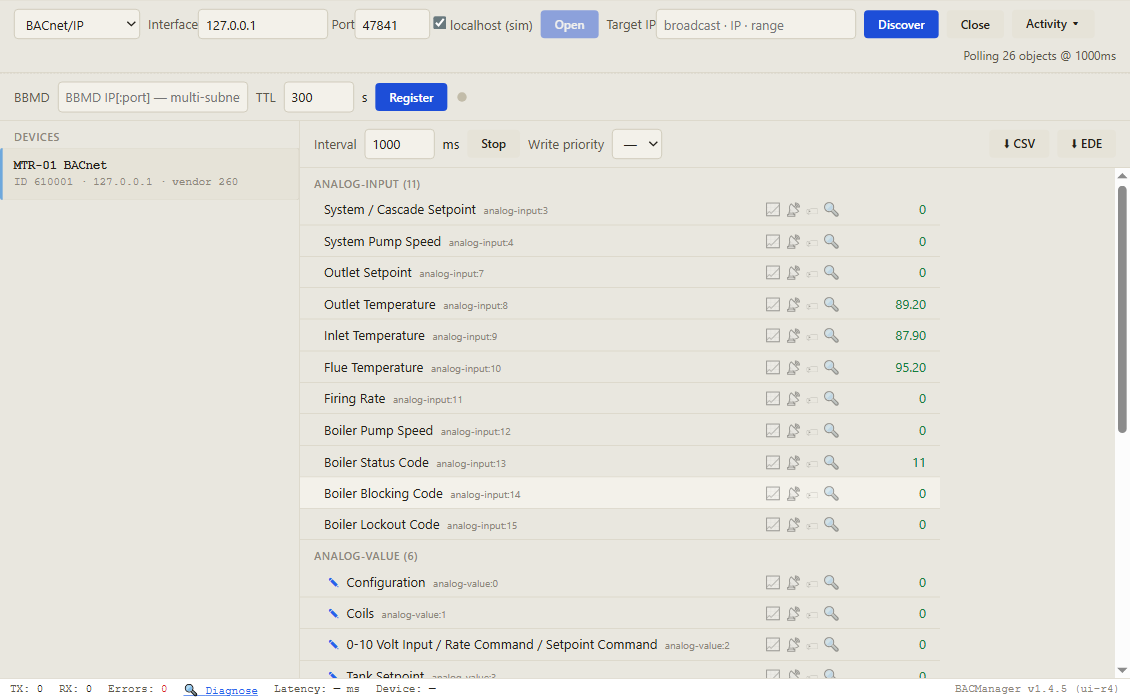
Discover, click the boiler, and its objects come up by name with live values. Pictured: a simulated Crest built from Lochinvar's published memory map, before any BMS command
// free download
The Lochinvar Crest workspace
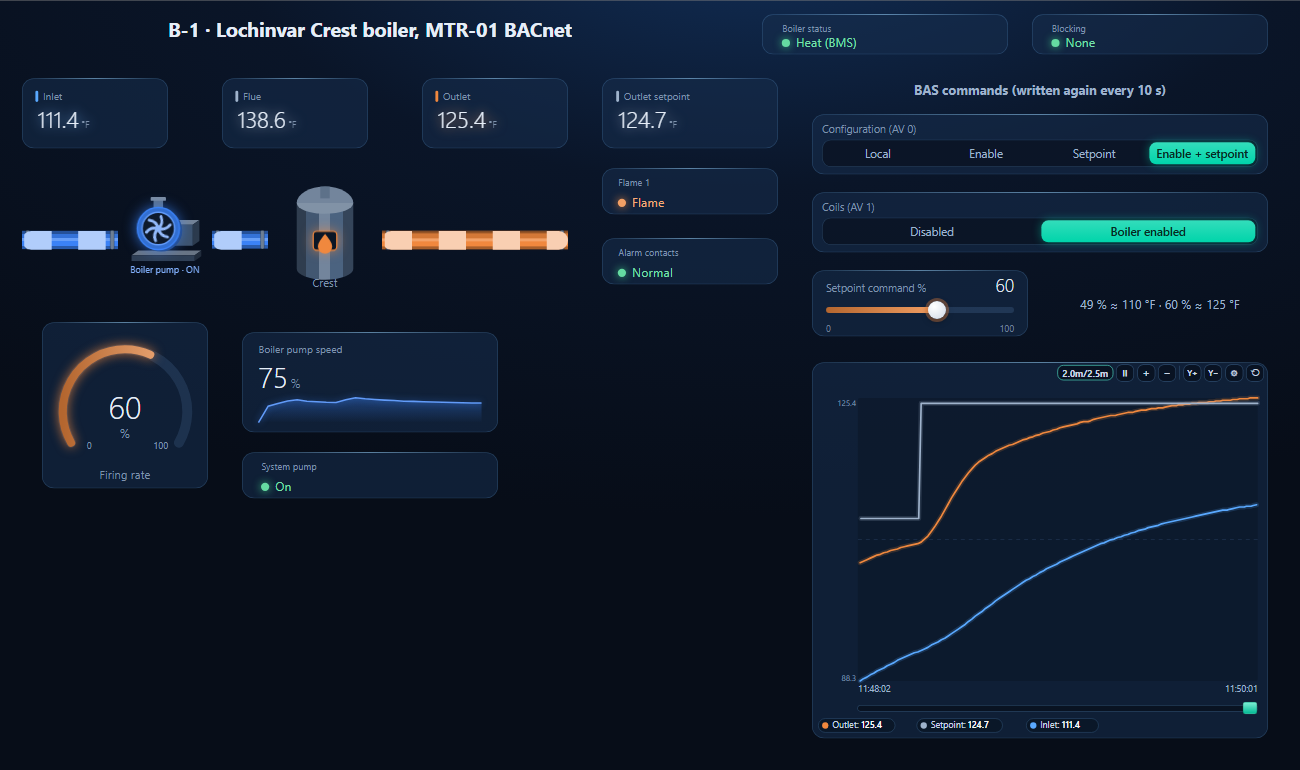
One dashboard page for a Crest boiler with enable and setpoint from the BMS: status and blocking codes as text, inlet, outlet and flue temperature, the setpoint in force, firing rate, flame, pumps and alarm contacts — with Configuration, Coils and the setpoint command written again every 10 seconds.
Setpoint command written from the page, 49 → 60 % (110 → 125 °F), the outlet following it, and the commands repeated every 10 s so the boiler stays on the BMS (simulated controller)
1
Discover the boiler
On the BACnet tab open MS/TP on the PC's RS-485 port at the board's baud rate (or BACnet/IP behind a router) and press Discover. The boiler appears as MTR-01 BACnet.
2
Open the workspace
Workspace → Open. The file reads device 610001; if yours has another instance, BACManager asks which discovered device takes its place and moves every point over.
3
Run, then command once
BACManager starts reading the boiler by itself. On the Dashboard press Run, pick Enable + setpoint, enable the boiler and set the percentage — from then on all three are written again every 10 seconds. After BACManager restarts, command them once more.
Works, then the boiler goes back to its own control
Nothing written within the BAS timer
Write configuration and commands every 10 s (Refresh 10 s in BACManager); timer 30–60 s
Boiler ignores AV:2
AV:0 bit 2 not set, or BMS inactive in the demand configuration
AV:0 = 4 or 5; check Main Menu → Setup → BMS
Setpoint written, burner never fires
AV:0 bit 0 set but AV:1 bit 0 is 0 — or a blocking code
Write AV:1 = 1; read AI:14 for the block
Boiler runs flat out
A temperature written to AV:2
AV:2 is 0–100 %: 110 °F is 49 %
No answer; D7 1.5 s on, 0.5 s off
No BACnet communication
Baud on DIP 9/10, MAC on DIP 1–7, A/B, 120 Ω at both ends
Two boilers, one device instance
Same model, same MAC on two trunks
Change one board's base
Temperatures in the wrong unit
DIP 8
On for °F, off for °C
A Knight's objects don't match this list
Knight, Armor and SYNC use a ProtoNode gateway
Use the object list in Lochinvar's ProtoNode FPC-N54 start-up guide
// questions
Lochinvar Crest BACnet — FAQ
Where is the Lochinvar Crest BACnet points list?+
In Lochinvar's ModBus and BACnet Communication Instructions, 100161012_2000020084 Rev X, section 7 (BACnet memory map for Crest and Hellcat). The table on this page lists the points a BMS uses most.
What is the device instance of a Crest boiler?+
The model's base plus the MS/TP MAC address: 610000 for FB 751–2001, 670000 for FB 2501–6001 and 680000 for FCB1000–6000. MAC 50 on an FB 1001 gives 610050. The base can be changed by the integrator.
Why does my Crest stop following the BMS after a while?+
Because the BAS timer ran out: when no write arrives within the time set under Main Menu → Setup → BAS (5–120 s), the boiler goes back to its own inputs. Write the configuration and the commands again every few seconds.
How do I send a temperature setpoint over BACnet?+
Set bit 2 of AV:0 and write a percentage to AV:2. With the defaults, 20 % (2 V) is 69.8 °F and 100 % (10 V) is 179.6 °F, so 110 °F is 49 %. Read AI:7 to see the setpoint the boiler made of it.
How do Knight boilers connect to BACnet?+
Lochinvar's documents connect Knight, Knight XL, Armor and SYNC boilers through a ProtoNode FPC-N54 gateway, which reads them over Modbus RTU and serves BACnet MS/TP or BACnet/IP, with object numbers of its own. The Crest's MTR-01 BACnet board is native BACnet MS/TP.
Which baud rates does the MTR-01 BACnet board support?+
9600, 19200, 38400 and 76800, set on DIP switches 9 and 10. Use the rate of the rest of the MS/TP trunk.
// sources
Where this comes from
Lochinvar: ModBus and BACnet Communication Instructions — Crest FB/OF751–6001, FCB1000–6000 & Regent IWH500–1000, 100161012_2000020084 Rev X, and the ProtoNode FPC-N54 Start-up Guide for Lochinvar, both on lochinvar.com. Check the manual for your boiler's revision before commissioning. Lochinvar, Crest, Knight, Armor and SYNC are trademarks of their owners; ProtoNode belongs to MSA Safety. BACManager is not affiliated with Lochinvar. The pictures on this page are from BACManager connected to a simulated boiler built from the published memory map.
Download the free trial, discover the boiler and open the Crest workspace — every point by name, status codes as text, commands kept alive. No credit card.