Every device. One tool. Pay once.Modbus · BACnet · Siemens S7 · one-time licence · also from us: ModbusManager ↗
// mitsubishi electric · ae-200 · ae-50 · ew-50
Mitsubishi AE-200 BACnet Points List & Setup
How to bring CITY MULTI and Mr. Slim groups onto a BMS through the AE-200 centralized controller's own BACnet/IP: the licence and the Setting Tool, the two LAN ports, a device number that leaves the factory as 3, objects that do not exist until you tick them — and the 200 ms per property that a fast BMS poll breaks. With a free BACManager workspace.
Sources: Mitsubishi Electric WT07919X08 (AE-200/AE-50/EW-50 Instruction Book, BACnet function) and WT07921X06 (BACnet Setting Tool)
// before you start
No gateway, but a licence and a tool
🔑
“BACnet connection” licence
The AE-200, AE-50 and EW-50 speak BACnet/IP themselves — no separate interface. Each controller that connects to BACnet needs its own “BACnet connection” licence; apportioned energy objects need the “Charge” licence as well. All controllers on BACnet must run the same software version.
🔧
The Setting Tool must match
BACnet is configured with Mitsubishi's BACnet Setting Tool on a PC, and its version has to match the controller's: Ver. 7.3x–7.4x takes tool 3.0, 7.50–7.70 tool 3.1, 7.71–7.85 tool 3.2, 7.9 and later tool 3.3. Otherwise sending settings ends in “Version Mismatch Error”.
📋
What the controller serves
Per WT07919X08: BACnet/IP to ANSI/ASHRAE 135-2010, APDU up to 1024 octets, segmentation both ways, vendor ID 99. ReadProperty(Multiple), ReadRange, WriteProperty(Multiple), SubscribeCOV, events and time synchronisation. No Schedule or Calendar objects, no DeviceCommunicationControl or ReinitializeDevice.
// setup
Two ports, and BACnet on LAN2
LAN1 carries the air-conditioning system and the web browser, LAN2 carries BACnet. They must be on different networks and on different switches. One default gateway, set on the LAN2 page, serves both.
Setting (BACnet Setting Tool)
Factory
Set to
LAN1 IP address
192.168.1.1
The AC system / web network; also where the Setting Tool connects
LAN2 IP address
192.168.2.1 / 24
An address on the BACnet network, not LAN1's network
BACnet Port No.
47808
Shown only
Device No.
3
A unique device instance, 0–4194302. Every AE-200, AE-50 and EW-50 leaves the factory as 3
Device Name
—
1–32 characters: letters, digits, - _ and space
Use Remote BBMD
Off
On to register as a foreign device; Time To Live in minutes, 0 = no limit
APDU Timeout / Retries
6000 ms / 3
Leave
Use Dry Mode, Use Fan Speed Mid1/Mid2
Off
On only if the BMS should offer Dry, or Mid1/Mid2
☑
Tick every object you need
On the Object tab each object has a Use box. Only ticked objects exist on BACnet, and the controller only creates those the group's units support. COV and event notification are off per object until you switch them on.
⇄
Offline to send, Online to run
Settings are sent only while the controller is Offline — and Offline stops its BACnet. Switching back to Online restarts the controller. It will not go Online without a valid licence, and with many groups it takes up to about ten minutes. Changing groups in the Initial Setting Tool drops it back to Offline.
🔌
Then unplug the PC
Mitsubishi's system drawings have the setting PC disconnected from the controller once the settings are made. An AE-200 controls up to 50 units itself and up to three AE-50 or EW-50 below it; each of those is a BACnet device of its own, with its own licence and Device No.
// instance numbers
The number tells you the group
Objects are per group — the indoor units that share a remote controller — not per indoor unit. The instance is six digits: object class, a fixed 1, the group 01–50, and the member number.
Digits
Meaning
Example
C
Object class: 0 group, 4 PI controller, 6 interlocked unit, 7 chiller system, 9 chiller unit
0
1
Fixed
1
GG
Group 01–50 (99 = all groups)
05
MM
Member: what the object is
09 = Room Temp
So group 5's room temperature is 010509 — analog-input 10509, because a BMS drops the leading zero. Group 12's on/off command is binary-output 11201; the collective System Forced Off for all groups is binary-value 19921.
// the rules that bite
200 ms per property
200 ms
The request interval
Mitsubishi asks the BMS to leave at least 200 ms per property between requests: after a ReadPropertyMultiple of 10 properties, wait 2000 ms before the next request. That is five properties a second, for the whole controller — 50 groups with ten points each take 100 seconds to read once.
🌡
The right set point object
Groups whose units all support dual set points in Auto use Set Temp Cool and Set Temp Heat (xx24, xx25) — or Set Temp Auto (xx26) in single-set-point Auto. Groups with older units, or with Old Model Compatibility Mode on, use Set Temp (xx10). A dual-set-point object written to a group without dual set points is answered with an error.
⚠
External input on level
If the controller's External Input Setting is ON/OFF (Level signal), do not use On Off Setup, Prohibition On Off or System Forced Off from the BMS. And during Night Purge the fan speed and ventilation mode read from BACnet are not what the unit is doing.
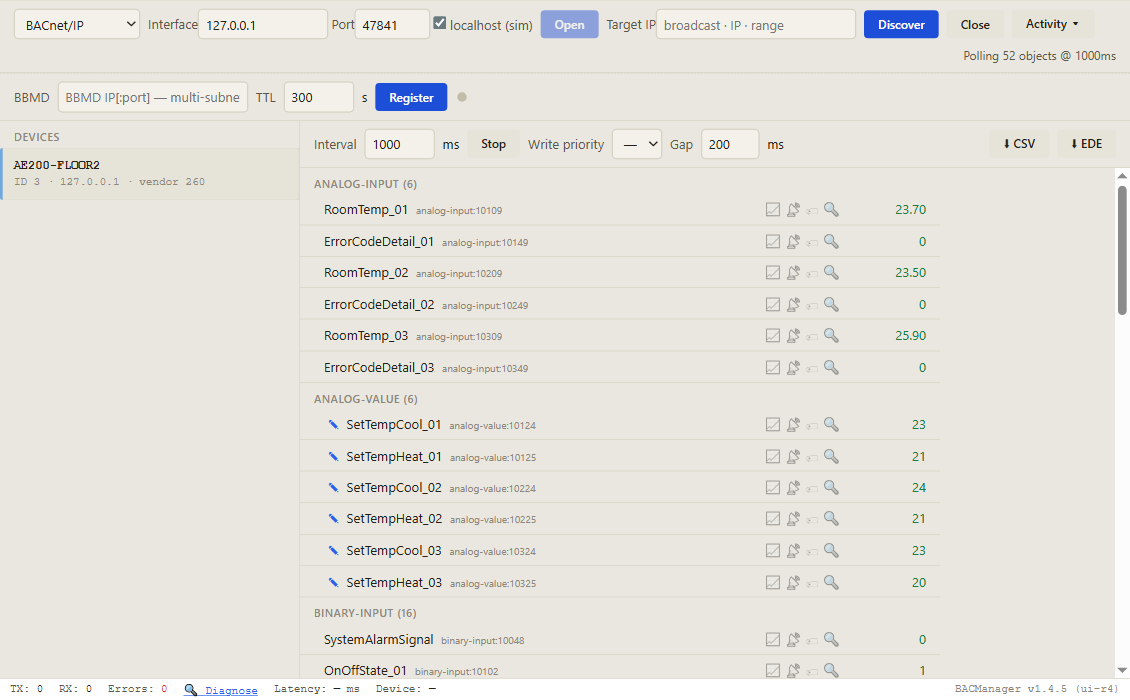
In BACManager a BACnet device can have a Gap, in ms per property, next to the Interval on the BACnet tab (version 1.4.6): every request to the device — poll, write, Refresh — waits until the one before it has had its properties × the gap. Set 200 for an AE-200; the free workspace brings it along for its controller. Measured against the simulated AE-200 reading the workspace's 31 points every second: without the gap BACManager asked for 31 properties a second and sent requests 2000 ms too soon after a full one; with it, about 5 a second and no request early by more than a millisecond.
// points list
The AE-200 points a BMS uses, per group
Instance 01xx.. with xx = group 01–50. Multi-state values start at 1. Which objects a group has depends on its units.
Object
Name
Values
BO 01xx01 / BI 01xx02
On Off Setup / On Off State
0 Stop, 1 Run
MO 01xx05 / MI 01xx06
Operational Mode Setup / State
1 Cool, 2 Heat, 3 Fan, 4 Auto, 5 Dry, 6 Setback
MO 01xx07 / MI 01xx08
Fan Speed Setup / State
1 Low, 2 High, 3 Mid 2, 4 Mid 1, 5 Auto
AI 01xx09
Room Temp [Water Temp]
°C or °F, as set in the Setting Tool
AV 01xx10
Set Temp [Set Water Temp]
Groups without dual set points
AV 01xx24 / 25 / 26
Set Temp Cool / Heat / Auto
Groups with dual set points
BI 01xx03 / MI 01xx04 / AI 01xx49
Alarm Signal / Error Code / Error Code Detail
Normal/Error; 1 Normal … 9 System error; the 4-digit code
BI 01xx11 / BV 01xx12
Filter Sign / Filter Sign Reset
Filter due; reset it
BV 01xx13–17
Prohibition On Off, Mode, Filter Sign Reset, Set Temperature, Fan Speed
0 Permit, 1 Prohibit — lock out the local remote controller
BI 01xx20
M-NET Communication State
Normal / Error
BV 01xx21 / BV 019921
System Forced Off (individual / collective)
Stop and prohibit on/off at the remote controller
MO 01xx22 / MI 01xx23
Air Direction Setup / State
Horizontal, Downblow 60/80/100 %, Swing
BI 01xx47
Thermo On Off State
The unit is actually heating or cooling
BI 010048
System Alarm Signal
Controller-wide alarm
LOG 01xx80
Trend Log Room Temp
Room Temp every minute, read with ReadRange
AC 01xx39
Group Apportioned Electric Energy
0.1 kWh; needs the “Charge” licence
Dry and Mid 1/Mid 2 exist only when switched on in the Setting Tool. While a unit runs Auto, Mode State shows Cool or Heat unless “Use Operation Mode State Auto” is ticked. Chillers, LOSSNAY, Air To Water and PI-controller objects are in section 5-2 of Mitsubishi's WT07919X08; the controller's own schedules are not on BACnet.
Discover, click the controller, and its objects come up with live values — the instance tells you the group, and Gap paces every request to it. Pictured: a simulated AE-200 with three groups, built from Mitsubishi's object list; object names as entered for this simulation
// free download
The AE-200 workspace
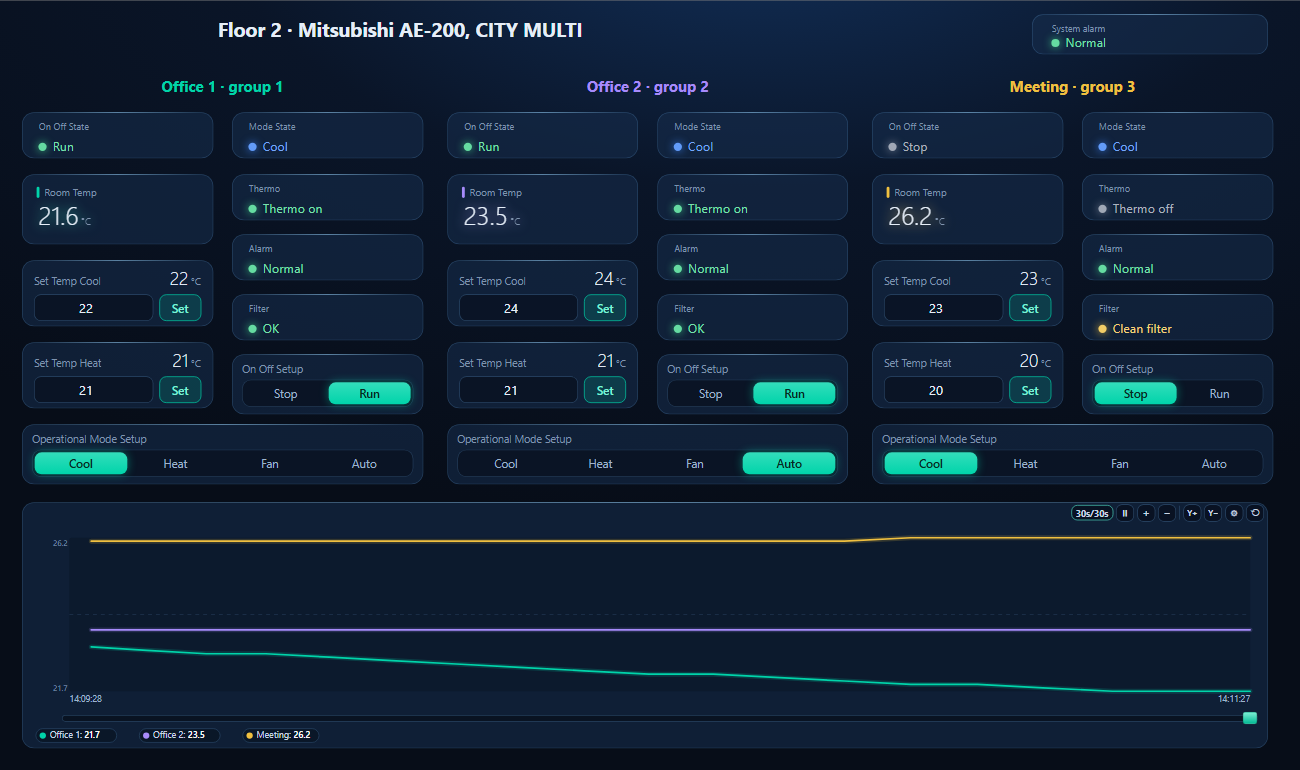
One dashboard page for three groups on a floor: run state, mode, room temperature, thermo, alarm and filter for each, with on/off, mode and both set points to write, and the room temperatures on one trend.
Office 1's Set Temp Cool written from the page, 23 → 22 °C (simulated controller and rooms)
1
Discover
On the BACnet tab open BACnet/IP on the network card on LAN2's network and press Discover. The controller answers with its Device No.; click it to see its objects and its Gap.
2
Open the workspace
Workspace → Open. The file reads device 3, groups 1–3, with a gap of 200 ms per property; if your controller has another Device No., BACManager asks which discovered device takes its place and moves every point — and the gap — over. For other groups, change the group digits in the tags.
3
Run
BACManager starts reading the groups by itself. On the Dashboard press Run; on/off, mode and set points are written when you change them. Groups without dual set points need Set Temp (xx10) instead.
Online in the Setting Tool; register the “BACnet connection” licence; connect to LAN2
“Version Mismatch Error” on Send settings
Setting Tool and controller versions do not match
Use the tool version for the controller's software
Two controllers answer as device 3
Factory Device No.
Set a unique Device No. on every AE-200, AE-50 and EW-50
An object is missing
Not ticked Use, or the group's units do not support it
Tick it on the Object tab, send, go Online
Writing a set point returns an error
A dual-set-point object on a group without dual set points
xx24/xx25 (or xx26) for dual-set-point groups, xx10 otherwise
BMS reads more than 5 properties a second
Faster than Mitsubishi's 200 ms per property
Gap 200 ms per property for the controller (the workspace sets it)
Mode reads Cool while the unit is in Auto
Mode State shows the actual mode
Tick “Use Operation Mode State Auto” if the BMS should see Auto
BMS lost the controller after a settings change
Offline for Send settings, or groups changed; going Online restarts it and can take up to about 10 minutes
Plan Setting Tool work; check the mode is Online again
// questions
Mitsubishi AE-200 BACnet — FAQ
Where is the Mitsubishi AE-200 BACnet points list?+
In section 5-2 of Mitsubishi Electric's AE-200/AE-50/EW-50 Instruction Book (BACnet function), WT07919X08. The table on this page lists the points a BMS uses per group.
Does the AE-200 need a BACnet gateway?+
No. The AE-200, AE-50 and EW-50 serve BACnet/IP on their LAN2 port. Each one needs a “BACnet connection” licence and is configured with Mitsubishi's BACnet Setting Tool.
What is the AE-200's default BACnet device instance?+
Device No. 3. LAN2, the BACnet port, is 192.168.2.1 from the factory and LAN1 192.168.1.1. Give every controller its own Device No.
How are AE-200 BACnet instance numbers built?+
Six digits: object class (0 for a group), a fixed 1, the group number 01–50 and the member number. Group 5's Room Temp is 010509, which a BMS shows as analog-input 10509.
How fast can a BMS poll the AE-200?+
Mitsubishi asks for at least 200 ms per property between requests — after a ReadPropertyMultiple of 10 properties, wait 2 seconds. That is about five properties a second for the whole controller.
Why can't I see an AE-200 object over BACnet?+
Only objects ticked “Use” on the BACnet Setting Tool's Object tab exist, and only those the group's units support. Tick it, send the settings while Offline, and switch back to Online.
// sources
Where this comes from
Mitsubishi Electric: Air Conditioning Control System Centralized Controller AE-200/AE-50/EW-50 Instruction Book (BACnet function), WT07919X08, describing software Ver. 7.97, and AE-200/AE-50/EW-50 Instruction Book (BACnet Setting Tool), WT07921X06. Get them, the Setting Tool and the licence through your Mitsubishi Electric dealer or mitsubishielectric.com, and check them against your controller's software before commissioning. Mitsubishi Electric, CITY MULTI, Mr. Slim and LOSSNAY are trademarks of their owner; BACManager is not affiliated with Mitsubishi Electric. The pictures on this page are from BACManager connected to a simulated controller built from the published object list.
Download the free trial, discover the controller and open the AE-200 workspace — three groups by instance, set points and modes to write. No credit card.