Every device. One tool. Pay once.Modbus · BACnet · Siemens S7 · one-time licence · also from us: ModbusManager ↗
// daikin · intelligent touch manager · dcm014a51
Daikin iTM BACnet Points List & Setup
How to bring Daikin VRV indoor units onto a BMS through the iTM BACnet Server Gateway: an activation key, a CSV file on a USB stick, device instances that are empty until you fill them — and a virtual router that puts every indoor unit on a BACnet network of its own, which a BMS has to reach by network number. With a free BACManager workspace.
The BACnet Server Gateway is a licensed option of the iTM (DCM601A71). In the iTM's Service Settings open Activation, press Add and enter the activation key; the BACnet Server/Gateway button appears only after that.
🌐
BACnet/IP, one port
BACnet/IP only, on the iTM's Ethernet port, which it shares with web access. Factory IP 192.168.0.1/24, UDP port 47808. On another subnet than the BMS, register the iTM as a foreign device with a BBMD. Up to 128 indoor-unit groups and outdoor units, or up to 4000 points.
📋
What the iTM serves
Per Daikin's PICS: protocol revision 4, ReadProperty(Multiple), WriteProperty(Multiple), COV, time synchronisation, router configuration; Max APDU 1024, segmentation both ways, vendor ID 53. No schedule, trend or alarm objects. Daikin's overview lists it as not BTL certified.
// the router inside
Every indoor unit is a device on network 100
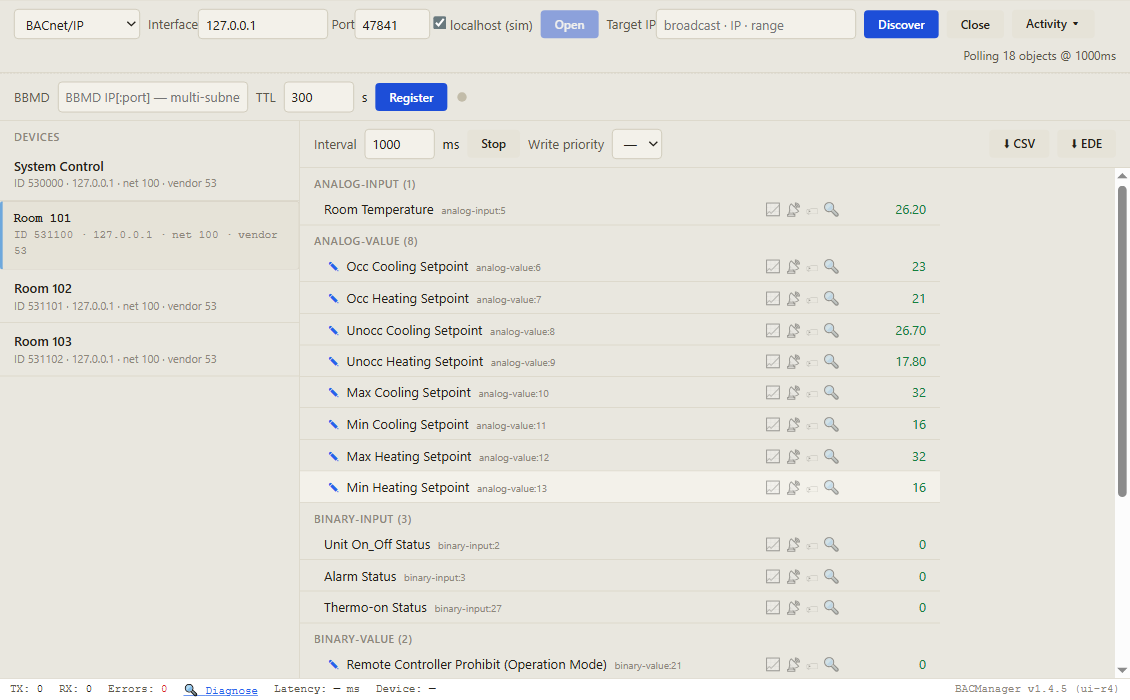
The iTM is a BACnet router. Each indoor-unit management point is a virtual BACnet device on a virtual network behind the iTM's IP; the System Control settings are one more. A BMS reaches them by that network number and each device's MAC on it — not by IP alone.
Item
Factory
Daikin's recommendation
BACnet network number
100
Unique on the site's BACnet network, 1–65534
System Control device
empty
530000 (53 = Daikin's vendor ID)
Indoor unit device
empty
53PGGG: P = DIII port (1 iTM, 2–8 iTM Plus Adaptor), GGG = group address. 1-00 on port 1 = 531100
Outdoor unit device
empty
53PN: port and outdoor unit number. CU-1 on port 1 = 5311
Virtual MAC
—
The device instance in 4 bytes and two zero bytes: 531100 = 00:08:1A:9C:00:00
A client that keeps only the IP finds the indoor units on Who-Is, but every read goes to the iTM itself and is never answered by the unit. BACManager reaches devices behind a router from version 1.4.6: the device list shows them as 192.168.0.1 · net 100, and every request carries the network and the device's MAC. Tested against a simulated iTM with System Control and three indoor units: each answered with its own name, values and writes, and no request went out without its network.
// setup
The CSV file does the configuration
1
Set up the iTM first
Before exporting, have every indoor unit recognised and named, unoccupied set points and set point limits enabled, and auto-changeover configured in the iTM. Then Service Settings → BACnet Server/Gateway → Export Configuration Data to a USB stick.
2
Fill in the instances
The CSV has COMMONSETTING (port, network, BBMD) and PNTSETTING, one row per indoor unit. Device_Instance is empty from the factory — give every unit and the System Control device a unique number; duplicates are refused on import. Leave the name, address and ID columns the iTM fills in alone.
3
Tick the points, import
Each point is 1 (enabled) or 0. Import Configuration Data from the stick, keeping the file name; “No error” means it was read, not that it is right. Close, and the iTM reboots. Keep the CSV for the handover.
Enabled from the factory are members 1–13 (occupancy, status, alarm, mode, room temperature and the set points) and the three remote-controller prohibits, 20–22. Off are fan speed, airflow direction, filter sign, communication status, thermo-on, compressor status and the rest — tick them in the CSV if the BMS needs them. If a BMS cannot discover the points, Daikin's answer is to enter them by hand from the design guide.
// the rules that bite
On/off is Occupancy Mode, and the unit remembers
⏻
Occupancy Mode is the switch
There is no separate on/off output. Occupancy Mode (MO1): Occ sends On, Unocc sends Off and allows the timer extension, Standby sends On and shifts the set point by 2 °C (up in cool, down in heat) without showing it. It reads Unocc after the iTM starts, and its relinquish default is Unocc.
💾
EEPROM: under 200 a day
Every change is sent to the indoor unit, which stores it in EEPROM. Daikin asks for 70,000–80,000 changes a year at most, as a rule of thumb fewer than 200 a day per item. Resending the same value does not count — but Occupancy Mode sends its command again on every write.
↺
A refused write reverts
The iTM takes a written value at once and waits for the indoor unit. If the unit does not take it — a set point beyond the limits, a mode change on a unit that is not the changeover master — the value goes back after 10 minutes. Set points outside 16–32 °C are corrected to the limit.
So write on change, not cyclically: the free workspace has no Refresh on any point. Unit On_Off Status stays On while the unit is in error — watch Alarm Status, whose Description carries the error code (“00” when normal). COV on temperatures fires only at 1 °C steps, so poll them. The indoor unit has no priority of its own: the last change wins, from the BMS, the iTM screen or the remote controller.
// points list
The iTM points a BMS uses, per indoor unit
On each indoor-unit device, the object instance is Daikin's member number. Temperatures follow the iTM's locale, °C or °F.
Return Air, Discharge Air, Liquid Pipe, Gas Pipe Temperature, EV Position
Service values
530000: BO1 / BO2 / MV3 / BO4
Enable iTM Schedule, Enable iTM Auto-Changeover, Timed Override Minutes, System Forced Off
On the System Control device
Outdoor-unit devices bring operation mode, alarm, defrost, oil return, a calculated power and current, outdoor temperature and refrigerant data. System Forced Off stops every indoor unit, and remote controllers cannot restart them until it is released. The complete lists are in Daikin's DCM014A51 Design Guide.
Four devices behind one IP, each on network 100: click an indoor unit and its objects come up by name. Pictured: a simulated iTM built from Daikin's object list; device names as entered for this simulation
// free download
The iTM workspace
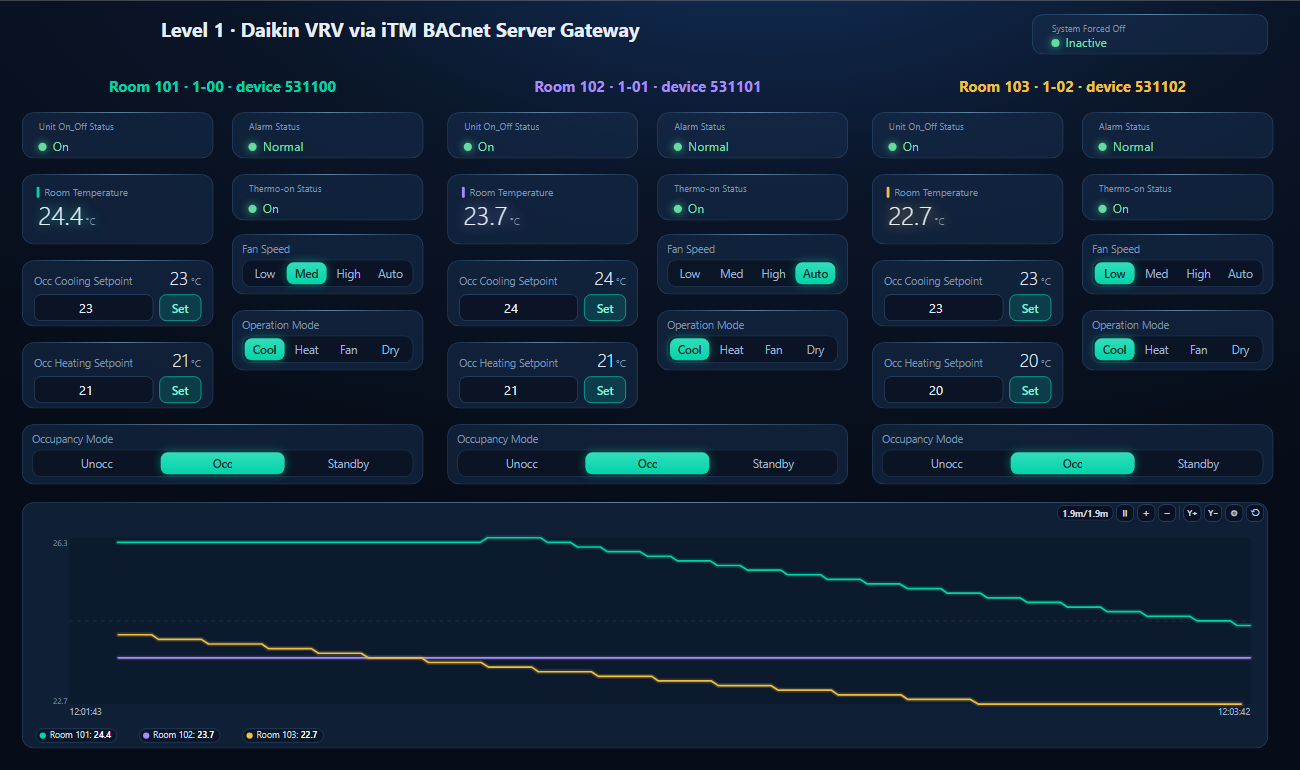
One dashboard page for three indoor units: on/off, alarm, room temperature, thermo-on, fan speed and mode for each, the occupied set points and Occupancy Mode to write, System Forced Off, and the room temperatures on one trend.
Room 101's Occupancy Mode written from the page, Unocc → Occ (simulated iTM and rooms)
1
Discover the iTM
On the BACnet tab open BACnet/IP on the network card on the iTM's network and press Discover. Every indoor unit and the System Control device appear, all at the iTM's IP and marked with their network.
2
Open the workspace
Workspace → Open. The file reads devices 530000 and 531100–531102, Daikin's recommended numbers for port 1, groups 1-00 to 1-02; if yours differ, BACManager asks which discovered device takes each one's place.
3
Run
BACManager starts reading the units by itself. On the Dashboard press Run; Occupancy Mode, mode, fan speed and set points are written when you change them, and never repeated.
Service Settings → Activation → Add, enter the key
Import ends in “Duplicate Device_Instance”
Two rows, or a unit and System Control, share an instance
Give each a unique number; the error names row and column
Indoor units found, but no values
The client sends to the iTM's IP without the network number
A client that reads routed devices (BACManager 1.4.6 or later)
Unit switched on from the BMS, off again later
Occupancy Mode relinquished or the iTM restarted: Unocc
Keep a command in Occupancy Mode; write it after an iTM restart
A written value comes back after 10 minutes
The indoor unit did not take it
Check the set point limits, the changeover master, the mode
Unit reads On but does not run
It is in error; On_Off Status stays On
Read Alarm Status and its Description
Room temperature COV arrives rarely
COV_Increment is fixed at 1.0
Poll the temperature
A point the BMS needs does not exist
Disabled in the CSV (most are, beyond 1–13 and 20–22)
Enable it in PNTSETTING and import again
// questions
Daikin iTM BACnet — FAQ
Where is the Daikin iTM BACnet points list?+
In Daikin's intelligent Touch Manager DCM014A51 Design Guide, which lists every indoor unit, outdoor unit and System Control object. The table on this page lists the points a BMS uses per indoor unit.
How do I enable BACnet on the Daikin iTM?+
Activate the BACnet Server Gateway option DCM014A51 with its key in the iTM's Service Settings, export the configuration CSV to a USB stick, fill in the device instances and the points, and import it again; the iTM reboots.
What device instance does a Daikin iTM indoor unit have?+
None from the factory: Device_Instance is empty in the CSV. Daikin recommends 53PGGG — 53 for Daikin, the DIII port and the group address — so group 1-00 on the iTM's own port is 531100, and 530000 for the System Control device.
Why can my BMS see the iTM indoor units but not read them?+
The iTM is a BACnet router: each indoor unit is a virtual device on network 100 by default. A client must address it by that network number and the device's MAC, not by the iTM's IP alone.
How do I turn a Daikin indoor unit on and off over BACnet?+
With Occupancy Mode, multi-state output 1 on the indoor unit's device: 2 Occ turns it on, 1 Unocc off, 3 Standby on with the set point shifted by 2 °C.
How often may a BMS write to a Daikin indoor unit?+
Daikin asks to keep changes to 70,000–80,000 a year, fewer than 200 a day for each item, because the indoor unit stores each setting in EEPROM. Resending the same value is not counted as a change.
// sources
Where this comes from
Daikin: intelligent Touch Manager (iTM) DCM014A51 Design Guide, DG_DCM014A51_02-19, with its PICS for the iTM DCM601A71, and BACnet Gateways Overview (Daikin North America). Get them and the activation key through your Daikin representative or daikincomfort.com, and check them against your iTM's software before commissioning. Daikin, VRV and intelligent Touch Manager are trademarks of their owner; BACManager is not affiliated with Daikin. The pictures on this page are from BACManager connected to a simulated iTM built from the published object list.
Download the free trial, discover the iTM's indoor units behind its virtual router and open the iTM workspace — every unit by name, on network 100. No credit card.