Every device. One tool. Pay once.Modbus · BACnet · Siemens S7 · one-time licence · also from us: ModbusManager ↗
// schneider electric · altivar process atv600 · vw3a3725
Schneider ATV600 BACnet Points List & Setup
How to put an Altivar Process ATV600 drive on BACnet MS/TP with the VW3A3725 module: the address and instance that both leave the factory at 0, the one-second fieldbus timeout, the control channel — and why a drive that has had a communication fault stays stopped while its run command still reads Start. With a free BACManager workspace.
Sources: Schneider Electric QGH66984 (ATV600 BACnet MS/TP manual, VW3A3725) and the Altivar Process ATV6x PICS (2018)
// before you start
BACnet is an option card
🔌
VW3A3725 in slot A
The ATV600 speaks BACnet MS/TP through the VW3A3725 fieldbus module, fitted in slot A with the power off. It needs drive software V1.7 or later. For BACnet/IP put a BACnet router in front of the trunk, or read MS/TP directly from a PC — see BACnet MS/TP over RS-485.
⚡
Wiring
A 5-pin block: signal common, Data−, shield, Data+. Daisy chain only, 120 Ω at both ends, wired on the terminal block. The module has no bias resistors, so bias has to come from another device on the trunk. It is half a unit load, so a segment takes up to 64 of them.
📋
What the drive serves
Per the manual and PICS: B-ASC, ReadPropertyMultiple, WritePropertyMultiple, COV, max APDU 480, MS/TP master only at Auto, 9600, 19200, 38400 or 76800 baud. BTL-listed for firmware V1.7.
A free MS/TP MAC, 1–127. 0 is often the BMS controller or router on the trunk
[Instance nb] INXP
0
A device instance unique in the building. Every drive leaves the factory as instance 0
[Bit rate] bdr
Automatic
The trunk's rate, or leave Automatic; the frame format is fixed 8-N-1
[Fieldbus timeout] tLP
1.0 s
0.1–60 s. Longer than the gap between your BMS's messages to the drive, with margin
[Max master address] MMn
127
The highest master MAC on the trunk
[Max info frames] MiF
10
Frames per token; usually leave
The device instance does not follow the address: set INXP on every drive. The module's MS LED tells you its state: green blinking is normal, green triple flash waits for auto-baud, red double flash is an invalid configuration, red triple flash a communication interruption. The diagnostics menu shows the baud rate in use and the received, transmitted and bad frame counts.
// control
Hand command and reference to the module
In [Complete settings] → [Command and Reference]. Schneider's own example starts from a factory reset. Keep the CiA 402 profile: with the I/O profile the module reports [Fieldbus Error] EPF2.
Parameter
Combined: both from BACnet
Separate: command from BACnet
[Ref Freq 1 Config] Fr1
[Com. Module] nEt
e.g. [AI1]
[Control Mode] CHCF
[Not separ.] SIM
[Separate] SEP
[Cmd channel 1] Cd1
—
[Com. Module] nEt
[Freq Switch Assign] rFC
Fr1 (default)
Fr1
2
Both, at least once
The channel is enabled only when every parameter it carries has been written at least once: the drive will not start on RUN/STOP CMD (BV10) until INPUT REF 1 (AV16) has been written too, and the other way round.
%
AV16 is a percentage
INPUT REF 1 is in %, and neither the manual nor the PICS says of what. Write 50, read OUTPUT FREQ (AV1) and the drive's own display, and scale your BMS point to match.
↺
Fault reset on an edge
FAULT RESET (BV14) acts on a rising edge. Writing Reset twice does nothing the second time: write No, then Reset.
// the rules that bite
One second, and a channel that switches itself off
1 s
Any message, every tLP
Once a command or reference has been written, the module expects a BACnet message at its address at least every tLP — 1.0 s from the factory. If none comes, the drive raises [Fieldbus Com Interrupt] CnF and, by default, stops freewheel. A busy MS/TP trunk easily leaves a drive alone for longer than a second.
⚙
Set tLP, then CLL
Raise tLP above your poll interval with margin — 10 s for a BMS that polls every few seconds. What the drive does on CnF is [Fieldbus Interrupt Resp] CLL: freewheel (factory), ramp, fast stop or DC injection as a fault, or fallback speed, speed maintained or stop without a fault. Schneider warns to use Ignore only for tests.
⚠
Then: write both again
A communication interruption disables the channel. After the fault reset the drive waits for the command and the reference to be written again — and reading BV10 still says Start, because a read of a commandable object is answered from the module's priority array, not from the drive.
In BACManager a BACnet tag has Refresh (s): the last value written to it is written again every that many seconds until it is relinquished. The free workspace sets 10 s on BV10 and AV16, so after a fault reset the drive gets both back on its own. Tested against the simulated ATV600 with an 8-second link loss: both runs tripped on CnF; after FAULT RESET the drive with Refresh was running again within 5 s, the one without stayed stopped for the rest of the run — with BV10 reading Start the whole time.
// points list
The ATV600 points a BMS uses
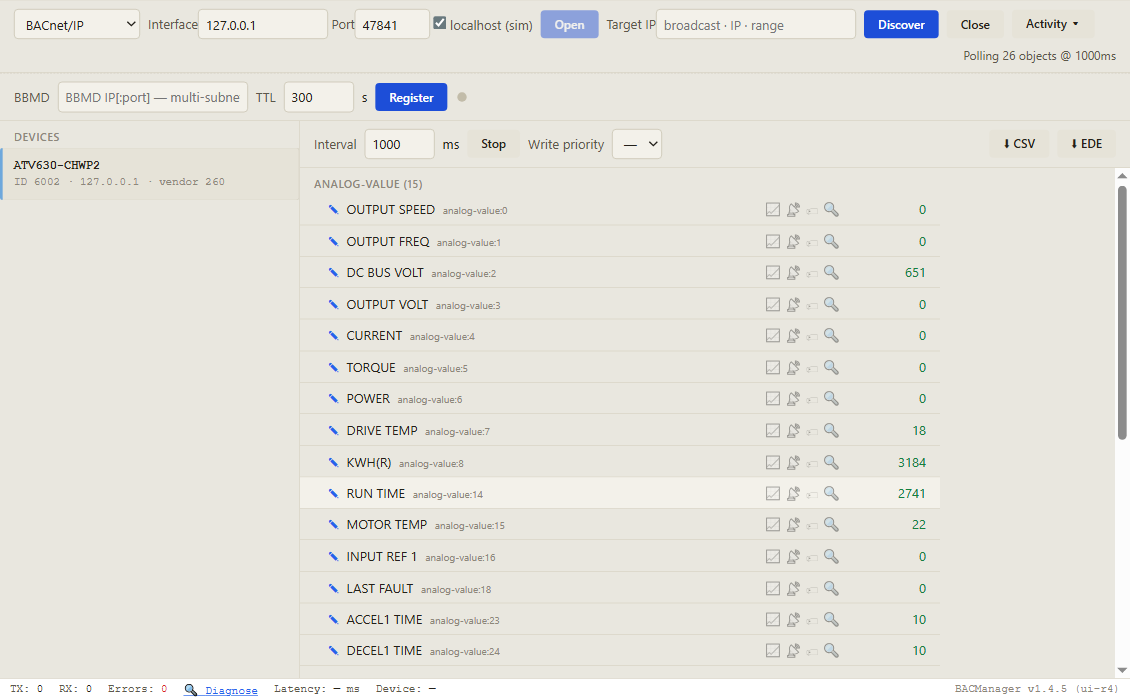
Object names as the module reports them. C = commandable, W = writable, R = read only. Writes to a commandable object always succeed, even when the drive is not ready to take them — check the result on the R objects.
Object
Object name
Access
What it is
BV10
RUN/STOP CMD
C
Start / Stop (CiA 402 control word)
AV16
INPUT REF 1
C
Speed/frequency reference from BACnet, %
BV11
FWD/REV CMD
C
Direction
BV14
FAULT RESET
W
Resets a fault on a rising edge
AV27
EXT PID STPT
C
PID setpoint from BACnet
BV0 / BV8
RUN/STOP ACT / AT SETPOINT
R
Running; reference reached
BV2 / BV7
FAULT ACT / DRIVE READY
R
In fault; ready for a start command
BV4 / BV1
HAND/AUTO ACT / FWD/REV ACT
R
Forced local (hand); direction
AV1 / AV0
OUTPUT FREQ / OUTPUT SPEED
R
Hz, rpm
AV4 / AV5 / AV6
CURRENT / TORQUE / POWER
R
A; torque and power in %, not N·m or kW
AV2 / AV3
DC BUS VOLT / OUTPUT VOLT
R
V
AV7 / AV15
DRIVE TEMP / MOTOR TEMP
R
Thermal state of drive and motor, %
AV8 / AV14
KWH(R) / RUN TIME
R
Energy, kWh; operating hours
AV18 / AV19 / AV20
LAST FAULT / PREV FLT 1 / PREV FLT 2
R
Current and previous error codes
AV23 / AV24
ACCEL1 TIME / DECEL1 TIME
W
Ramp times
AV25 / AV26, BV15 / BV16
MBOX PARAM / MBOX DATA, MBOX READ / MBOX WRITE
W
Read or write any drive parameter by its address
AV28–35 / AV36–43
COM SCAN OUT1–8 / COM SCAN IN1–8
C / R
General-purpose values mapped to drive registers
BI1–BI3, BI6–BI11
RO1 ACT…, DI 1 ACT…
R
Relays and digital inputs
BO0–BO2, AO0–AO1
RO 1 CMD…, AO1 COMMAND…
C
Relays and analog outputs, only if no drive function is assigned to them
Note the gaps in the numbering: the first relay is BI1, not BI0, and the first digital input BI6. The complete list, with extension-module points, is in appendix A of Schneider's QGH66984 and in the ATV6x PICS. The 2017 manual's table marks INPUT REF 1 read-only; the PICS marks it commandable, which is how the reference is written.
Discover, click the drive, and its objects come up by name with live values. Pictured: a simulated ATV600 built from Schneider's object list, stopped
// free download
The ATV600 workspace
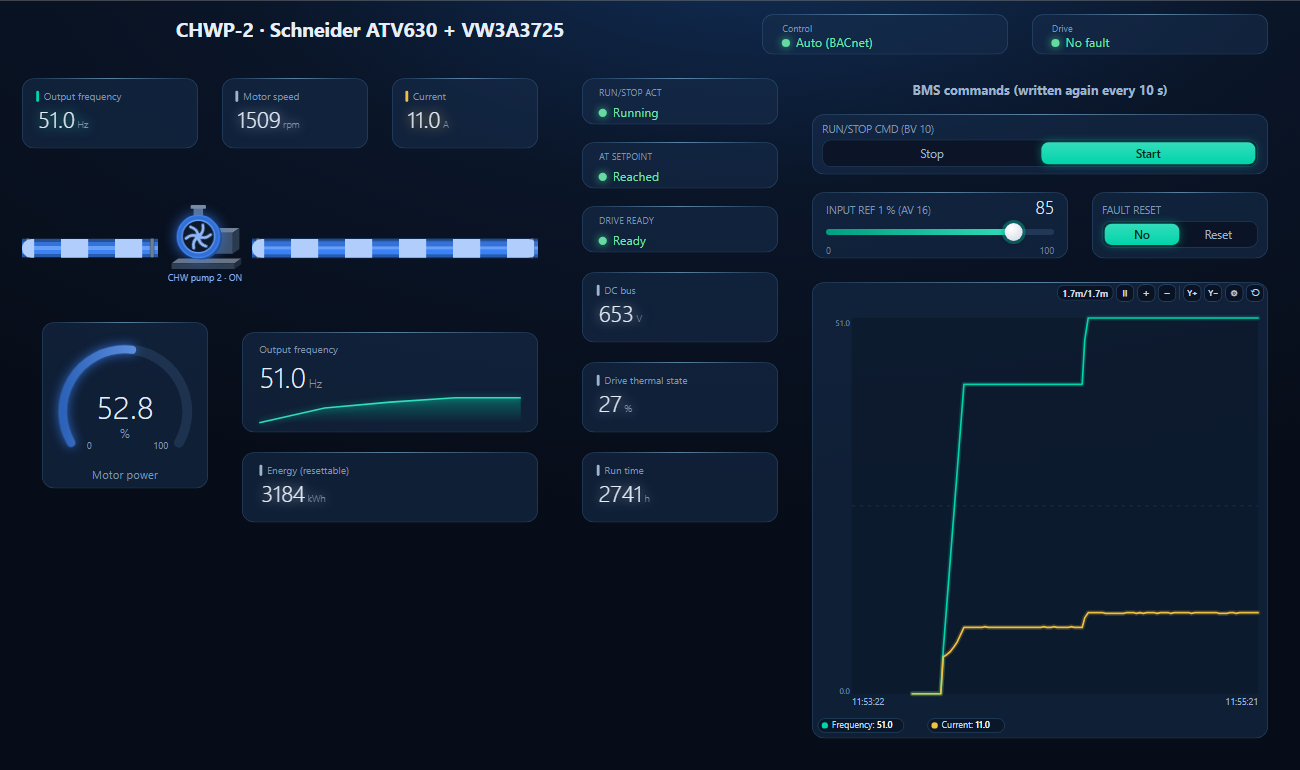
One dashboard page for an ATV600 on a chilled-water pump: hand/auto and fault as text, frequency, speed, current, power, DC bus, thermal state, energy and run time — with the start command and the reference written again every 10 seconds, and fault reset.
Start and INPUT REF 1 written from the page, 70 → 85 %, repeated every 10 s (simulated drive, which takes the reference as % of 60 Hz)
1
Discover the drive
On the BACnet tab open MS/TP on the PC's RS-485 port at the trunk's baud rate (or BACnet/IP behind a router) and press Discover. The drive appears with the instance from INXP.
2
Open the workspace
Workspace → Open. The file reads device 6002; if yours has another instance, BACManager asks which discovered device takes its place and moves every point over.
3
Run, then command once
BACManager starts reading the drive by itself. On the Dashboard press Run, choose Start and set the reference — from then on both are written again every 10 seconds. After BACManager restarts, command them once more.
After a fault reset the drive stays stopped, BV10 reads Start
Channel disabled by the interruption; reads come from the priority array
Write BV10 and AV16 again (Refresh 10 s in BACManager)
Start written, nothing happens
Reference never written, or Fr1 not on nEt
Write AV16 once; Fr1 = [Com. Module]
Fault reset does nothing
BV14 acts on a rising edge
Write No, then Reset
Two drives answer as instance 0
INXP factory value
Set INXP on every drive
MS LED red double flash; EPF2
Invalid configuration; I/O profile
Check the BACnet parameters; use the CiA 402 profile
Bad frames, no communication
No bias on the trunk, or missing terminators
Bias from another device; 120 Ω at both ends
Power reads 50 where you expected kW
POWER is a percentage
Read it as % of the motor's rating, or calculate kW from current and voltage
// questions
Schneider ATV600 BACnet — FAQ
Where is the ATV600 BACnet points list?+
In appendix A of Schneider Electric's ATV600 BACnet MS/TP manual for the VW3A3725 module, document QGH66984, and in the Altivar Process ATV6x PICS. The table on this page lists the points a BMS uses most.
Does the ATV600 have BACnet built in?+
No. BACnet MS/TP comes with the VW3A3725 fieldbus module in slot A, on drive software V1.7 or later.
What is the ATV600's default BACnet address and instance?+
Both 0 from the factory: [Address] AdrC and [Instance nb] INXP. Set a free MS/TP address and a unique device instance on every drive.
Why does my ATV600 stop with CnF?+
[Fieldbus Com Interrupt] CnF means the module received no BACnet message at its address within [Fieldbus timeout] tLP, 1.0 s from the factory. Set tLP longer than the BMS's poll interval and choose the reaction in [Fieldbus Interrupt Resp] CLL.
Why won't the ATV600 restart after a fault reset?+
A communication interruption disables the control channel; the drive waits until the command and the reference have both been written again. Reading RUN/STOP CMD shows the module's stored value, not the drive's, so it can say Start while the drive waits.
How do I read any ATV600 parameter over BACnet?+
With the mailbox: write the parameter's logical address to MBOX PARAM (AV25), set MBOX READ (BV15), and read the value from MBOX DATA (AV26). Writing works the same way with MBOX WRITE (BV16).
// sources
Where this comes from
Schneider Electric: Altivar Process ATV600 BACnet MS/TP Manual — VW3A3725, QGH66984, and the BACnet Protocol Implementation Conformance Statement for Altivar Process ATV630/650/660/690 (2018), BTL listing for firmware V1.7. Get the manual from se.com by searching for QGH66984, and check it against your drive's firmware before commissioning. Schneider Electric, Altivar and Altivar Process are trademarks of their owner; BACManager is not affiliated with Schneider Electric. The pictures on this page are from BACManager connected to a simulated drive built from the published object list.