Every device. One tool. Pay once.Modbus · BACnet · Siemens S7 · one-time licence · also from us: ModbusManager ↗
// grundfos · magna3 · cim 300 · cim 500
Grundfos CIM BACnet Points List & Setup
How to put a Grundfos MAGNA3 or E-pump on BACnet with a CIM 300 (MS/TP) or CIM 500 (BACnet/IP) module: address and baud rate on switches, a device instance of 227000 plus the address, a setpoint in percent of a range — a pump that ignores the BMS until it is switched to bus control, stops if it is switched too early, and stays on local control after a watchdog trip. With a free BACManager workspace.
Sources: Grundfos “BACnet for Grundfos pumps — CIM/CIU 300 BACnet MS/TP, CIM/CIU 500 Ethernet for BACnet IP” 97572650 and the CIM 300 PICS
// before you start
A module in the pump
🔌
CIM or CIU
A CIM is a communication module that plugs into the pump's electronics — MAGNA3 and the E-pumps — on a 10-pin connector and takes its power from it. A CIU is the same module in a box of its own, for pumps that cannot take one inside. Grundfos' profile covers MAGNA3, E-pumps 0.25–7.5 kW and CUE / E-pumps 11–22 kW.
🌐
MS/TP: CIM 300. IP: CIM 500
CIM 300 speaks BACnet MS/TP. For BACnet/IP use the CIM 500 Ethernet module and turn its protocol switch SW1 to 2: from the factory it is 0, PROFINET IO. Turning it while powered restarts the module in the new protocol.
📋
What the module serves
B-ASC, ReadProperty(Multiple), WriteProperty(Multiple), COV with up to 10 subscriptions, DeviceCommunicationControl. Vendor ID 227. BTL-listed for the CIM/CIU 300, firmware 04.02.00. The control objects are writable, not commandable.
The baud rate and SW3 take effect at once. The CIM 300 has no bias resistors, so bias must come from another device on the segment, which takes 32 devices without repeaters. On a CIM 500 the web page at 192.168.1.100 sets the IP address, the UDP port (47808), the device instance (227000) and foreign-device registration with a BBMD; its login is printed in the manual and must be changed on first use.
// control
Bus values first, then bus control
1
Set control source
BO0 Set control source is 0 local from the factory: the pump runs on its own settings and does nothing the BMS writes. Write 1 for bus control. BI0 and MI14 say who is in control; BI64 Forced to local says something on site overrides it.
2
…but not first
The bus values the pump takes over have factory values too: control mode constant speed and operating mode Stop. Grundfos' own example writes operating mode Start (MO1), the control mode (MO0) and the setpoint (AO0) first, and enables bus control last — otherwise the pump stops.
%
The setpoint is a percentage
AO0 is % of the setpoint range in closed-loop modes: actual = AO0 × (rmax − rmin) + rmin, with rmin and rmax = AI133 and AI134 × the sensor maximum AI86. Grundfos' MAGNA3 example: 5–50 % of 20 m is 1–10 m, so 40 % is 4.6 m. In constant speed it is % of nominal frequency, and 0 % does not stop the pump.
// the rule that bites
The watchdog that does not come back
⏳
Off from the factory
AV1 BACnet watchdog is 0, off: a pump on bus control stays on the last bus values forever if the BMS goes away. Set 5–3600 s to have it fall back to its local settings instead — after making those local settings right with Grundfos GO.
⚠
No way back by itself
After a watchdog time-out the pump stays on local control when BACnet returns. Grundfos: the user must set it back to bus control with BO0. A BMS that wrote BO0 once at commissioning never does.
↻
Write BO0 again
Writing BO0 = 1 cyclically brings the pump back on bus control as soon as the link is back.
In BACManager a BACnet tag has Refresh (s): the last value written to it is written again every that many seconds until it is relinquished. The free workspace sets 10 s on BO0 only. Tested against the simulated MAGNA3 with a 15-second watchdog and a 20-second link loss: both runs fell back to local control 15 s into the loss; with Refresh the pump was on bus control again 5 s after the link returned, without it it stayed on local control for the rest of the run.
// points list
The MAGNA3 points a BMS uses
Object names as Grundfos lists them. W = writable, R = read only. A value the pump does not have reads 65535.
% of the setpoint range (closed loop) or of nominal frequency
BO4
Reset fault
W
On a rising edge, with bus control
AV1
BACnet watchdog
W
0 off (factory), 5–3600 s
BI0 / MI14 / BI64
Control source status / Control Source / Forced to local
R
Local or bus; which source; overridden on site
MI0 / MI1
Actual control mode / Actual operating mode
R
What the pump is doing
BI2
Rotation status
R
Running
AI0 / AI1
Fault code / Warning code
R
Grundfos alarm codes
AI93 / AI5
Differential pressure / Flow
R
bar; m³/h (on MAGNA3 an estimate, for monitoring)
AI7 / AI8 / AI6
Speed / Frequency / Relative performance
R
rpm; Hz; % of maximum
AI13 / AI10 / AI30
Power / Motor current / Energy consumption
R
W; A; kWh
AI22
Fluid temperature
R
°C
AI9 / AI58
Actual setpoint / User setpoint
R
The setpoint in use, the one set
AI133 / AI134 / AI86
Setpoint range minimum / maximum / Max. of feedback sensor
R
To turn AO0 into metres or bar
AI27 / AI31
Runtime / Number of starts
R
h; count
Which values exist depends on the pump: the profile's tables mark each one for MAGNA3, the small E-pumps and CUE. Twin-head MAGNA3 and TPED pumps in multi-pump mode use Grundfos' separate booster profile. The complete lists, with fault codes, are in Grundfos' 97572650.
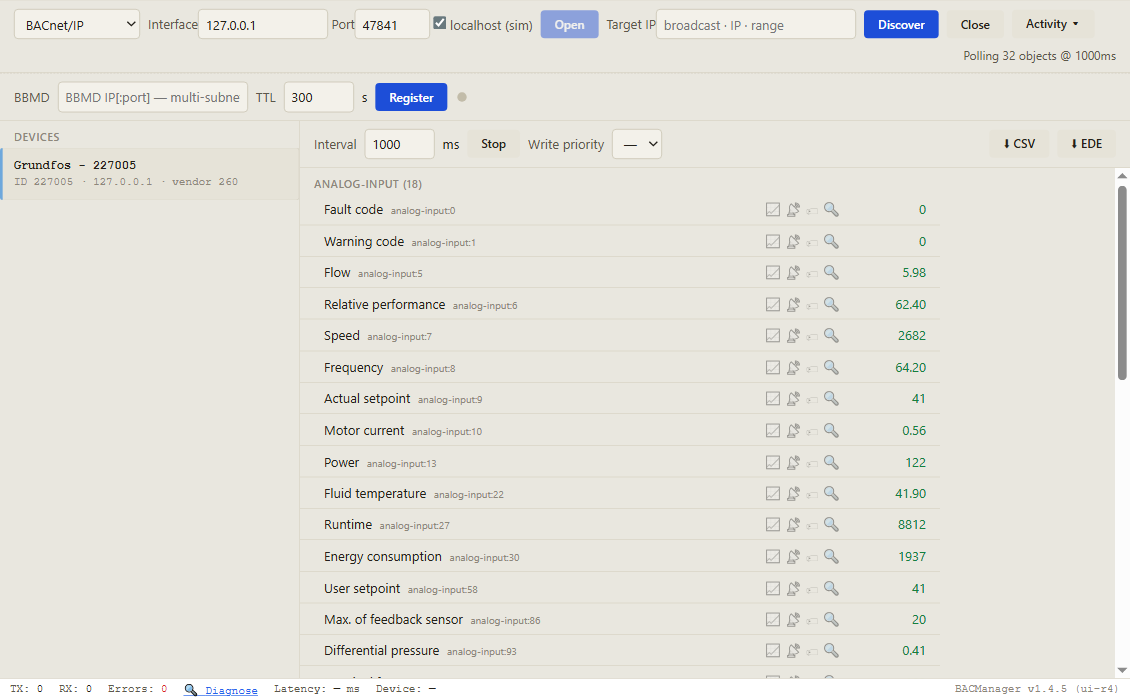
Discover, click the pump, and its objects come up by name with live values. Pictured: a simulated MAGNA3 with CIM 300 built from Grundfos' object list, on local control
// free download
The MAGNA3 workspace
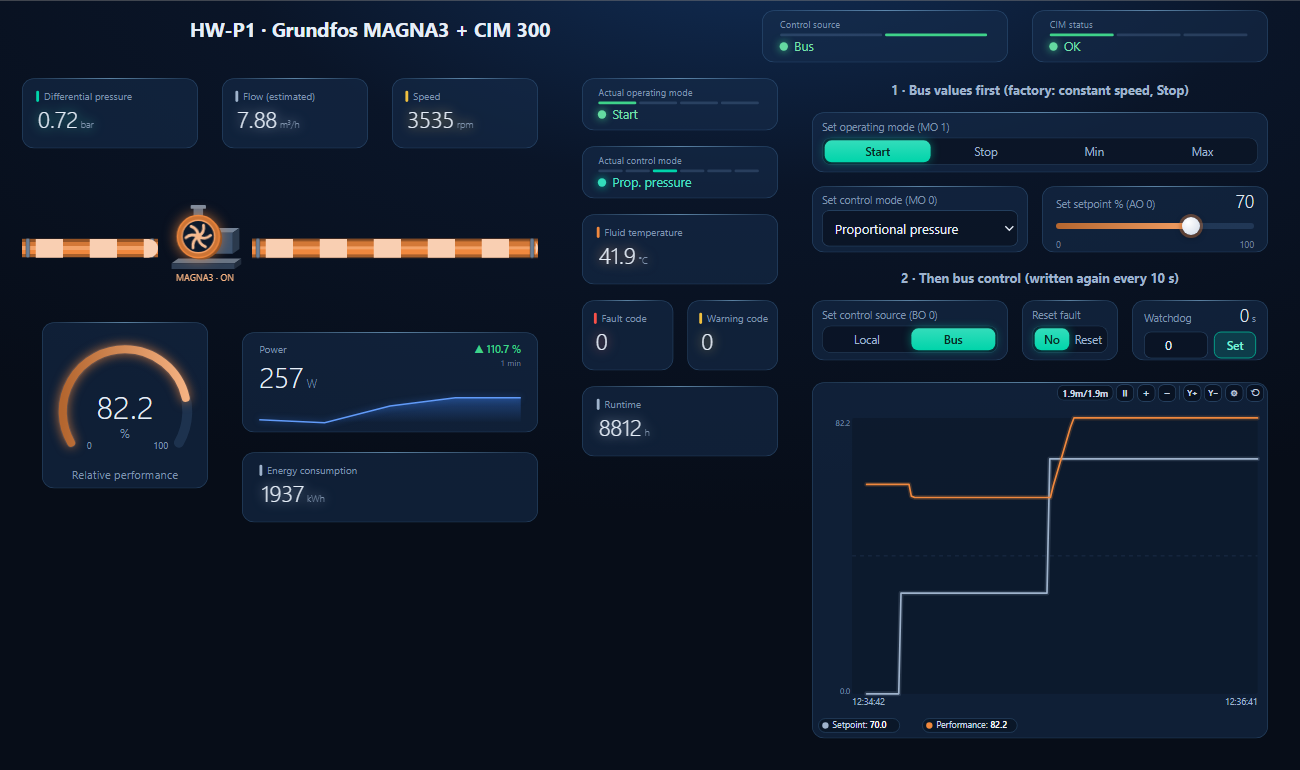
One dashboard page for a MAGNA3 on a heating circuit: control source and CIM status, differential pressure, estimated flow, speed, relative performance, power and energy, the actual modes and fault codes — with the bus values to write first, bus control written again every 10 seconds, fault reset and the watchdog.
Start, proportional pressure and 30 % written, then bus control; the setpoint then raised to 70 % = 7.3 m (simulated pump)
1
Discover the pump
On the BACnet tab open MS/TP on the PC's RS-485 port at the CIM 300's baud rate, or BACnet/IP for a CIM 500, and press Discover. The pump appears as 227000 plus its MAC.
2
Open the workspace
Workspace → Open. The file reads device 227005; if yours has another instance, BACManager asks which discovered device takes its place and moves every point over.
3
Bus values, then bus
On the Dashboard press Run. Choose Start, the control mode and the setpoint; then Bus. From then on BO0 is written again every 10 seconds. After BACManager restarts, write it once more.
Bias from another device; SW1+SW2 ON at both ends only
Two pumps answer as the same device
Same MAC, SW3 off
A unique MAC on SW6/SW7, or SW3 ON with AV0
// questions
Grundfos CIM BACnet — FAQ
Where is the Grundfos MAGNA3 BACnet points list?+
In Grundfos' “BACnet for Grundfos pumps” functional profile and user manual for CIM/CIU 300 and 500, document 97572650, which marks every object for MAGNA3, E-pumps and CUE. The table on this page lists the points a BMS uses most.
CIM 300 or CIM 500 for BACnet?+
CIM 300 for BACnet MS/TP. CIM 500 for BACnet/IP, with its protocol switch SW1 turned to 2; from the factory it is set to PROFINET IO.
What is the Grundfos CIM 300 default BACnet device instance?+
227000 plus the MS/TP MAC set on SW6 and SW7, while SW3 is off. With SW3 on, the instance is the value written to AV0.
Why doesn't my Grundfos pump respond to BACnet commands?+
Set control source (BO0) is 0, local, from the factory. Write the operating mode, control mode and setpoint first, then BO0 = 1 for bus control.
Why did my pump stay on local control after a network fault?+
The BACnet watchdog (AV1) put it on its local settings, and it does not return to bus control by itself. BO0 has to be written 1 again once the link is back.
How is the Grundfos BACnet setpoint scaled?+
In closed loop AO0 is a percentage of the setpoint range: actual = AO0 × (rmax − rmin) + rmin, where rmin and rmax are AI133 and AI134 times the sensor maximum AI86. In open loop it is a percentage of the nominal frequency.
// sources
Where this comes from
Grundfos: BACnet for Grundfos pumps — CIM/CIU 300 BACnet MS/TP, CIM/CIU 500 Ethernet for BACnet IP, Functional profile and user manual, 97572650 (09.2025); the BACnet PICS CIM 300; BTL listing BTL-24189. Get them from grundfos.com and check them against your pump and module before commissioning. Grundfos, MAGNA3, AUTOADAPT and FLOWADAPT are trademarks of their owner; BACManager is not affiliated with Grundfos. The pictures on this page are from BACManager connected to a simulated pump built from the published object list.
Download the free trial, discover the pump and open the MAGNA3 workspace — every point by name, bus control written again after a watchdog trip. No credit card.