Every device. One tool. Pay once. Modbus · BACnet · Siemens S7 · one-time licence · also from us: ModbusManager ↗
// lennox · core unit controller · bacnet ms/tp & ip

Lennox CORE
BACnet Points List & Setup

How to put a Lennox rooftop unit with the CORE Unit Controller on BACnet: the Network Setup Wizard, MS/TP and BACnet/IP defaults, the points a BMS uses — and the rule that catches every new integration: setpoints and occupancy written once are dropped after five minutes, and the unit falls back to its backup mode. With a free BACManager workspace that writes them again every two minutes.

Download free trial Free CORE workspace

Source: Lennox 508112-02, CORE Unit Controller BACnet Setup Guide (2026)

// before you start

Built in, set up from a phone

🔌

No BACnet module

The CORE Unit Controller has BACnet MS/TP and BACnet/IP on board. The Lennox BACnet modules people search for belong to older controls: 59W51 for Prodigy M2/M3, 38B35 for CORE LITE.

📱

Network Setup Wizard

In the CORE Service app: RTU Menu → Network Integration → Network Setup Wizard. Choose BACnet MS/TP or BACnet IP, the address, the control mode and the backup mode.

🌡

Room Sensor mode

Lennox recommends Room Sensor for BACnet: the unit controls to setpoints and occupancy sent over the network. Monitor Only ignores them; Network Thermostat takes heat/cool demands and is not recommended.

// setup

CORE BACnet settings

SettingBACnet MS/TPBACnet/IP
AddressMAC address, unique on the trunkStatic IP or DHCP
Device instanceThe MAC address by defaultThe last octet of the IP address by default
Device nameLennox_M4_ + MACLennox_M4_ + last IP octet
Baud rate38.4 k by default (9.6, 19.2, 76.8 k)—
Max Master / Max Info Frames127 / 1—
UDP port—47808, fixed
Max APDU4801476
SegmentationNot supported — keep each ReadPropertyMultiple small

Because the device instance follows the MAC (or the IP's last octet), two units with MAC 2 on two MS/TP trunks get the same device instance — set it per unit in the app or through AO:105 BACnet Device Instance. Wire MS/TP with shielded 22 AWG twisted pair, daisy-chained, 120 Ω at the last device; Lennox allows 32 CORE controllers per segment without a repeater. Across IP subnets you need a BBMD — see BBMD and foreign devices.

// the rule that bites

Write it again within five minutes

The CORE does not keep a BMS value for ever. Lennox's own time-outs:

5

Every 5 minutes

If they are used, these must be written again at least every 5 minutes: the network setpoints (AO:109, AV:130–133), occupancy (AO:104), space temperature, humidity and CO2 inputs, and network thermostat demands (AO:101). Lennox recommends every 2 minutes, so a lost write can be retried in time.

15

Every 15 minutes

The device as a whole must be written to at least every 15 minutes, or the CORE considers the network offline.

93

Then: backup mode

The unit drops to the backup mode chosen in the wizard — usually Return Air, with its own backup setpoints — and reports code 93. A CORE also forgets every BACnet command at a reset, so they must be sent again after one.

A BMS handles this with a periodic write. In BACManager a BACnet tag has Refresh (s): the last value written to it is written again every that many seconds until it is relinquished. The free workspace sets 120 s on the occupied setpoints and the occupancy. Tested against the simulated CORE with its time-out shortened to 30 s: with Refresh the unit stayed in Room Sensor mode for the whole run; without it, it was in backup mode within half a minute of the last write.

// points list

The CORE points a BMS uses

AOs and AVs are written, AIs and MSVs read. For Room Sensor control Lennox points to the occupied/unoccupied setpoints and the occupancy scheduler.

ObjectObject nameAccessWhat it is
AV:130 / AV:131Heating / Cooling Occupied SetpointWOccupied setpoints; heating must stay below cooling by the deadband. Refresh every 5 min
AV:132 / AV:133Heating / Cooling Unoccupied SetpointWUnoccupied setpoints. Refresh every 5 min
AO:104Occupancy Scheduler ControlW0 occupied, 1–255 unoccupied. Refresh every 5 min
AO:109Temperature Setpoint (abs)WA single setpoint instead of AV:130–133 — whichever was written last wins
AO:113Space Temperature InputWSpace temperature from the BMS when the unit has no sensor. Refresh every 5 min
AO:101Application Mode ControlW0 Auto, 1 Heat, 3 Cool, 6 Off, 9 Fan Only, 208 Fan Auto, 209 Fan On, 254 Reset
AO:102Outdoor Air Min Pos ControlWRaises the damper's minimum position, %; not an override
AO:103Occupancy Override ControlWOccupied/unoccupied override and the override timer
AO:115Compressor Enable ControlWCompressor capacity allowed, %; below 50 disables the compressors
AO:105BACnet Device InstanceWSets the device instance, 1–4194302
AI:232Unit StatusRThe unit's status code
AI:239 / AI:252Space Temperature / Space Temperature Setpoint (Eff)RSpace temperature and the setpoint actually in force
AI:240 / AI:281Discharge Air Temperature / Return Air TemperatureRDischarge and return air
AI:241Effective OccupancyR0 occupied, 1 unoccupied, 2 timed override
AI:242Local Outside Air TemperatureROutdoor air at the unit
AI:244, AI:247, AI:250Outside Air Damper, Cool Primary, Supply Fan StatusRDamper %, cooling %, supply fan %
MSV:310Mode of OperationR1 wired thermostat, 2 remote thermostat, 3 discharge air control, 4 room sensor, 5 backup — watch this one
MSV:312RTU StatusR1 heat, 2 morning warm-up, 3 cool, 5 pre-cool, 6 off, 7 test, 8 emergency heat, 9 fan only…
CSV:302Alarm LogRAlarm codes as text, comma separated, oldest first (the old AI:253–264 error objects are obsolete)

The complete object list — IAQ, humidity, static pressure, free cooling, heat pump and exhaust points — is in sections 7 and 9 of Lennox 508112-02. On COV the guide contradicts itself: it says COV is not supported, while its object tables mark it available on newer firmware. Poll the unit; don't build on COV.
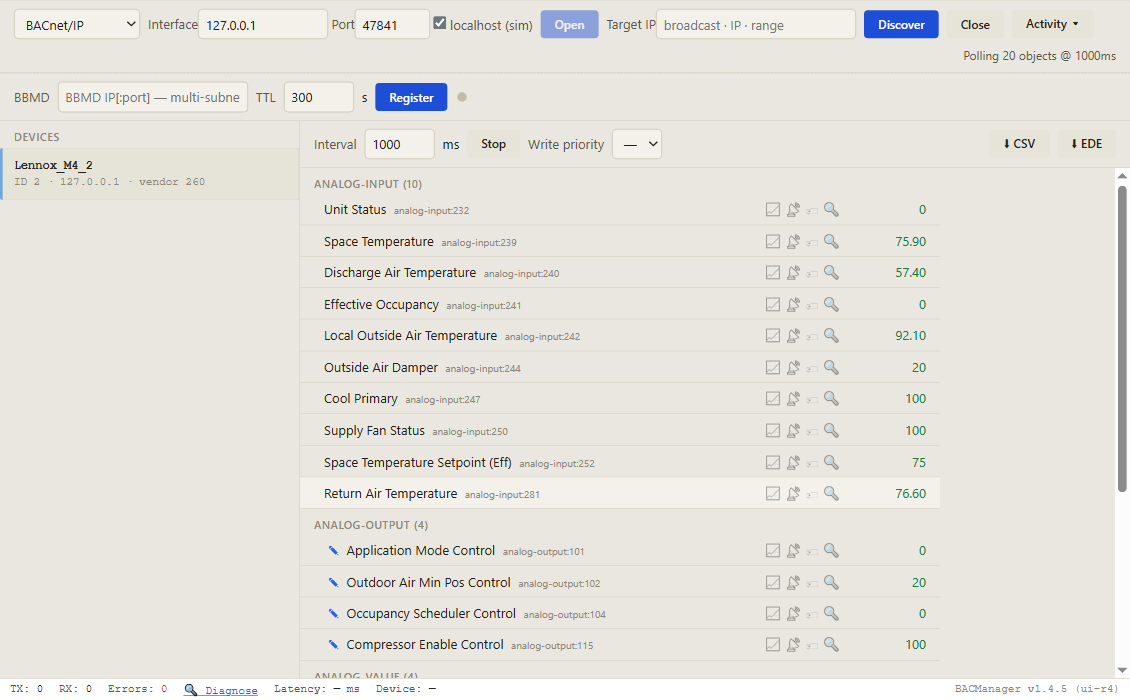
BACManager BACnet tab: device Lennox_M4_2, device instance 2, with its CORE objects listed by name, Unit Status, Space Temperature, Discharge Air Temperature, Effective Occupancy, Application Mode Control, Occupancy Scheduler Control and more, polled every second
Discover, click the unit, and its objects come up by name with live values. Pictured: a simulated CORE built from Lennox's published object list
// writing to the unit

Three more things about writes

⏻

Off means off

Application mode 6 (Off) is a complete unit disable: outputs and timers are cleared. Don't use it to end heating or cooling as part of normal control — let the setpoints and occupancy do that.

⇄

Last setpoint wins

AO:109 (one setpoint, with AO:110 as offset) and AV:130–133 (four setpoints) both set the space setpoints; the CORE uses whichever was written last. Pick one style and stay with it.

🔧

A local tool overrides

When a service tool on the unit writes the same setpoint, the AO's status shows it as overridden. Check before assuming the BMS value is the one in force — AI:252 says what is.

// free download

The Lennox CORE workspace

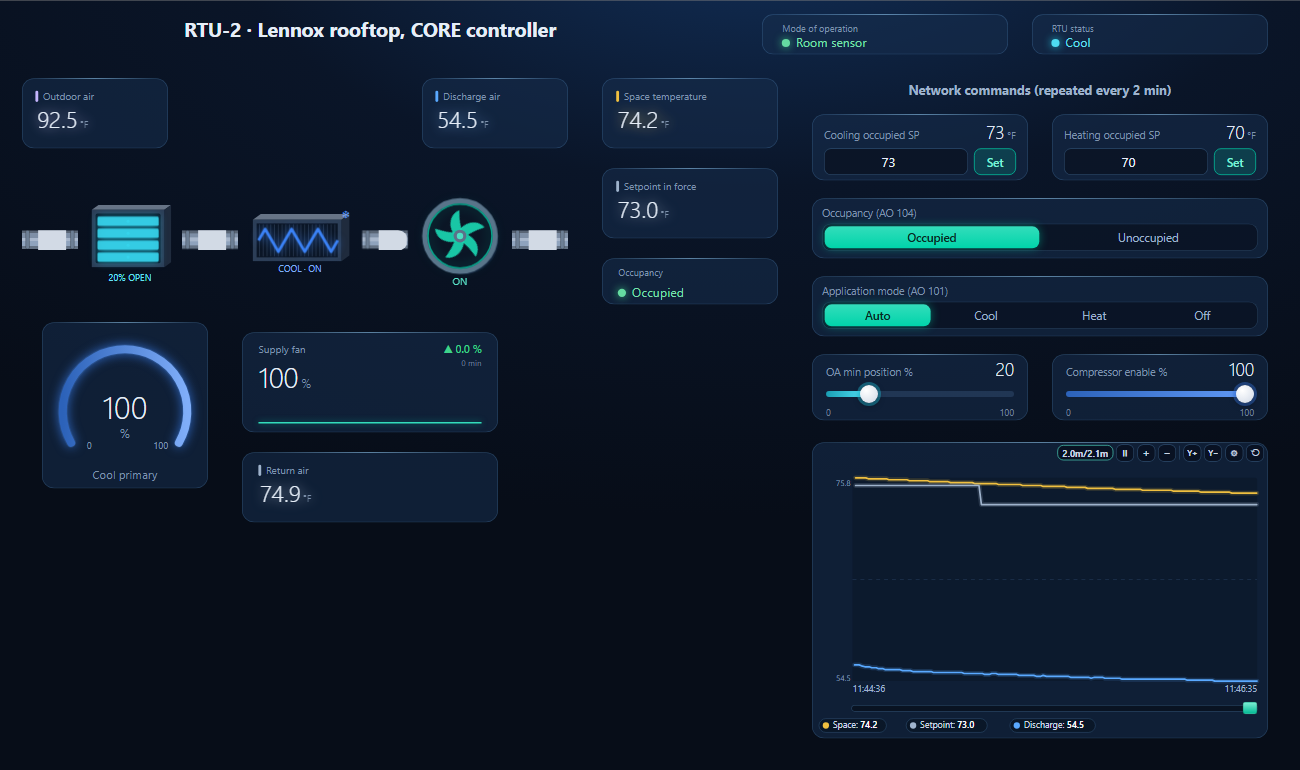
One dashboard page for a CORE rooftop unit in Room Sensor mode: mode of operation (with backup shown in red), RTU status, outdoor, discharge, return and space temperature, the setpoint in force, occupancy, damper, cooling and supply fan — with the occupied cooling and heating setpoints and the occupancy written again every 2 minutes, and application mode, minimum outdoor air and compressor enable writable.

BACManager dashboard for a Lennox rooftop unit with a CORE controller: mode of operation Room sensor, RTU status Cool, air path with outdoor air damper, cooling and supply fan, discharge air 54.5, space temperature 74.2 and setpoint in force 73 degrees F, network commands repeated every 2 minutes, and a trend where the setpoint steps from 75 to 73
The cooling occupied setpoint written from the page, 75 → 73 °F, and repeated every 2 minutes so the unit stays in Room Sensor mode (simulated controller)
1

Discover the unit

On the BACnet tab open BACnet/IP (or MS/TP on the PC's RS-485 port at the trunk's baud rate) and press Discover. The unit appears as Lennox_M4_…

2

Open the workspace

Workspace → Open. The file reads device 2; if yours has another instance, BACManager asks which discovered device takes its place and moves every point over.

3

Run, then set once

BACManager starts reading the unit by itself. On the Dashboard press Run and set the occupancy and setpoints once — from then on they are written again every 2 minutes. After BACManager restarts, set them once more.

Download workspace
// when it does not work

Typical problems

What you seeWhyWhat to do
Works for a few minutes, then ignores the BMS (code 93)Setpoints or occupancy not written again within 5 minutesWrite them every 2 minutes (Refresh 120 s in BACManager)
Network values ignored from the startControl mode Monitor OnlyRun the Network Setup Wizard again and choose Room Sensor
Everything lost after a power cutThe CORE does not keep BACnet commands over a resetSend them again after every reset
Unit completely idle, nothing runsApplication mode written as Off (6)Write 0 (Auto) to AO:101
Two units, one device instanceSame MAC (or IP last octet) on two networksSet the instance per unit (app or AO:105)
Reads abort on a big requestNo segmentationFewer objects per ReadPropertyMultiple
Setpoint jumps back to an old valueAO:109 and AV:130–133 both in useUse one style; the last write wins
// questions

Lennox CORE BACnet — FAQ

Where is the Lennox CORE BACnet points list?+
In Lennox's CORE Unit Controller BACnet Setup Guide, 508112-02, on lennox.com, sections 7 and 9. The table on this page lists the points a BMS uses most.
Do I need a Lennox BACnet module for a CORE unit?+
No. BACnet MS/TP and BACnet/IP are built into the CORE Unit Controller. The modules 59W51 and 38B35 are for Prodigy M2/M3 and CORE LITE controls.
Why does my Lennox unit go into backup mode?+
Because the network setpoints, occupancy or sensor inputs were not written again within 5 minutes, or nothing was written to the device for 15 minutes. Write them every 2 minutes, as Lennox recommends; the unit reports code 93 while in backup.
What are the CORE's default BACnet settings?+
MS/TP at 38.4 kbps with Max Master 127 and Max Info Frames 1; the device instance follows the MAC address, or on BACnet/IP the last octet of the IP address. BACnet/IP uses UDP 47808, which cannot be changed.
Which control mode should I use for BACnet?+
Room Sensor, which Lennox recommends: the unit controls the space to setpoints and occupancy written over BACnet. Monitor Only ignores them, and Network Thermostat mode is not recommended.
Does the Lennox CORE support COV?+
Lennox's guide says both: COV is not supported at the interface, yet its object tables mark it available on newer firmware. Poll the unit rather than rely on COV.
// sources

Where this comes from

Lennox: CORE Unit Controller BACnet Setup Guide, 508112-02 (2026), on lennox.com. Check the guide for your controller's firmware before commissioning. Lennox, CORE and Prodigy are trademarks of their owners; BACManager is not affiliated with Lennox. The pictures on this page are from BACManager connected to a simulated controller built from the published object list.

// more device guides

Other BACnet devices

Chillers and rooftop units
Daikin MicroTech III chiller
Trane Symbio 700
AAON VCCX2
Boilers
Lochinvar Crest boiler
VRF and split systems
Daikin iTM (VRV)
Mitsubishi AE-200
Drives
ABB ACH580
Schneider ATV600
Pumps and valves
Grundfos MAGNA3 (CIM)
Wilo Stratos MAXO (CIF)
Belimo Energy Valve
Routers
BASrouter (MS/TP to IP)

All BACnet device guides →

Keep the Lennox unit under network control

Download the free trial, discover the unit and open the CORE workspace — setpoints and occupancy written again every 2 minutes. No credit card.

Download free trial See pricing

Windows 10/11 · $149 one-time