How to put a Trane rooftop unit with Symbio 700 controls — Precedent, Voyager 3 — on BACnet: the rotary address, the mobile-app settings for MS/TP and BACnet/IP, the J17 wiring, the points a BMS uses, and why Symbio keeps its own setpoint when a BMS writes at the wrong priority. Plus what changes on a chiller with Symbio 800, and a free BACManager workspace for the rooftop unit.
Sources: Trane BAS-SVP066B-EN, BAS-PTS001C-EN (Symbio 700) and BAS-SVP047B-EN (Symbio 800)
Symbio 700 comes on the unit and speaks BACnet MS/TP and BACnet/IP itself (and Modbus RTU/TCP, LonTalk and Trane's Air-Fi wireless). You choose the protocol; there is no separate BACnet card.
Settings are made in Trane's Symbio Service and Installation app over Bluetooth — tap the unit's display to switch Bluetooth on — or on the onboard display under Tools → Protocol Configuration.
Arbitration Method Request (MV-11100) decides whether Symbio listens to a BMS at all. In Standalone Control it ignores every BAS input; Enable External/BAS Control is the default.
| Setting | BACnet MS/TP | BACnet/IP |
|---|---|---|
| MAC address | The rotary address, 001–127. Takes effect at once, no power cycle | — |
| Device ID | The rotary address as well (1–127). Use Software Device ID allows 1–4194302 | |
| Baud rate | 76,800 by default; every device on the trunk must match | — |
| IP address | — | Tools → IP Configuration: DHCP or a static address, mask, gateway |
| UDP port | — | Set to the network's BACnet port (47808 on almost every site) |
| BBMD | — | Tick only if this unit is the only BACnet/IP device on its subnet |
| Units on the network | Inch-pound or SI, chosen in the app or on the display — independent of what the display shows | |
Because the rotary address gives both the MAC and the device ID, two units on two different MS/TP trunks with the same rotary setting end up with the same device ID. On a site with more than one trunk, give each unit a software device ID.
The MS/TP (or Modbus RTU) pair lands on connector J17, + and −. J17 has two sets of terminals connected inside, so the trunk comes in on one and goes on to the next unit from the other.
No stubs, observe polarity, terminate only the two ends of the trunk. Trane's own best-practice guide for MS/TP links is BAS-SVX51; our MS/TP troubleshooting guide covers the usual faults.
BACnet/IP and Modbus TCP use the controller's RJ-45 port. Across subnets you need a BBMD; see BBMD and foreign devices.
Trane's names tell you the access: BAS, Request, Command and AV/BV/MV Setpoint points are written; Status, Active, Local and Input points are read. Which points exist depends on how the unit is configured — a dual-setpoint sensor, an economizer, a second compressor.
| Object | Object name | Access | What it is |
|---|---|---|---|
| AV-10127 | Space Temperature Setpoint BAS | W | The space setpoint from the BMS (single-setpoint control). Write at a priority stronger than 14 |
| AV-10159 / AV-10160 | Occupied Cooling / Heating Setpoint BAS | W | Separate occupied cooling and heating setpoints (dual-setpoint control) |
| AV-10114 | Space Temperature BAS | W | Space temperature from the BMS, when the unit has no sensor of its own |
| AV-10113 | Outdoor Air Temperature BAS | W | Outdoor air temperature from the BMS |
| MV-10106 | Occupancy Request | W | 1 Occupied, 2 Unoccupied, 3 Occupied Bypass, 4 Occupied Standby, 5 Auto |
| MV-10104 | Heat Cool Mode Request | W | 1 Auto, 2 Heat, 4 Cool, 7 Off, 10 Fan Only and others |
| AV-10139 | Cooling Capacity Enable | W | Cooling capacity allowed, % — the demand limit for cooling |
| MV-11100 | Arbitration Method Request | W | 1 Enable External/BAS Control, 2 Standalone Control |
| BV-10110 | Reset Diagnostic | W | Resets diagnostics that may be reset |
| AV-11178 | Space Temperature Active | R | The space temperature the unit controls to |
| AV-11181 | Space Temperature Setpoint Active | R | The setpoint actually in use, after arbitration — compare it with what you wrote |
| AV-11128 / AV-11129 | Space Temp Cooling / Heating Setpoint Status | R | The cooling and heating setpoints in use |
| AI-10124 | Discharge Air Temperature Local | R | Discharge air temperature |
| AI-10118 | Outdoor Air Temperature Active | R | Outdoor air temperature in use |
| AI-10101 | Cooling Capacity Status | R | Cooling capacity running, % |
| MI-10101 | Heat Cool Mode Status | R | The mode it is in (same list as the request, plus Morning Warm-up, Economizer, Dehumidify…) |
| MV-11123 | Occupancy Status | R | The occupancy in force |
| BI-10226 / AV-11163 | Supply Fan Status / Supply Fan Speed Status | R | Supply fan on, and its estimated speed % |
| BI-11100 / BI-11103 | Compressor 1 / 2 Command Status | R | Compressor outputs |
| BI-10219 | Economizer Airside Status | R | Airside economizing active |
| BV-11100 | Alarm Indicator Status | R | The controller's alarm output |
| BV-11144 | Diagnostic: Filter Change Required | R | Dirty filter (with a clogged-filter switch installed); every diagnostic has its own point |
| AV-11169 / AV-11183 | Run Time - Compressor 1 (Hours) / Starts - Compressor 1 | R | Compressor run hours and starts |
The complete list — about 640 objects with their Modbus registers, availability conditions and defaults — is Trane's BAS-PTS001C-EN for Precedent and Axiom units; Voyager 3 has its own in BAS-SVP066B-EN, with the same object numbers for the points above.
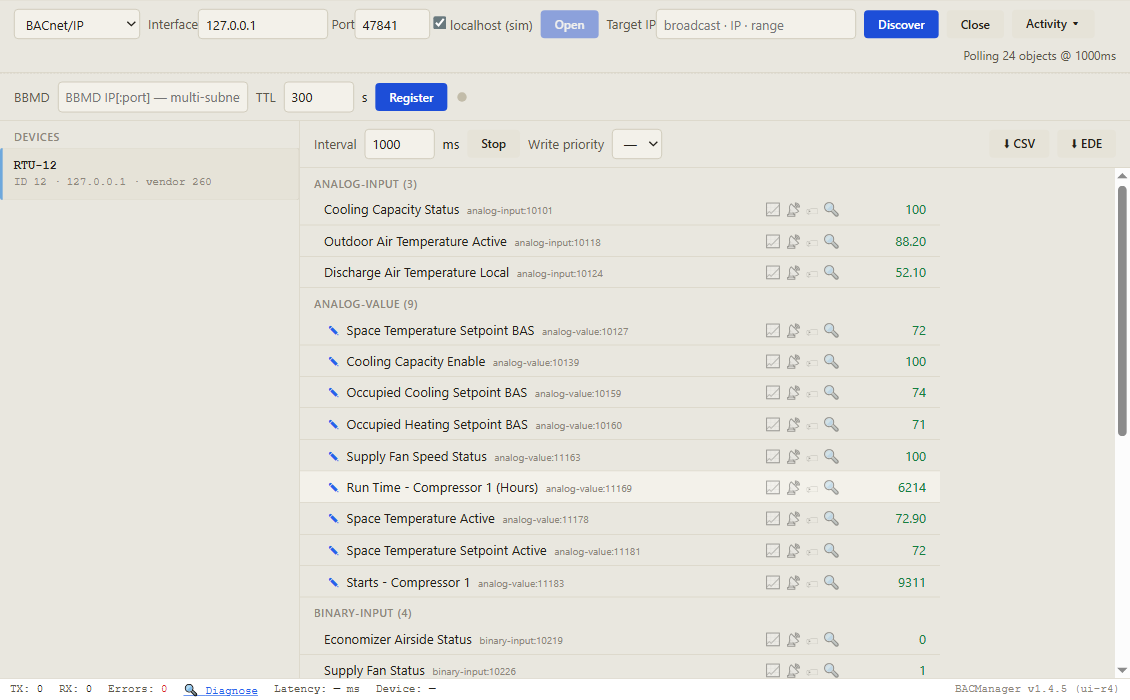
The BAS points carry a priority array, and Symbio's own setpoint sources write into the same array.
A wired setpoint shows up in Space Temperature Setpoint BAS at priority 15, an Air-Fi sensor's at 14. A BMS value written at 14 or weaker is ignored. Write at 8 — BACManager's default.
A setpoint changed on the unit's display or in the mobile app goes to the point's relinquish default, not into the array. It is only used when no other valid source exists — so it can look as if the display "does nothing" on a unit the BMS controls.
When the BMS value is not valid, Symbio goes back to the Air-Fi sensor, then the wired one, then its default. Read Space Temperature Setpoint Active to see which won.
A value written at 8 stays until it is relinquished. To give control back to the local setpoint, write NULL at the same priority — the priority array explained.
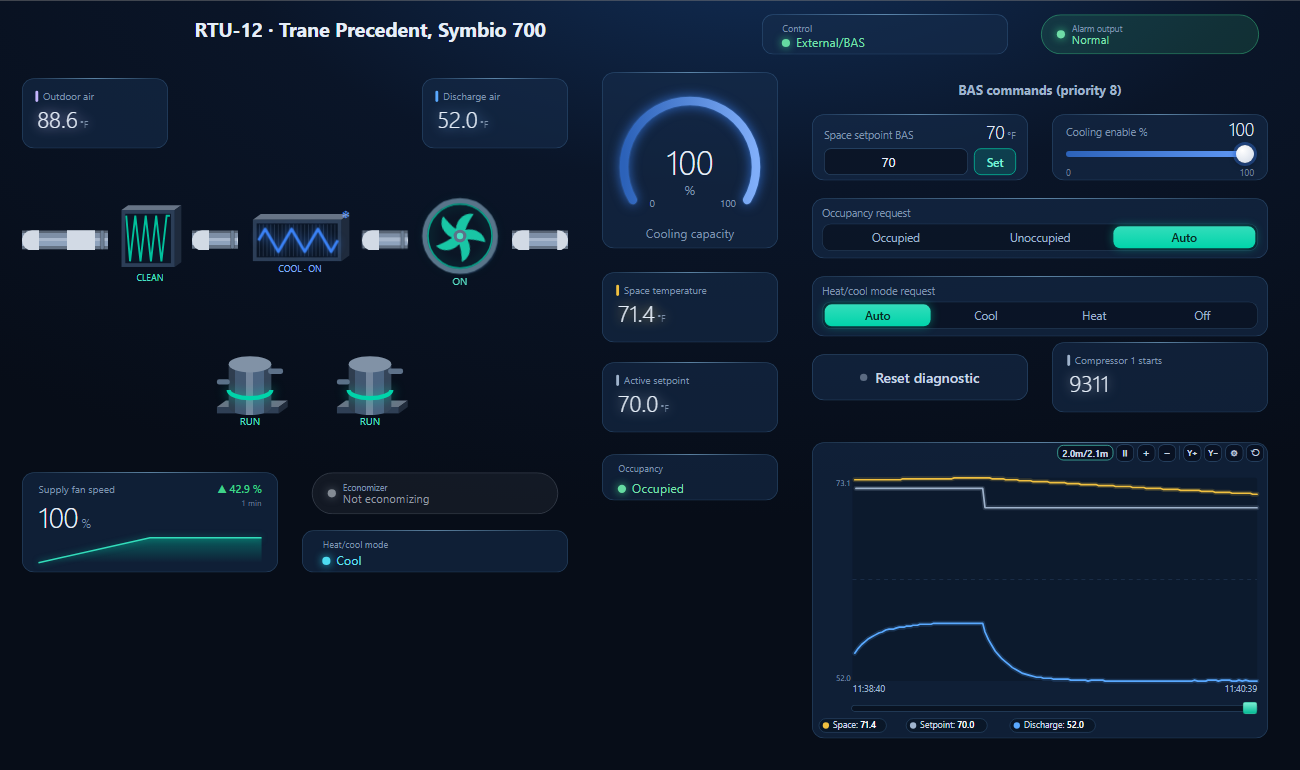
One dashboard page for the unit: outdoor, discharge and space temperature, cooling capacity, the two compressors, supply fan and its speed, economizer, filter, heat/cool mode, occupancy, alarm output and a trend of space and discharge air — with the space setpoint, cooling enable, occupancy request, heat/cool mode request and diagnostic reset writable at priority 8.
On the BACnet tab open BACnet/IP (or MS/TP on the PC's RS-485 port) and press Discover. The unit appears with its device ID.
Workspace → Open. The file reads device 12 (rotary 012); if yours has another ID, BACManager asks which discovered device takes its place and moves every point over.
BACManager starts reading the unit by itself. On the Dashboard press Run: the controls write only in Run mode, and only after the unit has answered.
| What you see | Why | What to do |
|---|---|---|
| Setpoint written, active setpoint stays | Written at priority 14, 15 or 16 — the wired or Air-Fi setpoint is stronger | Write at 8 |
| Every BAS write ignored | Arbitration Method Request is Standalone Control | Write 1 (Enable External/BAS Control) to MV-11100 |
| A point from the list is missing | Not configured on this unit (no dual-setpoint sensor, no economizer, one compressor) | Check the availability column of BAS-PTS001C |
| Two units, one device ID | Same rotary address on two trunks | Set a software device ID on one |
| MS/TP trunk errors after adding the unit | Baud rate differs from the trunk (Symbio defaults to 76,800) | Set the trunk's baud rate in the app |
| Other BACnet/IP devices on the subnet act up | The unit's BBMD box ticked on a shared subnet | Untick it; BBMD there only if it is the only BACnet/IP device |
| Setpoint changed on the display, nothing happens | The display writes the relinquish default, used only without a BAS value | Change it from the BMS, or relinquish the BMS value |
Symbio 800 runs Trane chillers, air handlers and large packaged units. The BACnet ideas are the same; the tools and defaults are not.
| Symbio 700 | Symbio 800 | |
|---|---|---|
| Service tool | Mobile app over Bluetooth, or the onboard display | Web page over a USB A/B cable at http://198.80.18.1/ — not over Ethernet |
| Rotary 000 | — | Turns MS/TP off; the factory default when no protocol was ordered. Set 001–127 |
| MS/TP | J17, 76,800 | P1 link, 76,800 |
| BACnet/IP | RJ-45 port | Ethernet 1 (or Wi-Fi with Trane's USB adapter), UDP 47808 by default |
| Points list | BAS-PTS001C (Precedent), BAS-SVP066B (Voyager 3) | One per equipment type, e.g. BAS-SVP047B for Agility chillers |
Trane: BAS-SVP066B-EN Integration Guide: BACnet and Modbus Integration to Voyager 3 Packaged Rooftop Air-Conditioners with Symbio 700 Controls (2024), BAS-PTS001C-EN Symbio 700 Integration Points List, Precedent, Axiom (2026) and BAS-SVP047B-EN BACnet and Modbus Integration to Agility Water-Cooled Chillers with Symbio Controls (2023), in the Trane eLibrary. Check the document for your unit and firmware before commissioning. Trane, Symbio, Precedent, Voyager, Axiom, Agility and Air-Fi are trademarks of their owners; BACManager is not affiliated with Trane. The pictures on this page are from BACManager connected to a simulated controller built from the published points list.
Download the free trial, discover the unit and open the Symbio 700 workspace — every point by name, writes at priority 8. No credit card.
Windows 10/11 · $149 one-time
We use Google Analytics cookies to see how the site is used. You can accept or decline — declining keeps analytics off.