Every device. One tool. Pay once.Modbus · BACnet · Siemens S7 · one-time licence · also from us: ModbusManager ↗
// daikin applied · microtech iii chiller · bacnet ms/tp & ip
Daikin MicroTech III BACnet Points List & Setup
How to put a Daikin Applied chiller with a MicroTech III unit controller on BACnet: which communication module it needs, the keypad settings for MS/TP and BACnet/IP, the points a BMS actually uses, and the three reasons a chiller ignores a setpoint that was written without an error. With a free BACManager workspace that reads and commands the chiller from the first minute.
Covers Trailblazer AGZ, AMZ, Pathfinder AWS/AWV, ADS, Magnitude WME (B vintage) and Navigator WWV · source: Daikin Applied ED 15120-11
// before you start
Three things the chiller needs
🔌
A BACnet communication module
The MicroTech III controller speaks BACnet through an add-on module that clips onto its left side: one for MS/TP (POL904) or one for BACnet/IP (POL908). It is fitted at the factory or in the field; Daikin's module manuals are IM 967 (MS/TP) and IM 966 (IP).
🔑
Network control at the keypad
Chiller Local/Network can only be set on the keypad. In Local the chiller reads fine but ignores every network enable, mode, setpoint, limit and clear-alarm write — without returning an error. Set it to Network.
🏷
A unique device instance
The controller computes its first device instance from the module's MAC address (MS/TP) or production code (IP), so read it on the keypad or with a Discover. Two chillers must not share one; change it on the keypad and cycle power.
// keypad setup
MicroTech III BACnet settings
Log in on the keypad (Daikin gives the password 5321 for this menu), turn the unit switch off, then go to View/Set Unit → BACnet MSTP Setup or BACnet IP Setup. Changes take effect when you set ApplyMSTPChgs / ApplyIPChgs to Yes, which restarts the controller.
Setting
MS/TP module
BACnet/IP module
MAC address
18 (0–127)
—
Baud rate
38400 (9600, 19200, 76800)
—
Max Master
127
—
Max Info Frames
1 in ED 15120-11 (the module manual says 10 — check the keypad)
—
Termination
Term Resistor = Yes on the first and last unit only
—
IP address
—
DHCP on by default; fixed address in Given IP, mask, gateway
UDP port
—
47808 (BAC0); can register with a BBMD as a foreign device
Device instance
computed (IM 967 lists 368136)
computed (IM 966 lists 1579312)
Device object name
POL904_ + digits from the module
POL908_ + digits from the module
Max APDU
480
1476
Units on the network
English by default; Units (MSV:4) switches to Metric after a power cycle
Two things catch people out. A field upgrade of the chiller's application software puts the network parameters back to their defaults, so a chiller that vanished after a service visit may simply be on MAC 18 again. And on BACnet/IP the keypad shows Act IP as 0.0.0.0 when the network cable was not connected at power-up.
// ms/tp wiring
RS-485 to the MS/TP module
+−
Three wires
The module's network plug takes +, − and Ref. Daisy-chain the trunk, no stubs, and ground the shield at one point only. The port is isolated and is a 1/8 unit load.
Ω
Termination that survives a power cut
The keypad's Term Resistor is a software resistor: it disappears when the controller is off, and the whole trunk with it. Daikin recommends a physical 120 Ω resistor at both ends instead.
↔
Length
Up to about 4000 ft (1200 m) at 76800 baud without a repeater. If the chiller drops off the trunk now and then, see the MS/TP troubleshooting guide.
// points list
The points a BMS uses
The objects below are the ones that run, monitor and alarm a MicroTech III chiller. C = commandable (has a priority array), W = writable, R = read only. Which points exist depends on the model — chiller kW, for one, is only on some.
Object
Object name
Access
What it is
BV:2
ChillerEnableStp
C
Enable from the network (1). Allows the chiller to run; it starts only when it has a reason to
AV:4
NetworkCoolTempSetpoint
C
Leaving chilled water setpoint in Cool mode, 24.98–60.08 °F, default 43.88 °F
AV:7
NetworkIceTempSetpoint
C
Leaving water setpoint in Ice mode
AV:3
NetworkCapacityLimitPct
C
Capacity limit from the network, 0–100 %
MSV:3
ChillerOperationMode
C
Mode request: 1 Ice, 2 Cool (these models run only these two)
BV:8
ClearAlarm
C
1 clears active alarms that may be cleared from the network
MSV:4
Units
W
1 Metric, 2 English
BI:3
ChillerLocalRemote
R
0 Network, 1 Local — check this first when writes do nothing
MSV:1
UnitStatus
R
1 Off, 2 Start, 3 Run, 4 Preshutdown, 5 Service
MSV:2
ActiveMode
R
The mode it is running in
BI:4
UnitOnOff
R
Chiller on or off
BI:5
RunEnabled
R
Running mode enabled
BI:7
ChillerEnableOutput
R
Whether operation is enabled, from any source
BI:6
ChillerLimited
R
Capacity is being held back by a limit or condition
AV:2
ChillerCapacity
R
Actual capacity, %
AV:1
ActiveCapacityLimit
R
The limit actually in force, %
AV:5
ActiveLvgWaterTarget
R
The setpoint actually in force, after any reset
AI:1
EntEvapWaterTemp
R
Evaporator entering water (chilled water return)
AI:2
LvgEvapWaterTempUnit
R
Evaporator leaving water (chilled water supply)
AI:3 / AI:4
EntCondWaterTemp / LvgCondWaterTemp
R
Condenser entering and leaving water
AI:5
OutdoorAirTemp
R
Outdoor air temperature
AI:148 / AI:147
EvapWaterFlowRate / CondWaterFlowRate
R
Water flow, GPM
BI:2 / BI:1
EvapWaterFlowStatus / CondWaterFlowStatus
R
Flow switches
BI:8, BI:9 / BI:11, BI:12
EvapPump1State … CondPump2State
R
Pump commands from the chiller
AI:6
ChillerCurrent
R
Average chiller current
AI:8 / AV:114
ChillerKilowatts
R
Chiller power: AI:8 on AWS and ADS, AV:114 on AWV and WME
AI:9, AV:74, AV:92
C1Comp1Current, C1Comp1Hours, C1Comp1Starts
R
Per compressor: current, run hours, starts (and the same for each circuit and compressor)
The active fault, problem and warning, 0 when none
The full list — refrigerant pressures and saturated temperatures per circuit, discharge and suction temperatures, oil pressure, VFD values, heat recovery — is in Daikin's ED 15120-11, Tables 3–7, with a model-by-model matrix in Table 2. Expect several analog inputs with the same value for one sensor: the controller makes one object per intrinsic alarm, and any one of them gives you the reading.
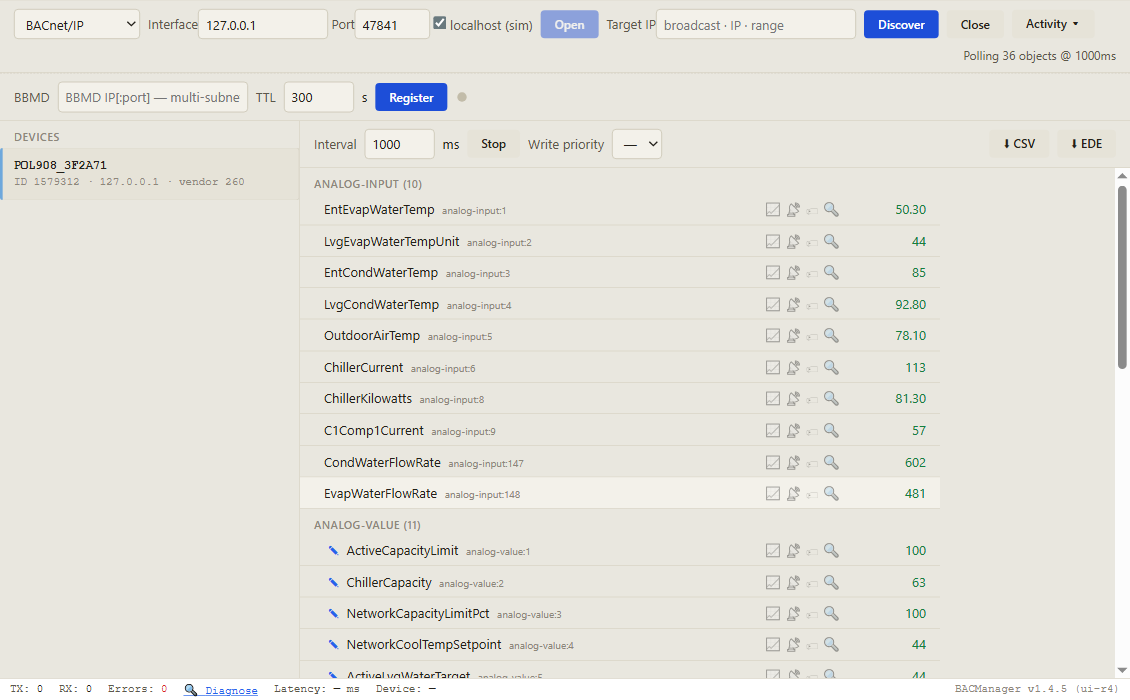
Discover, click the chiller, and its objects come up by name with live values. Pictured: a simulated MicroTech III controller built from the ED 15120-11 points list
// writing to the chiller
Priority 8, and the writes it ignores
The commandable points carry a 16-slot priority array. The value that applies is the one in the strongest slot that holds something.
8
Write at priority 8
The controller keeps priorities 1 and 5 for its own application: a BACnet write there fails. If a LonWorks or Modbus module is fitted as well, they write at 8, and Daikin says BACnet must write at 8 or stronger. BACManager writes at 8 unless you choose otherwise.
🚫
Accepted, then ignored
In Local (BI:3 = 1) the controller takes the write and does nothing with it. A cool setpoint below the setpoint set at the unit does not apply either, and the mode request is only used when the unit's available modes include Ice.
⚠
Not every alarm clears
ClearAlarm cannot clear the manual-reset faults — low evaporator pressure, high condenser pressure, high motor temperature, freeze protection and mechanical pressure trips. Those need someone at the chiller.
A value written at priority 8 stays there until it is relinquished, also after the BMS that wrote it is gone. To hand control back, write NULL to the same slot — see the priority array explained.
// free download
The MicroTech III chiller workspace
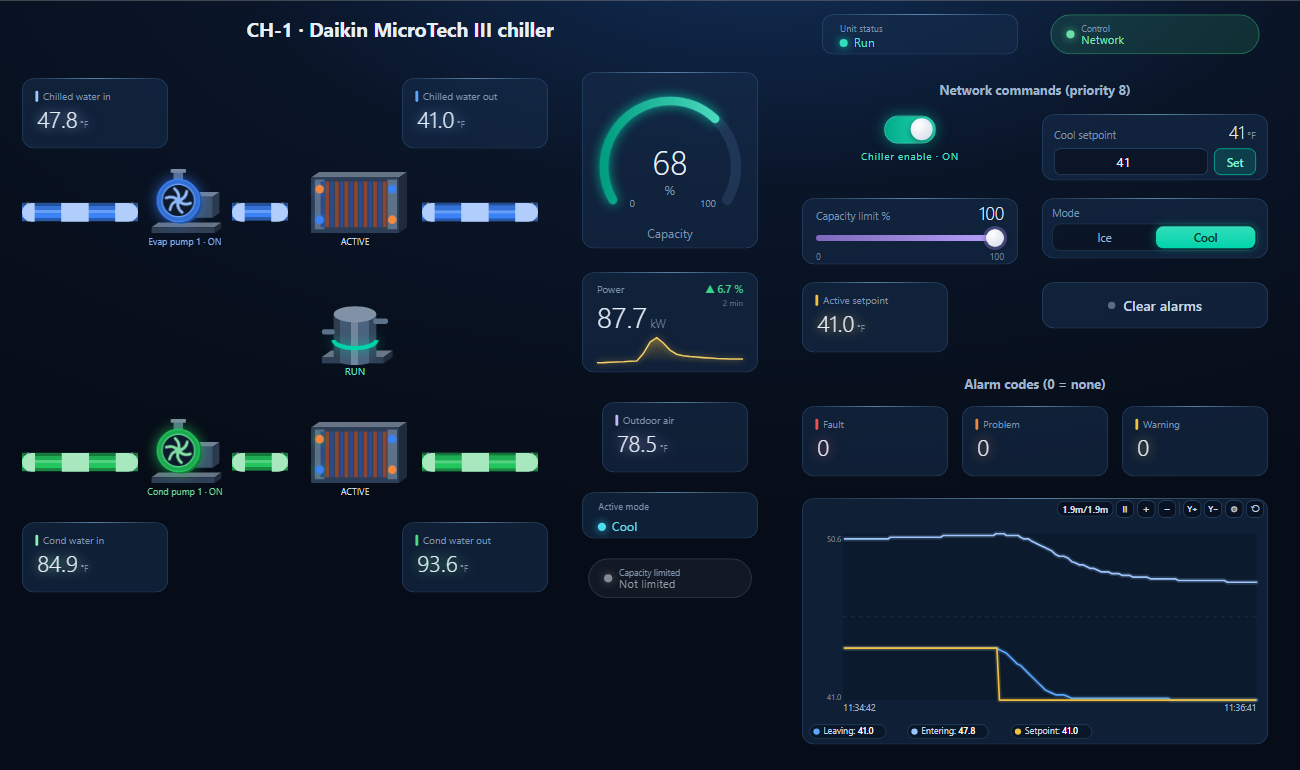
One dashboard page for the chiller: chilled and condenser water in and out, capacity, power, outdoor air, unit status, active mode, Local/Network, the three alarm codes and a trend of leaving water against its setpoint — with enable, cool setpoint, capacity limit, mode and clear alarms writable at priority 8.
The cool setpoint written from the page at priority 8, 43 → 41 °F: the leaving water follows within seconds (simulated controller)
1
Discover the chiller
On the BACnet tab open BACnet/IP (or MS/TP on the PC's RS-485 port) and press Discover. The chiller appears with its device instance.
2
Open the workspace
Workspace → Open. The file reads device 1579312; if your chiller has another instance, BACManager asks which discovered device takes its place and moves every point over.
3
Run
BACManager starts reading the chiller by itself. On the Dashboard press Run: the controls write only in Run mode, and only after the chiller has answered.
Below the setpoint set at the unit, or the chiller is in Ice mode
Check the unit's cool setpoint and MSV:2
Chiller not found on MS/TP
MAC 18 taken by another device, or a baud rate that differs from the trunk
Give it a free MAC and the trunk's baud, then Apply
Two chillers, one answers
Same device instance
Change one on the keypad and cycle power
Gone after a software update
The update reset the network parameters
Enter MAC, baud, instance or IP again
Whole trunk dead while the chiller is off
Software termination resistor
Fit a physical 120 Ω resistor
Chiller time differs from the BMS
The module and the controller keep separate clocks
They resynchronise about every 60–68 minutes and at power-up
// newer controllers
AGZ-F, WMT, WMC-E: the touchscreen generation
Daikin's newer chillers with the touchscreen HMI — often searched for as “MicroTech 4”, though Daikin's own protocol document does not use that name — are documented separately, in ED 19131-1 and IM 1283. Most object instances are the same; what differs:
MicroTech III (ED 15120-11)
AGZ-F, WMT, WMC-E (ED 19131-1)
Module
Separate MS/TP or IP module
One BAS module; BACnet/IP, MS/TP or Modbus chosen on the HMI
Default instance
Computed
9050, object name Daikin_MicroTech_<instance>
IP defaults
DHCP on
192.168.1.10, DHCP off
MS/TP defaults
MAC 18, 38400
MAC 1; baud 38400 or 19200 depending on the document — check the HMI
Setpoints, enable
Commandable (priority array)
Writable, no priority array
Network control
Local/Network on the keypad
Control Source = BAS (and on some models Remote Enable)
// questions
Daikin MicroTech III BACnet — FAQ
Where is the Daikin MicroTech III BACnet points list?+
In Daikin Applied's document ED 15120-11, MicroTech Chiller Unit Controller Protocol Information, on daikinapplied.com. The table on this page lists the points a BMS uses most; ED 15120-11 has every object per model.
Does a MicroTech III chiller need a BACnet card?+
Yes. BACnet goes through a communication module clipped onto the controller: POL904 for BACnet MS/TP or POL908 for BACnet/IP. It can be ordered with the chiller or fitted later.
What is the default device instance?+
The controller computes it from the module's MAC address or production code, so it differs per chiller. The module manuals give 368136 for MS/TP and 1579312 for BACnet/IP. Read the real one on the keypad or with a Discover.
What are the default MS/TP settings?+
MAC address 18, 38400 baud, Max Master 127. They are changed in the keypad's BACnet MSTP Setup menu and take effect after Apply, which restarts the controller.
Which BACnet priority should I write the setpoint at?+
Priority 8. Priorities 1 and 5 are reserved for the controller and writes there fail; with a LonWorks or Modbus module also fitted, BACnet has to write at 8 or stronger.
Why does the chiller ignore my BACnet setpoint?+
Most often Chiller Local/Network is set to Local, which only the keypad can change. A network cool setpoint below the setpoint set at the unit is also not applied. Compare AV:4 with the active setpoint AV:5.
Does the MicroTech III support COV?+
Yes. Daikin's PICS lists SubscribeCOV, ReadPropertyMultiple, WritePropertyMultiple, intrinsic alarming, scheduling and trend logs. A change of COV increment needs a power cycle to stick.
// sources
Where this comes from
Daikin Applied: ED 15120-11 MicroTech Chiller Unit Controller Protocol Information (2023), IM 966-5 and IM 967-5 MicroTech III Chiller Unit Controller BACnet IP / MS/TP Communication Module (2022), ED 19131-1 MicroTech Unit Controller Protocol Information (2026) and IM 1283-2 (2026), all on daikinapplied.com. Check the document for your chiller's model and software version before commissioning. Daikin, MicroTech, Trailblazer, Pathfinder, Magnitude and Navigator are trademarks of their owners; BACManager is not affiliated with Daikin Applied. The pictures on this page are from BACManager connected to a simulated controller built from the published points list.