Every device. One tool. Pay once. Modbus · BACnet · Siemens S7 · one-time licence · also from us: ModbusManager ↗
// contemporary controls · basrouter · basrt-b

BASrouter
BACnet MS/TP to IP Setup

How to read MS/TP devices over BACnet/IP through a Contemporary Controls BASrouter: the factory IP and login, network numbers that must not repeat, the router's own device instance of 0, bias and termination inside the box — and why some BACnet clients find the devices behind it but never get a value from them. With a free BACManager workspace.

Download free trial Free MS/TP plant workspace

Sources: Contemporary Controls UM-BASRTB00 (BASRT-B user manual), IS-BASRT001, TN-BASRT000, DS-BASRTB00, DS-BASRTBX0 and AG-BASRTB00

// router or gateway

A router passes BACnet; it does not translate

⇄

Router

A BACnet router joins BACnet networks — BACnet/IP, BACnet Ethernet, MS/TP — at the network layer. Contemporary Controls puts it plainly: their routers only pass messages, with no knowledge of what they contain. The devices behind it keep their own device instances and objects.

⚙

Gateway

A gateway speaks one protocol on one side and another on the other — Modbus to BACnet, say — and builds new objects for what it reads. That is a different job; see Modbus to BACnet gateway.

🔍

Bring a client

The router finds and manages nothing by itself: a BACnet client on the IP side discovers the MS/TP devices and reads them. Its own Device object is all it holds — it does not keep the other devices' properties.

// setup

BASRT-B: the web page at 192.168.92.68

Give the PC an address on the same subnet (192.168.92.69, say), open the router's page and log in; the user name and password are printed in the manual and should be changed. A reset button restores the IP address and login — not the BACnet settings.

SettingFactorySet to
Device Instance0A unique instance, 0–4194302. Every router leaves the factory as 0
Device NameBASRT-B + last 6 of the MACUnique, up to 20 characters
BACnet/IP Network11–65534, the same for every router on that IP network; not the MS/TP number
MS/TP Network2001Unique in the whole internetwork: a second router needs another one
BACnet/IP UDP Port0xBAC0 (47808)Leave
BACnet Ethernet Network0 (off)Leave at 0 unless BACnet Ethernet (ISO 8802-3) is used — and then on one router per subnet only
MS/TP MAC0Keep 0; number the other masters from 1 without gaps
Max Masters127Leave unless every device can take a lower value
Max Info Frames1001–100; 20–40 typical
MS/TP Baud Rate384009600–76800, the trunk's rate; autobauding devices follow the router
MS/TP ToleranceStrictLenient interoperates better with odd devices, a little less efficiently
⚡

Bias and termination inside

The BASRT-B ships with bias (604 Ω up and down) and termination (130 Ω) applied by three jumpers under the cover. At the end of a segment leave them; in the middle remove all three and terminate the far end with 120 Ω. A segment takes 31 full-load devices.

⏚

Connect SC

The MS/TP port is isolated: its SC pin must go to the trunk's signal common, or communication fails. With non-isolated two-wire devices, SC goes to their supply common.

🌐

Other subnets: BBMD

On another IP subnet than the BMS, enable BBMD on the Advanced page and list every other BBMD in its table. Do not enable it when it is not needed — Contemporary Controls warns it impairs traffic. A BASrouter can take foreign-device registrations but cannot register as one. More: BBMD and foreign device.

// the rule that bites

Found, but never answered

📡

A routed I-Am

When an MS/TP device answers Who-Is through the router, its I-Am comes from the router's IP address and carries the device's network (2001) and MS/TP MAC in the message's network header. That pair is its address now.

⚠

Reading from the router

Contemporary Controls' troubleshooting note describes clients that discover MS/TP devices via the router, then ignore the routing information and try to read the device's properties from the router itself — which holds only its own. The device shows up in the list and every read times out.

✅

Network and MAC on every request

A request to a device behind a router has to carry its network and MAC as the destination. The router's status page gives it away otherwise: far more BACnet/IP packets than MS/TP ones means the client is not using the routing.

BACManager reads devices behind a router from version 1.4.6: the device list shows them at the router's IP with net 2001, and every read and write carries the device's network and MAC. Tested against a simulated BASrouter with an ABB drive, a Belimo valve and a Lochinvar boiler on MS/TP network 2001: each answered with its own name and values, and the dashboard wrote to the drive and the valve through the router. Without the change, version 1.4.5 finds devices like these and times out on every read of them.

// when it does not work

The router's status page tells you

What you seeWhyWhat to do
MNSM stays SoleMaster or PollForMaster; Next Station is the router's own MACThe router hears no other master: baud rate, polarity, SC not connected, no termination, or only slavesCheck baud and wiring; the LEDs flash whatever the polarity or baud
Devices found, every read times outThe client reads from the router instead of through itA client that uses the routing (BACManager 1.4.6 or later)
BIP packet count far above MS/TP countMessages are not being routedSame: the client is not using network numbers
Next Station keeps changing; devices drop in and outDuplicate MACs, a neighbour leaving the token, Max Masters not matchingUnique MACs from 1 up; the same Max Masters everywhere
Many Invalid Long FramesBias or terminationJumpers in at the end, out in the middle, 120 Ω at the far end
Two routers, devices vanishSame MS/TP network number, or instance 0 on bothA unique MS/TP network and device instance on each
MS/TP slaves (MAC 128+) not foundBASRT-B talks to slaves but cannot discover themAddress them directly, or a BASrouterLX with slave proxy
Nothing from another subnetNo BBMD, or BDT entries missing on one sideOne BBMD per subnet, each listing the others

The BASrouterLX adds 115200 baud, slave proxy and automatic slave discovery, an MS/TP backbone between IP networks, and a capture of MS/TP frames for Wireshark. Contemporary Controls' own free BACnet Discovery Tool works only on UDP port 0xBAC0; if it sees the MS/TP devices, the router is doing its job. Their manuals and notes are on ccontrols.com.
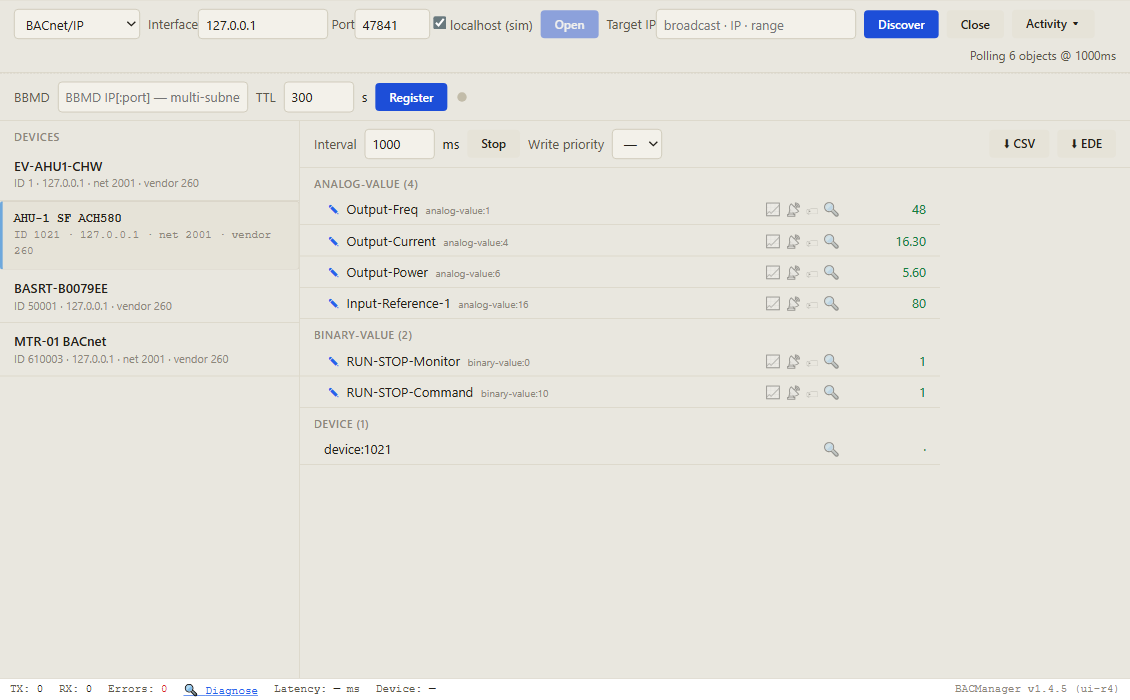
BACManager BACnet tab: four devices found at one IP address: the router BASRT-B0079EE as device 50001, and behind it on MS/TP network 2001 the Belimo valve EV-AHU1-CHW (device 1), the ABB drive AHU-1 SF ACH580 (device 1021) and the Lochinvar boiler MTR-01 BACnet (device 610003), each marked net 2001; the drive's objects Output-Freq, Output-Current, Output-Power, Input-Reference-1, RUN-STOP-Monitor and RUN-STOP-Command with live values
The router and three MS/TP devices behind it at one IP address — the routed ones marked net 2001. Pictured: a simulated BASrouter and devices built from their makers' object lists
// free download

The MS/TP plant workspace

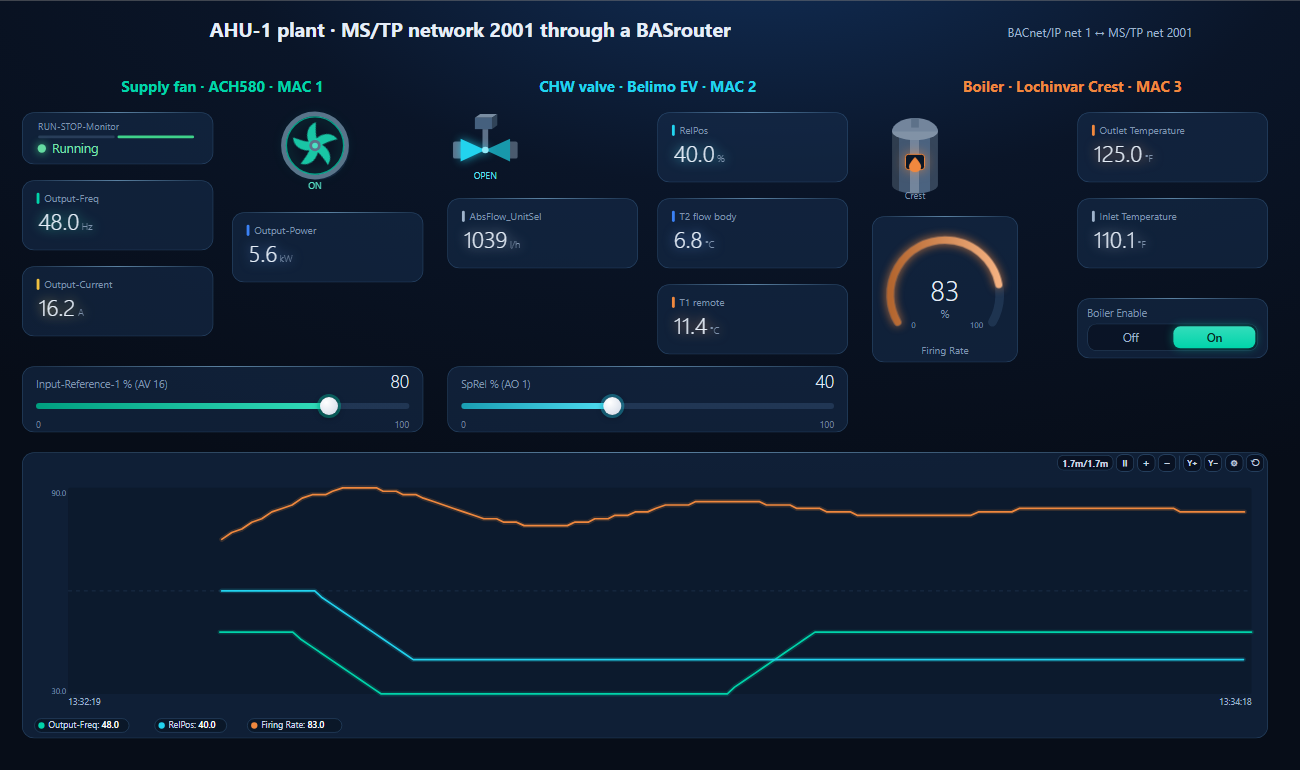
One dashboard page for three MS/TP devices read over BACnet/IP through the router: a supply-fan drive, a chilled-water valve and a boiler, with the drive's reference, the valve's setpoint and the boiler's enable to write.

BACManager dashboard for three MS/TP devices on network 2001 through a BASrouter: the ABB ACH580 supply fan running at 48.0 Hz, 5.6 kW, 16.2 A with its reference at 80 percent; the Belimo valve at 40 percent, 1039 litres per hour, 6.8 and 11.4 degrees C; the Lochinvar boiler with outlet 125.0 and inlet 110.1 degrees F, firing at 83 percent; and a trend of drive frequency, valve position and firing rate
The drive's reference written through the router, 50 → 80 % (simulated router and devices)
1

Discover

On the BACnet tab open BACnet/IP on the router's network and press Discover. The router and every MS/TP device behind it appear; the routed ones show their network.

2

Open the workspace

Workspace → Open. The file reads devices 1021, 1 and 610003; BACManager asks which discovered devices take their places and moves every point over. For your own devices, add their points the same way.

3

Run

BACManager starts reading the devices by itself, each through the router. On the Dashboard press Run; writes go through the router too.

Download workspace
// questions

BASrouter — FAQ

What is the difference between a BACnet router and a gateway?+
A router joins BACnet networks — MS/TP and BACnet/IP — and passes BACnet messages between them unchanged; the devices behind it keep their own objects. A gateway translates another protocol, such as Modbus, into BACnet objects of its own.
What is the BASrouter's default IP address?+
192.168.92.68 with a 24-bit mask and gateway 192.168.92.1, set as fixed. Give the PC an address such as 192.168.92.69 to reach its web page.
What network numbers does the BASrouter use?+
BACnet/IP network 1 and MS/TP network 2001 from the factory. Every MS/TP segment needs its own number across the whole internetwork, so a second router must get another MS/TP network number.
Why can I see MS/TP devices through the router but not read them?+
The client is reading them from the router's own address instead of routing to them. A request must carry the device's network number and MS/TP MAC; the router does not hold other devices' properties.
Do I need to set the BASrouter's device instance?+
Yes. It is 0 from the factory, and every BACnet device in the internetwork needs a unique instance.
Should the BASrouter terminate the MS/TP bus?+
Only at the end of a segment. It ships with bias and termination jumpers in; in the middle of a segment remove all three and terminate the far end with 120 Ω.
// sources

Where this comes from

Contemporary Controls: BASRT-B BACnet Multi-Network Router User Manual UM-BASRTB00-AA1, Successful Installation and Operation IS-BASRT001, Troubleshooting BACnet Networks TN-BASRT000-AB1, data sheets DS-BASRTB00-AD2 (BASrouter) and DS-BASRTBX0-AC1 (BASrouterLX), and the application guide AG-BASRTB00-AE3. Get them from ccontrols.com and check them against your router's firmware. Contemporary Controls and BASrouter are trademarks of their owner; BACManager is not affiliated with Contemporary Controls. The pictures on this page are from BACManager connected to a simulated router and devices.

// more device guides

Other BACnet devices

Chillers and rooftop units
Daikin MicroTech III chiller
Trane Symbio 700
AAON VCCX2
Lennox CORE
Boilers
Lochinvar Crest boiler
VRF and split systems
Daikin iTM (VRV)
Mitsubishi AE-200
Drives
ABB ACH580
Schneider ATV600
Pumps and valves
Grundfos MAGNA3 (CIM)
Wilo Stratos MAXO (CIF)
Belimo Energy Valve

All BACnet device guides →

Read MS/TP through the router from your laptop

Download the free trial, discover the router and every MS/TP device behind it, and open the plant workspace — each device read by its network and MAC. No credit card.

Download free trial See pricing

Windows 10/11 · $149 one-time