Every device. One tool. Pay once. Modbus · BACnet · Siemens S7 · one-time licence · also from us: ModbusManager ↗
// belimo · energy valve 4 · ev..r2+bac

Belimo Energy Valve
BACnet Points List & Setup

How to bring a Belimo Energy Valve 4 onto a BMS over BACnet/IP or MS/TP: a protocol that is off from the factory, a setpoint that listens to the analog wire until you tell it otherwise, the units behind every value — and the bus watchdog that moves the valve to its fail position when the BMS stops writing. With a free BACManager workspace.

Download free trial Free Energy Valve workspace

Sources: Belimo “BACnet Interface Description, Energy Valve DN 15…50 (Version 4)” V4.2.2 and the Belimo Energy Valve Operating Manual

// before you start

Which Energy Valve is it?

🔍

Find the Ethernet socket

Belimo's own rule: if the Ethernet socket sits on the actuator, the valve is a generation 1, 2 or 3 with its own BACnet document. If it sits on the flow sensor, it is an Energy Valve 4 — this page. It covers the DN 15–50 models EV..R2+BAC, EV..R2+MID and EV..R3+BAC.

🌐

IP or MS/TP

The same valve does BACnet/IP (UDP 47808 from the factory, also as a foreign device with a BBMD) or BACnet MS/TP on RS-485. For MS/TP from a PC see BACnet MS/TP over RS-485.

📋

What the valve serves

Per Belimo's PICS: B-ASC, protocol revision 14, ReadPropertyMultiple, WriteProperty, COV (at most 6 subscriptions, up to 8 hours each), no segmentation, no alarms, schedules or trend logs. BTL-listed.

// setup

Switch BACnet on first

The protocol is None from the factory: the valve says nothing on the network until you choose BACnet. Do it with the Belimo Assistant app over NFC, or in the valve's Web View — and set everything below before you connect the valve to the BACnet network.

SettingFactorySet to
ProtocolNoneBACnet/IP or BACnet MS/TP
Device instance1A unique instance, 0–4194302. Every valve leaves the factory as 1
UDP port (IP)47808Your BACnet/IP port; BBMD address and time-to-live for a foreign device
MS/TP MAC1A free address on the trunk
Baud rate (MS/TP)38400The trunk's rate: 9600, 19200, 38400, 76800 or 115200
Max Master—The highest master MAC on the trunk; Belimo: if unsure, 127
120 Ω terminationOffOn only at the two ends of the trunk

For Web View, connect a laptop straight to the Ethernet socket and open http://169.254.1.1; firmware from 4.2 also offers https with a certificate the valve generates. A segment takes up to 32 valves without a repeater — each is one full unit load. An older edition of Belimo's document (V4.2.0) says that on MS/TP the instance you set plus the MAC address make up the device ID; the current edition no longer says so, so discover the valve and use the instance it reports.

// control

Tell the setpoint to listen to BACnet

⚙

SpSource = Bus

The setpoint SpRel (AO1) does nothing while SpSource (MV122) is 1: Analog — the factory value, which takes the setpoint from 0.5–10 V on wire 3. Write 2: Bus once. With nothing on wire 3, a valve left on Analog just sits closed whatever the BMS writes.

%

What the % means

ControlMode (MV100) decides: 1 position, 2 flow (factory), 3 power, 4 differential pressure. In flow control SpRel is a share of the flow range up to V'max (AV94), in power control of P'max (AV110). Changing ControlMode resets the valve, so set it at commissioning, not from a BMS program.

⎘

Override

Override (MV1) is commandable: 1 None, 2 Open, 3 Close, 4 Minimum, 6 Maximum, 7 Nominal, 11 Motor stop. SpRel's default is 0 %, so a BMS that relinquishes its setpoint leaves the valve at 0.

// the rules that bite

A watchdog that wants to hear from you

120 s

Bus watchdog

If BusFailAction (MV130) is anything but 1: None, the valve expects SpRel (AO1) or Override (MV1) to be written within BusWatchdog (AV130) — 5 to 3600 s, 120 from the factory. If neither is, it goes to the fail position (open, close, max, min or stop) and sets bit 15 of ErrorState (AV140).

↻

Writing on change is not enough

Many BMS programs write a setpoint only when it changes. On a steady load that is no write at all, and after the watchdog time the valve drops to its fail position. The setpoint has to be written again, cyclically, faster than AV130.

⚠

…but not everything

Belimo marks every persistent writable object from instance 90 up — SpSource, ControlMode, the watchdog, the flow and power limits, the unit selectors — as not to be written on a regular basis. Only SpRel and Override are meant for cyclic writes.

In BACManager a BACnet tag has Refresh (s): the last value written to it is written again every that many seconds until it is relinquished. The free workspace sets 10 s on SpRel (AO1) and on nothing else. Tested against the simulated valve with bus fail action Close and a 30-second watchdog, SpRel written once at 60 %: with Refresh the valve held its position for the whole 90-second run; without it, ErrorState went to 32768 (bit 15) about 30 s after the write and the valve closed.

// points list

The Energy Valve points a BMS uses

Object names as Belimo lists them. C = commandable, W = writable, R = read only. Most values are in the unit chosen by a unit selector — read it before you scale a point.

ObjectObject nameAccessWhat it is
AO1SpRelCSetpoint, 0–100 % (position, flow or power by ControlMode)
MV122SpSourceW1 Analog (factory), 2 Bus
MV100ControlModeW1 Position, 2 Flow (factory), 3 Power, 4 Differential pressure — a change resets the valve
MV1OverrideC1 None, 2 Open, 3 Close, 4 Minimum, 6 Maximum, 7 Nominal, 11 Motor stop
MV130 / AV130BusFailAction / BusWatchdogWFail position (1 None factory); watchdog 5–3600 s, 120 factory
AI1 / AV2RelPos / AbsPosRValve position, % and 0–96°
AV19 / AV10 / AV17AbsFlow_UnitSel / RelFlow / SpAbsFlow_UnitSelRFlow in the selected unit, % of V'max, flow setpoint
AV90 / AV94 / AV100Vmin / Vmax / Vnom_UnitSelW / W / RFlow limits in %; V'max 25–100 %; nominal flow
AV45 / AV46 / AV40CoolingPower_UnitSel / HeatingPower_UnitSel / RelPowerRCooling and heating power; power in % of P'max
AV47 / AV48 / AV52CoolingEnergy_UnitSel / HeatingEnergy_UnitSel / Volume_UnitSelREnergy and volume counters (also as integers in PIV31 / PIV32 / PIV50)
AI22 / AI23 / AV22T1_UnitSel / T2_UnitSel / DeltaT_UnitSelRRemote sensor, flow-body sensor, their difference
AV60GlycolConcentrationRGlycol, %
MV99 / AV140SummaryStatus / ErrorStateR1 OK, 2 Warning, 3 Not OK; error bits 0–18
MV103–107StatusSensor, StatusFlow, StatusMedia, StatusActuator, StatusPowerRThe status behind the summary
MV123–128UnitSelFlow, UnitSelPower, UnitSelEnergy, UnitSelVolume, UnitSelTemperature, UnitSelDeltaTWUnits: l/h, kW, kWh, m³, °C, °C from the factory
MV101DeltaT_LimitationWDelta T manager: 1 Disabled (factory), 2 on, 3 with scaling
BV99BusTerminationRWhether the 120 Ω terminator is on

Belimo's document does not say which of T1 and T2 is supply and which is return — that depends on where the valve and the remote sensor are mounted, so check it on site. After a power failure the valve takes up to 190 seconds to initialise, and every value reads 0 in that time; do not let a BMS alarm on it. The complete list, with differential pressure, the sensor input on Y3 and the meter registers, is in Belimo's BACnet Interface Description, Energy Valve DN 15…50 (Version 4).
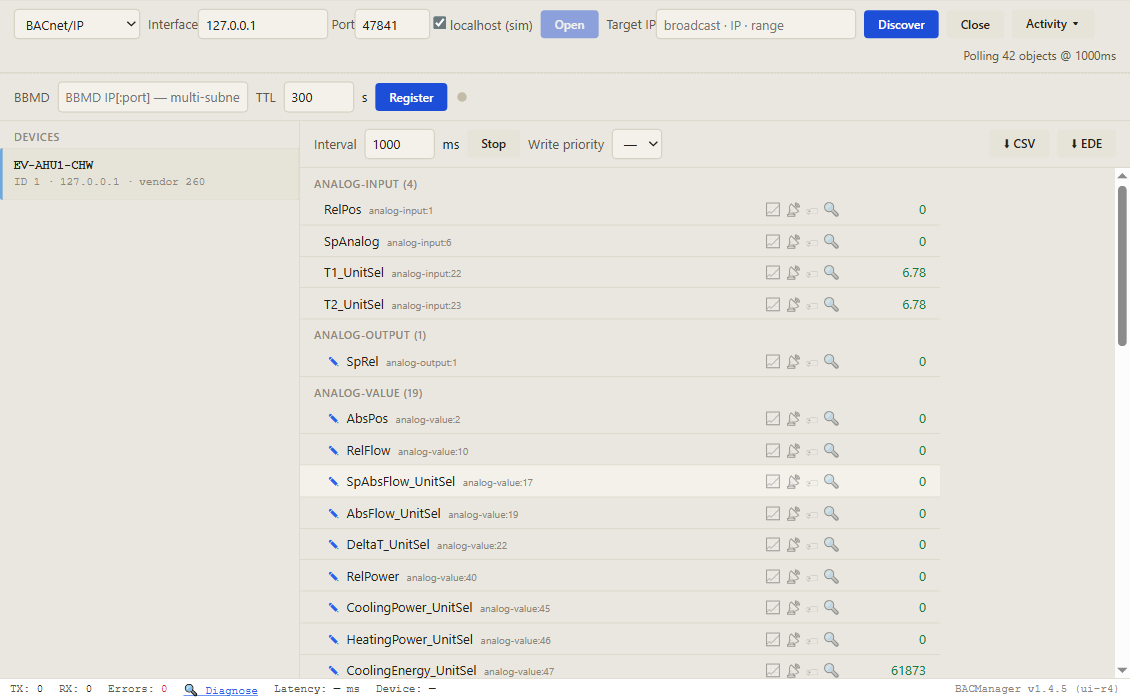
BACManager BACnet tab: device EV-AHU1-CHW, device instance 1, with its Energy Valve objects listed by name, RelPos, SpAnalog, T1_UnitSel, T2_UnitSel, SpRel, AbsPos, RelFlow, SpAbsFlow_UnitSel, AbsFlow_UnitSel, DeltaT_UnitSel, RelPower, CoolingPower_UnitSel and CoolingEnergy_UnitSel, polled every second
Discover, click the valve, and its objects come up by name with live values. Pictured: a simulated Energy Valve 4 built from Belimo's object list, still on SpSource Analog — closed
// free download

The Energy Valve workspace

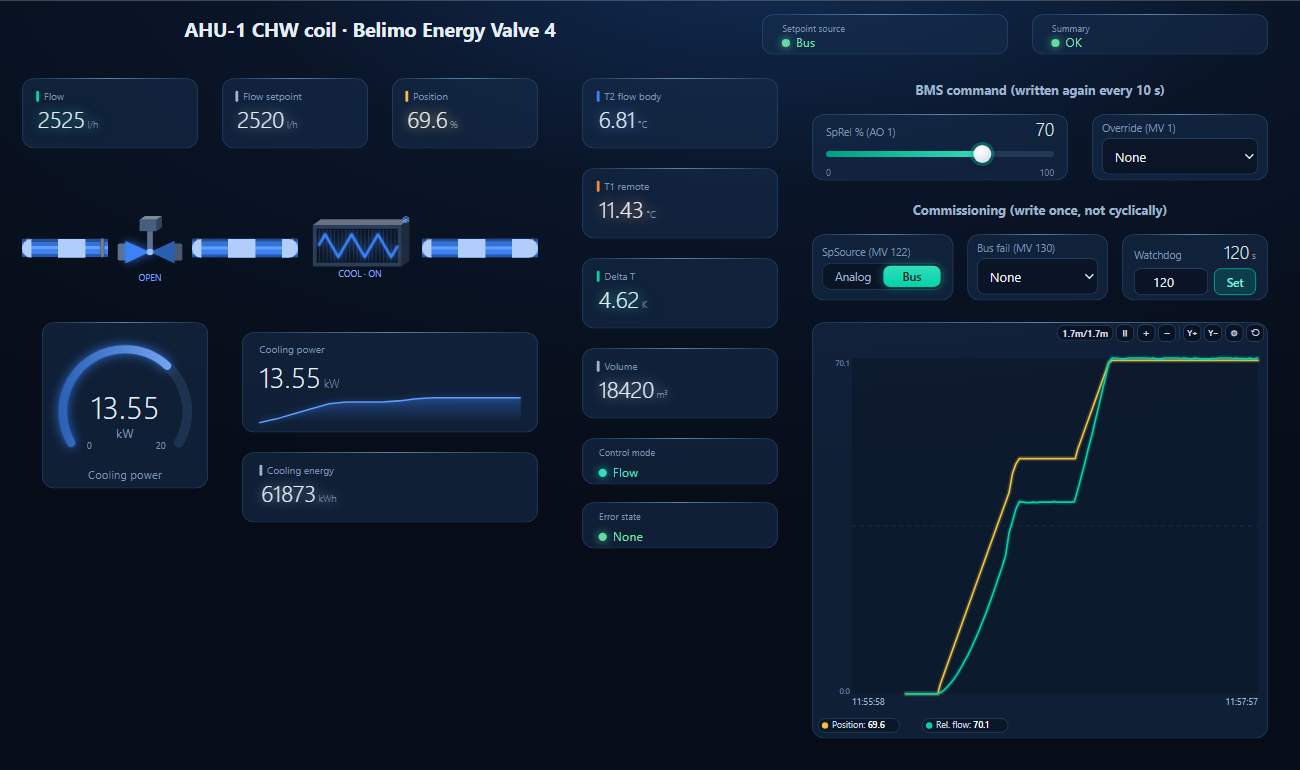
One dashboard page for an Energy Valve 4 on a chilled-water AHU coil: flow and flow setpoint, position, both temperatures and delta T, cooling power and energy, control mode and error state — with SpRel written again every 10 seconds, Override, and the commissioning writes (SpSource, bus fail action, watchdog) kept apart.

BACManager dashboard for a Belimo Energy Valve 4 on a chilled-water coil: setpoint source Bus, summary OK, flow 2525 l/h against a setpoint of 2520 l/h, position 69.6 percent, flow-body temperature 6.81 degrees C, remote 11.43 degrees C, delta T 4.62 K, cooling power 13.55 kW, control mode Flow, no error, SpRel at 70 percent, and a trend where position and relative flow step up
SpSource set to Bus, then SpRel written from the page, 40 → 70 %, repeated every 10 s (simulated valve and coil)
1

Discover the valve

On the BACnet tab open BACnet/IP on the PC's network card (or MS/TP on its RS-485 port at the trunk's baud rate) and press Discover. The valve appears with its instance — 1 if nobody has changed it.

2

Open the workspace

Workspace → Open. The file reads device 1; if yours has another instance, BACManager asks which discovered device takes its place and moves every point over.

3

Run, then command once

BACManager starts reading the valve by itself. On the Dashboard press Run, set SpSource to Bus once, then the setpoint — from then on SpRel is written again every 10 seconds. After BACManager restarts, write it once more.

Download workspace
// when it does not work

Typical problems

What you seeWhyWhat to do
The valve does not answer Who-IsProtocol None from the factoryChoose BACnet in Web View or the Belimo Assistant app
SpRel written, the valve does not moveSpSource still 1: AnalogWrite MV122 = 2: Bus once
Valve goes to its fail position on a steady load; ErrorState bit 15Neither SpRel nor Override written within the watchdog timeWrite SpRel cyclically, faster than AV130 (Refresh 10 s in BACManager)
Valve resets when the BMS startsThe BMS writes ControlModeSet ControlMode once at commissioning; take it out of the program
Two valves answer as instance 1Factory instanceSet a unique instance on every valve
All values 0 after a power cutUp to 190 s of initialisationDelay alarms after power-up
Flow off by a factor of 1000 or 3600Unit selector not what the BMS assumesRead MV123–128 and scale to match
COV subscription refusedAt most 6 active subscriptionsPoll the rest
// questions

Belimo Energy Valve BACnet — FAQ

Where is the Belimo Energy Valve BACnet points list?+
In Belimo's BACnet Interface Description for the Energy Valve DN 15…50 (Version 4); generations 1 to 3 have a separate document. The table on this page lists the points a BMS uses most.
How do I enable BACnet on the Energy Valve 4?+
The protocol is None from the factory. Choose BACnet/IP or BACnet MS/TP with the Belimo Assistant app over NFC, or in the valve's Web View, and set the instance, port or MAC and baud rate before connecting it to the BACnet network.
What is the Energy Valve's default BACnet device instance?+
1. The MS/TP MAC is also 1 and the baud rate 38400; BACnet/IP uses UDP port 47808. Give every valve its own instance.
Why doesn't the Energy Valve follow the BACnet setpoint?+
SpRel (AO1) only acts when SpSource (MV122) is 2: Bus. From the factory it is 1: Analog, and the valve follows the 0.5–10 V signal on wire 3 instead.
What is the Energy Valve bus watchdog?+
With a bus fail action set in MV130, the valve moves to that position if neither SpRel (AO1) nor Override (MV1) is written within BusWatchdog (AV130), 120 s from the factory, and sets bit 15 in ErrorState (AV140). The BMS has to write the setpoint again cyclically.
Which Energy Valve points may a BMS write cyclically?+
SpRel (AO1) and Override (MV1). Belimo asks that persistent writable objects from instance 90 up — setpoint source, control mode, watchdog, limits and units — are not written on a regular basis.
// sources

Where this comes from

BELIMO Automation AG: BACnet Interface Description, Energy Valve DN 15…50 (Version 4), edition 2025-11 / V4.2.2, with its PICS, and the earlier edition V4.2.0; Belimo Aircontrols (USA): Belimo Energy Valve Operating Manual (2/24); BTL listing BTL-30868. Get the documents from belimo.com and check them against your valve's firmware before commissioning. Belimo and Energy Valve are trademarks of their owner; BACManager is not affiliated with Belimo. The pictures on this page are from BACManager connected to a simulated valve built from the published object list.

// more device guides

Other BACnet devices

Chillers and rooftop units
Daikin MicroTech III chiller
Trane Symbio 700
AAON VCCX2
Lennox CORE
Boilers
Lochinvar Crest boiler
VRF and split systems
Daikin iTM (VRV)
Mitsubishi AE-200
Drives
ABB ACH580
Schneider ATV600
Pumps and valves
Grundfos MAGNA3 (CIM)
Wilo Stratos MAXO (CIF)
Routers
BASrouter (MS/TP to IP)

All BACnet device guides →

Commission the Energy Valve from your laptop

Download the free trial, discover the valve and open the Energy Valve workspace — every point by name, the setpoint kept alive for the bus watchdog. No credit card.

Download free trial See pricing

Windows 10/11 · $149 one-time