Every device. One tool. Pay once.Modbus · BACnet · Siemens S7 · one-time licence · also from us: ModbusManager ↗
// abb · ach580 hvac drive · bacnet ms/tp
ABB ACH580 BACnet Points List & Setup
How to put an ABB ACH580 HVAC drive on BACnet MS/TP: the group 58 parameters, the device ID you have to change, the two parameters that hand start/stop and speed to BACnet — and the communication-loss default that trips a drive whose BMS writes once and then only reads. With a free BACManager workspace that keeps the commands alive.
Sources: ABB 3AXD10000387059 (ACH580 BACnet PICS, Rev 16, 2024) and 3AXD50000027537 (ACH580 HVAC control program firmware manual)
// before you start
BACnet MS/TP is built in
🔌
Terminals X5
The embedded fieldbus is on the control unit: 29 B+, 30 A−, 31 DGND. Switch S4 TERM on at both ends of the trunk, and S5 BIAS on at one device, preferably at an end. For BACnet/IP the drive needs the FBIP-21 option module; otherwise go through a router or read MS/TP from a PC — see BACnet MS/TP over RS-485.
⚙
From the panel
Menu → Primary settings → Communication → Embedded fieldbus → Communication setup: EFB selection = BACnet MS/TP, Save, set the rows below, then Apply settings to embedded fieldbus. The same parameters are in group 58.
📋
What the drive serves
Per ABB's PICS: ReadPropertyMultiple and WritePropertyMultiple, COV with up to 5 subscriptions, max APDU 480, no segmentation. MS/TP master or slave, 9.6–115.2 kbps.
// setup
Group 58: the BACnet parameters
Parameter
Default
Set to
58.01 Protocol enable
None
BACnet MS/TP (2)
58.03 Node address
1
The drive's MS/TP MAC, unique on the trunk; 1–127 for a master
58.04 Baud rate
Autodetect (for BACnet)
The trunk's rate: 9.6, 19.2, 38.4, 76.8 or 115.2 kbps. Autodetect needs the parity in 58.05 right
58.05 Parity
8 EVEN 1
8 NONE 1, which is what MS/TP uses
58.40 Device object ID
4194303
Must be changed — 4194303 is not a valid instance. Unique in the whole building
58.41 / 58.42
127 / 1
Max master / max info frames; usually leave
58.06 Communication control
Enabled
Refresh settings — group 58 changes take effect only after this or a control-unit reboot
96.07 Parameter save manually
—
Save
The device instance does not follow the MAC address: it is whatever 58.40 says. A drive that still answers as 4194303 was never commissioned for BACnet. Diagnostics are in 58.07–58.13: 58.07 has bits for wiring error (A/B swapped), parity and baud errors, no bus activity and comm loss; 58.13 counts the tokens the drive received. Defaults on this page are from ABB's firmware manual; check them against your drive's firmware version.
// control
Hand start/stop and speed to BACnet
BACnet reads everything out of the box. To command the drive, point the control sources at the embedded fieldbus (EFB). Leave the rest at the factory defaults.
Parameter
Value
Then the BMS writes
20.01 Ext1 commands
Embedded fieldbus
BV10 RUN-STOP-Command (Run / Stop)
28.11 Ext1 frequency ref1
EFB ref1
AV16 Input-Reference-1, in % of 46.02 Frequency scaling (scalar control, the ACH580 default)
22.11 Ext1 speed ref1
EFB ref1
AV16 in % of 46.01 Speed scaling, if 99.04 is set to vector control
20.21 Direction
Request
BV11 Direction-Command, if needed
20.40 Run permissive
Embedded fieldbus
BV12 Run-Permissive-Command, if the BMS gives the permissive
19.11 Ext1/Ext2 selection
EFB MCW bit 11
BV13 EXT1-EXT2-Command; Ext2 uses 20.07 and 28.15 (AV17)
—
—
BV14 Fault-Reset-Command works without any setting
%
AV16 is a percentage
Input-Reference-1 runs from −150 to 150 %, and 100 % is the value in 46.02. With 46.02 = 60 Hz, 50 % is 30 Hz. Write 45 meaning hertz and the fan runs at 27 Hz.
☞
Control override
BV18 Control-Override-Command puts the drive under BACnet control from whatever its normal source is, without changing 20.01; BV19 shows it is active. The panel's HAND still beats it.
🔌
Relays, AOs and PID
BO0–BO5 drive RO1–RO5 and DO1 once their sources are the RO/DIO control word (10.99). AO0/AO1 need 13.12/13.22 = AO1/AO2 data storage. AV42 LOOP-Setpoint needs 40.16 = Setpoint data storage.
// the rule that bites
Writing once is not enough: 6681 EFB comm loss
ABB notes that BACnet has no timeout of its own, so the drive keeps one. Its defaults:
Parameter
Default
Means
58.14 Communication loss action
Fault
Trip on 6681 EFB comm loss when start/stop or the reference comes from the EFB
58.15 Communication loss mode
Cw / Ref1 / Ref2
Only a write of the control word or a reference resets the timer — reading does not
58.16 Communication loss time
30 s
0–6000 s
So a BMS that writes Run and a speed once and then only polls the drive lets the timer run out, and 30 seconds later the drive trips. There are three ways out. Write the commands again well inside 58.16 — in BACManager a BACnet tag has Refresh (s), which writes the last value again every that many seconds until it is relinquished, and the free workspace sets 10 s on BV10 and AV16. Or set 58.15 to Any message, as ABB's own setup example does, so that polling keeps the link alive. Or choose Last speed or Speed ref safe (28.41) in 58.14 — with ABB's warning to make sure it is safe to keep running when communication breaks. After any change in group 58, Refresh settings in 58.06.
Tested against the simulated ACH580 with the comm-loss time shortened to 20 s: with Refresh 10 s the drive ran without a fault for the whole run; without it, MSV1 Active-Fault-1 went to Comm-Error about 20 s after the last write.
// points list
The ACH580 points a BMS uses
Object names as the drive reports them. C = commandable (priority array and relinquish default), W = writable, R = read only.
Object
Object name
Access
What it is
BV10
RUN-STOP-Command
C
Run / Stop, with 20.01 = Embedded fieldbus
AV16 / AV17
Input-Reference-1 / -2
C
Speed or frequency reference, %, −150–150
BV11 / BV12 / BV13
Direction- / Run-Permissive- / EXT1-EXT2-Command
C
Direction, run permissive, control location
BV14
Fault-Reset-Command
W
Write Reset to clear a fault
BV18 / BV19
Control-Override-Command / -Monitor
C / R
BACnet takes control from the normal source
BV0 / BV24
RUN-STOP-Monitor / Started-Monitor
R
Running / start given
BV2 / BV5
OK-FAULT-Monitor / Warning-Monitor
R
Fault, warning
BV4 / MSV0
HAND-AUTO-Monitor / HAND-AUTO-Reference
R
Hand or Auto; MSV0 also Off and Override
BV7 / BV8 / BV9
Ready- / At-Setpoint- / Enabled-Monitor
R
Ready, at speed, run enabled
AV1 / AV0 / AV31
Output-Freq / Output-RPM / Output-Speed
R
Hz, rpm, % of synchronous speed
AV4 / AV6 / AV5
Output-Current / Output-Power / Output-Torque
R
A, kW, % of nominal torque
AV2 / AV7
DC-Voltage / Operating-Temp-Range
R
DC bus V; heatsink temperature in % of the fault limit
AV9 / AV8
Kilowatt-Hour-Meter-NR / -R
R / W
Energy, kWh; NR cannot be reset, R can
AV14
Running-Hours
R
Run time, h; reset by writing 0
AV18 / MSV1
Active-Fault / Active-Fault-1
R
The active fault as a code, and as text (None, Comm-Error, Overcurrent…)
AV23 / AV24
Accel-1-Seconds / Decel-1-Seconds
W
Ramp times
AV42 / AV43
LOOP-Setpoint / LOOP-Feedback
C / W
PID setpoint and feedback from the BMS
BI6–BI11 / AI0–AI1
DI1-Monitor… / AI1-Monitor, AI2-Monitor
R
The drive's own inputs
BO0–BO5 / AO0–AO1
RO1-Command… / AO1-Command, AO2-Command
C
The drive's outputs, once sourced from the EFB
BV39
Parameter-Save-Command
W
Save BACnet-written settings to flash now
The full list — PID set 2, the external PID, Data-IO objects AV120–129, hourly and daily kWh, the mailbox for reading any parameter, warnings MSV4–6 — is in ABB's PICS 3AXD10000387059. One more thing from its appendix: persistent properties written over BACnet (relinquish defaults, COV increments and the like) are saved to flash once an hour. Write BV39 Parameter-Save-Command after commissioning, or a power cut within the hour loses them.
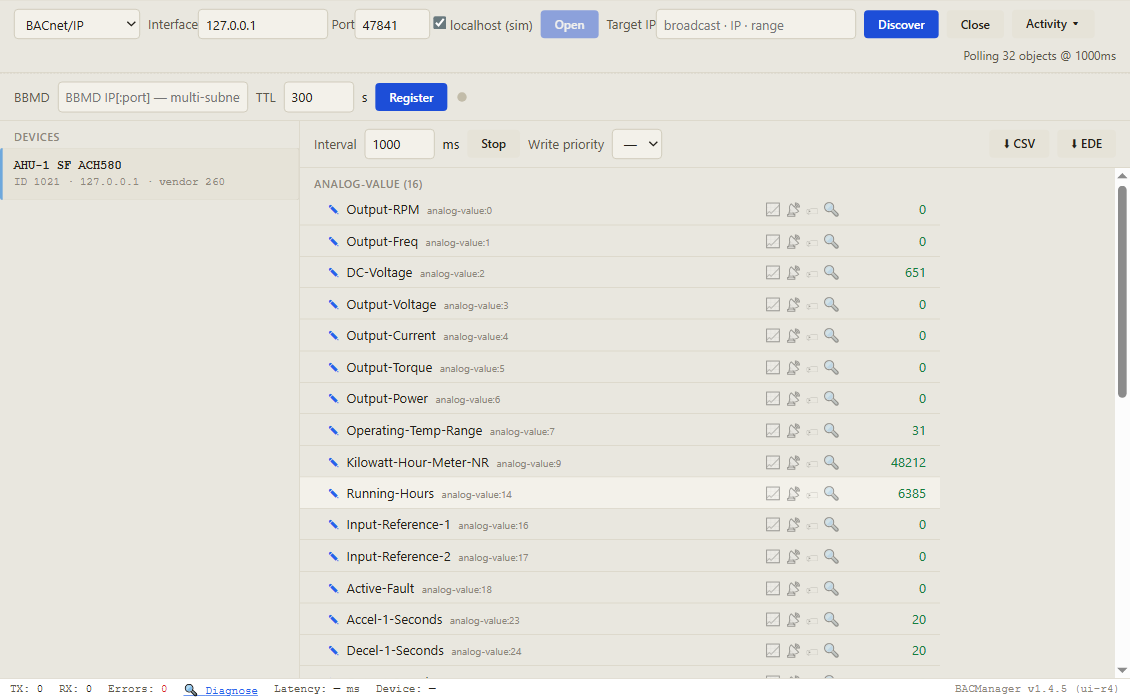
Discover, click the drive, and its objects come up by name with live values. Pictured: a simulated ACH580 built from ABB's PICS, stopped
// free download
The ACH580 workspace
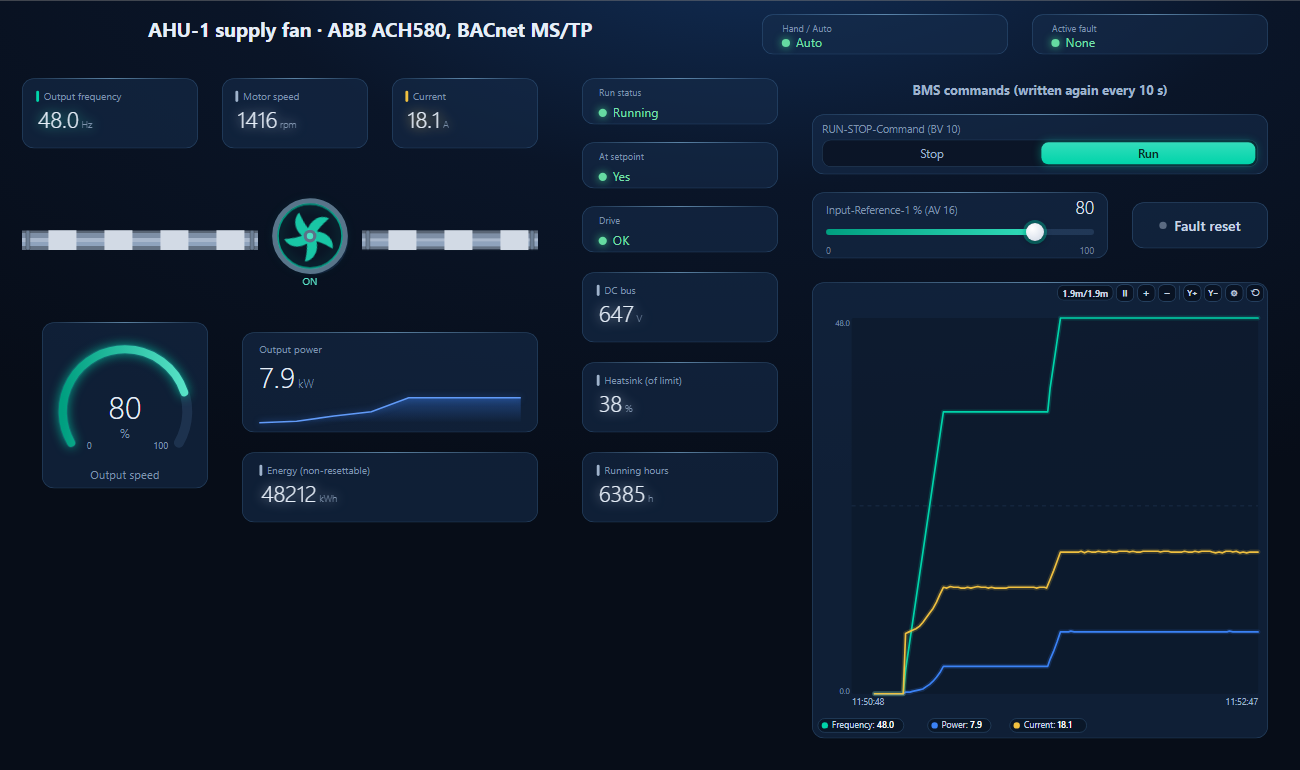
One dashboard page for an ACH580 on an AHU supply fan: hand/auto and the active fault as text, frequency, speed, current, power, DC bus, heatsink, energy and running hours — with Run/Stop and the speed reference written again every 10 seconds, and a fault reset button.
Run and Input-Reference-1 written from the page, 60 → 80 % (36 → 48 Hz with 46.02 = 60 Hz), repeated every 10 s so the drive never sees a comm loss (simulated drive)
1
Discover the drive
On the BACnet tab open MS/TP on the PC's RS-485 port at the trunk's baud rate (or BACnet/IP behind a router or an FBIP-21) and press Discover. The drive appears with the instance from 58.40.
2
Open the workspace
Workspace → Open. The file reads device 1021; if yours has another instance, BACManager asks which discovered device takes its place and moves every point over.
3
Run, then command once
BACManager starts reading the drive by itself. On the Dashboard press Run, choose Run and set the reference — from then on both are written again every 10 seconds. After BACManager restarts, command them once more.
Drive trips on 6681 about 30 s after the BMS started it
Commands written once; reads don't reset the timer (58.15 default)
Write BV10/AV16 every 10 s (Refresh 10 s), or 58.15 = Any message
Device found as 4194303, or not at all
58.40 never set
Set a unique device ID, then 58.06 = Refresh settings
Changes in group 58 do nothing
Not taken in use
58.06 = Refresh settings, or reboot the control unit
Writes accepted, motor doesn't start
20.01 still on I/O, or the panel is in HAND
20.01 = Embedded fieldbus; check BV4 / MSV0. Or use BV18 override
Speed is wrong by a factor
AV16 is % of 46.02, not Hz
With 46.02 = 60 Hz, 30 Hz is 50 %
No communication; 58.07 shows wiring or parity error
A/B swapped, wrong parity or baud
Check 29 B+ / 30 A−, 58.05 = 8 NONE 1, 58.04
Reads abort on a big request
No segmentation, max APDU 480
Fewer objects per ReadPropertyMultiple
Settings written over BACnet gone after a power cut
Saved to flash only hourly
Write BV39 Parameter-Save-Command
// questions
ABB ACH580 BACnet — FAQ
Where is the ABB ACH580 BACnet points list?+
In ABB's BACnet Protocol Implementation Conformance Statement for the ACH580, document 3AXD10000387059, in the ABB library. The table on this page lists the points a BMS uses most.
How do I enable BACnet on an ACH580?+
Set 58.01 Protocol enable to BACnet MS/TP, the node address in 58.03, the baud rate in 58.04 and a unique device ID in 58.40, then 58.06 = Refresh settings and save the parameters with 96.07. The Primary settings menu does the same under Communication → Embedded fieldbus.
Why does my ACH580 fault with 6681 EFB comm loss?+
By default the drive faults when no command or reference has been written for 30 seconds (58.14 Fault, 58.15 Cw / Ref1 / Ref2, 58.16 30 s) — reads don't count. Write the commands again regularly, or set 58.15 to Any message.
What is the ACH580's default BACnet device instance?+
4194303, which BACnet treats as invalid; it has to be set in 58.40 Device object ID. It does not follow the MS/TP address.
How do I set the ACH580's speed over BACnet?+
Set 28.11 Ext1 frequency ref1 to EFB ref1 and write a percentage to AV16 Input-Reference-1; 100 % equals 46.02 Frequency scaling. Start and stop with BV10 RUN-STOP-Command after setting 20.01 Ext1 commands to Embedded fieldbus.
Does the ACH580 support BACnet/IP?+
Not on the drive itself: the embedded interface is BACnet MS/TP. BACnet/IP needs the FBIP-21 adapter module, or a BACnet router in front of the MS/TP trunk.
// sources
Where this comes from
ABB: ACH580 BACnet Protocol Implementation Conformance Statement, 3AXD10000387059 Rev 16 (2024), and ACH580 HVAC control program firmware manual, 3AXD50000027537, chapter on BACnet MS/TP control through the embedded fieldbus interface, both in the ABB library on abb.com. Check the manual for your drive's firmware before commissioning. ABB and ACH580 are trademarks of their owner; BACManager is not affiliated with ABB. The pictures on this page are from BACManager connected to a simulated drive built from the published PICS.