How to put a Wilo-Stratos MAXO, Stratos GIGA2.0 or Yonos GIGA2.0 on BACnet with a CIF-Module: MS/TP or BACnet/IP, an MS/TP module that answers one property at a time, a pump that takes a value only when it changes — and the bus command timer, which wants its SET again before it runs out. With a free BACManager workspace.
Sources: Wilo “Wilo BACnet — CIF-Modul, Installation and operation instructions with functional description” and Wilo's EDE lists for the CIF-Module BACnet
The CIF-Module BACnet MS/TP (2190367) for RS-485, and the CIF-Module Ethernet Multiprotocol (2211408), which does BACnet/IP or Modbus TCP. Both go into the pump. Wilo publishes EDE lists for Stratos MAXO, Stratos GIGA2.0, Yonos GIGA2.0, Helix2.0-VE, Medana CH3-LE, SiFresh and Isar MODH1-E.
The pump needs a minimum software: a Stratos MAXO 01002500 for the MS/TP module and 01042500 for the Ethernet module (updated with the Wilo-Assistant app). On a twin pump the module goes in the main pump, and only the system's data is on BACnet.
The MS/TP module (PICS revision 4) has no ReadPropertyMultiple, no COV and no segmentation: B-SA and B-SS, ReadProperty and WriteProperty only. The Ethernet module (revision 16) is a B-ASC with ReadPropertyMultiple, WritePropertyMultiple and COV.
| Setting | Range | Note |
|---|---|---|
| MS/TP MAC (bus address) | 0–127, 128–254, OFF | 0–127 is an MS/TP master. 128 and up makes it a subordinate, which does not answer Who-Is. OFF switches the interface off |
| Baud rate | 9600–115200 | 9600, 19200, 38400, 76800 or 115200; the same on the whole trunk |
| Device instance | 0–4194302 | Set at the pump; give every pump its own |
| Max Master | Device object | Writable: Wilo advises the highest MAC in use plus a few, MACs from 0 without gaps |
| Termination | 120 Ω on the module | On only at the two ends; no stubs or stars |
Wilo's instruction is plain: activate the CIF-Module only after all settings are complete and checked. The MS/TP module is 1/8 unit load and isolated. RS-485 A and B: Wilo notes that some manufacturers mark them the other way round. On the Ethernet module the basic settings are made at the pump and extended ones in its web page; its two RJ45 ports chain on to the next pump only while the pump has power.
The pump can be set from the BMS, its own button and display, or a remote: the last change wins. So the module passes a value on only when it changes. Writing the same setpoint again does nothing — if someone changed it at the pump, the BMS's unchanged value will not undo it.
Wilo's recipe: read the value the pump uses, write that back, then write the one you want — or simply another value and then the wanted one. It also warns about gateways that write on a timer: repeating a value is not the way to hold it.
Parameter set (MO34) norm; bus command timer (MO1) OFF or MANUAL; control function (MO0); setpoint source (MO3) IF-Module; setpoint (AO0); the overrides (BO1–BO3) inactive; then pump on (BO0). Check each on its input twin: MI2034, MI2, MI0, MI3, AI34, BI0.
The outputs are commandable, but some have a floating default: Wilo realises it as a write at priority 16, so after every slot of the priority array is relinquished the Present_Value is not the Relinquish_Default. Inside the pump the commands rank: the external off input, then override off, override max, override min, override on.
MO1 busCmd.TimerInp,Act decides. MANUAL: the pump's own menu and the BMS both, last write wins. SET: the BMS locks the local menu for the bus command timer, AO8 — 300 s, at least 20 s. OFF: the timer is off and the local menu stays locked.
SET has to be written again within the timeout — Wilo's words are to repeat writing SET. If the BMS stops, the timer runs out (MI2 RESET): the pump can be operated locally, writes over the interface are blocked, and the pump shows an error. With SET_PRESET instead of SET it also loads fallback values (AO100, BO100, MO100/101).
Wilo's text says the module locks the local menu and input IN2 from the factory, which is the OFF state; its EDE list gives MANUAL as the default value. Read MI2 to see which yours is in. The activation is stored and survives a power cycle.
In BACManager a BACnet tag has Refresh (s): the last value written to it is written again every that many seconds until it is relinquished. The free workspace sets 60 s on MO1 only — well inside the 300-second timer — and on nothing else, since the pump ignores a repeated setpoint anyway. Tested against the simulated Stratos MAXO with a 30-second timeout and SET written once: with Refresh the timer stayed ACTIVE for the whole 90-second run; without it, it went to RESET after 30 s and stayed there. MS/TP module without ReadPropertyMultiple: BACManager notices the refusal and reads it one property at a time by itself.
Object names as in Wilo's EDE list. Inputs (AI, BI, MI) read, outputs (AO, BO, MO) write; most outputs have an input twin that shows what the pump took.
| Object | Object name | What it is |
|---|---|---|
| BO0 / BI0 | device/functionOnInp / device/functionOnAct | Pump on command; what the pump took |
| AO0 / AI34 | dutyPointRelInp / dutyPointRelAct | Setpoint in % of the maximum (default 100) |
| MO0 / MI0 | controlFunctionInp / controlFunctionAct | Control function: Gen_Spd (speed), Gen_PHdConst, Gen_PHdVar and the application modes |
| MO1 / MI2 | busCmd.TimerInp,Act / busCmd.TimerAct | 1 OFF, 2 SET, 3 ACTIVE, 4 RESET, 5 MANUAL, 6–9 the PRESET variants |
| AO8 / AI35 | busCmd.TimerTimeoutInp,Act / busCmd.TimerTimeRemain.Out | Timeout (300 s, min. 20 s); time left |
| MO3 / MI3 | setpointSignalSourceInp / setpointSignalSourceAct | 1 IF-Module (the bus), 0–10 V, 2–10 V, 0–20 mA, 4–20 mA, internal |
| BO1 / BO2 / BO3 / BO17 | overrideOffInp / overrideMaxInp / overrideMinInp / overrideOnInp | Overrides: off (0 %), max, min, on |
| AI0 / AI1 | dutyPointRelOut / speedP01Out | Duty point %; speed rpm |
| AI2 / AI3 | flowOut / pressureOut | m³/h (calculated); bar (estimated without a sensor) |
| AI4 / AI7 | powerInputOut / energyConsumptionOut | W; kWh |
| AI5 / AI16 / AI17 | temperatureFluid@DeviceOut / temperat.FluidFwdOut / temperat.FluidRetOut | °C at the pump, forward, return |
| AI20 / AI21, AI26 / AI27 | powerHeatingOut / powerRefrigerationOut, energyHeat.TotalOut / energyRefrig.TotalOut | Heat and cold power and energy |
| BI12 / BI13 / MI1 | warningPresentOut / errorPresentOut / warning/errorMessageOut | Warning, error, Wilo's message code |
| BI15 | localOperationOut | Not controlled from the CIF-Module |
| MO34 / MI2034 | parameterSetSelectorInp / parameterSetSelectorSel | norm, aux, preset: which set of inputs is in use |
Wilo's EDE lists give each object with the module software it needs, per pump family; the functional description explains every one. The device instance and name in the pictures are the simulation's.
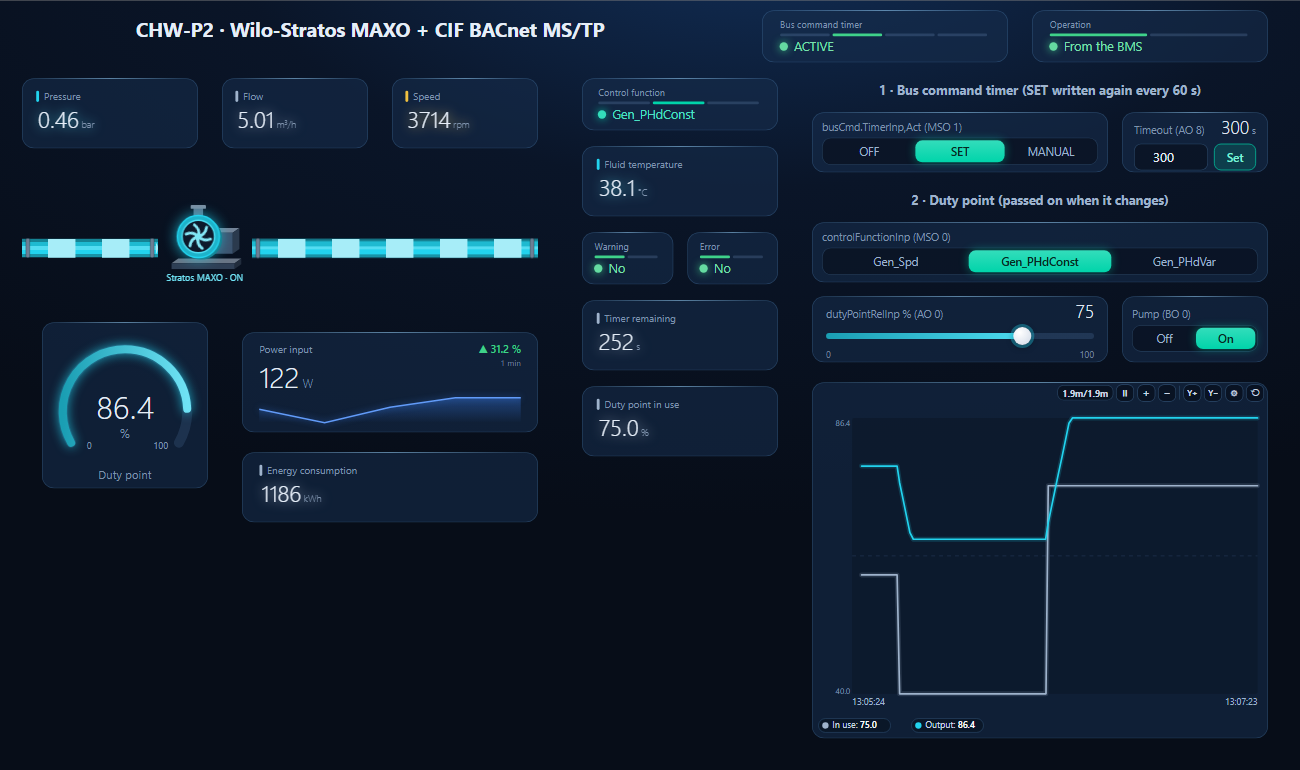
One dashboard page for a Stratos MAXO on a chilled-water circuit: bus command timer state and time left, who operates the pump, pressure, flow, speed, duty point, power and energy, control function, warning and error — with the timer's SET written again every 60 seconds and the duty point set once.
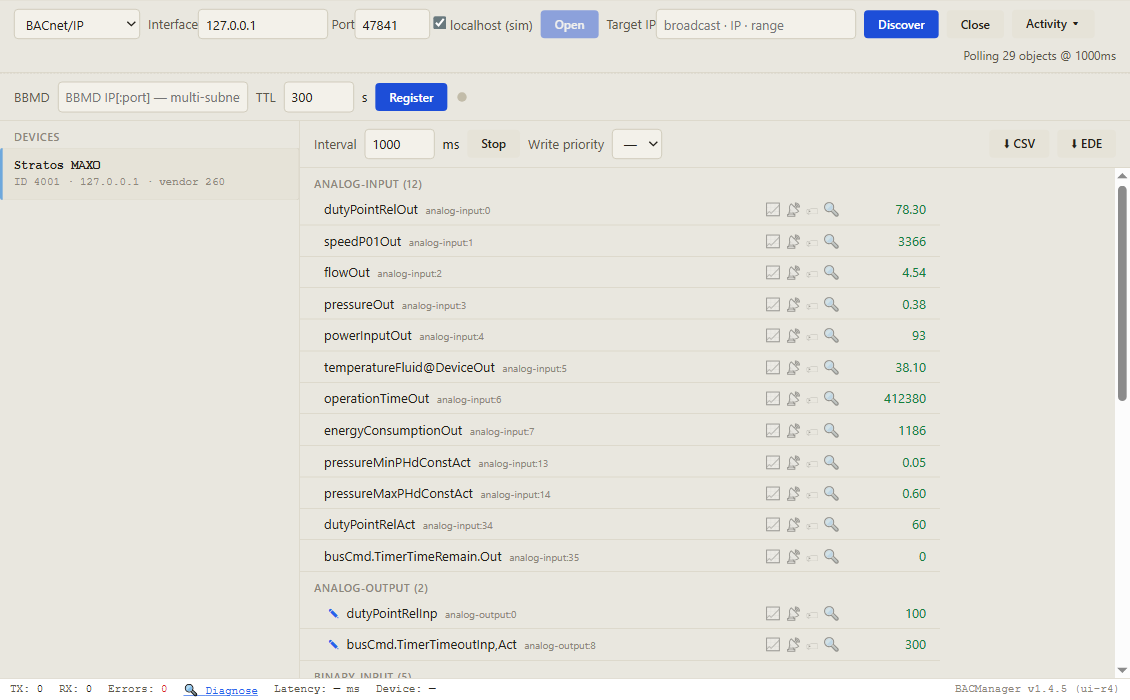
On the BACnet tab open MS/TP on the PC's RS-485 port at the pump's baud rate, or BACnet/IP for the Ethernet module, and press Discover. A pump with a MAC of 128 or more will not answer.
Workspace → Open. The file reads device 4001; BACManager asks which discovered device takes its place and moves every point over.
On the Dashboard press Run. Write SET (or MANUAL), the control function, the setpoint, then pump on. From then on SET is written again every 60 seconds. After BACManager restarts, write it once more.
| What you see | Why | What to do |
|---|---|---|
| Pump not found on Discover | MAC 128 or more (subordinate), interface OFF, or module not activated | MAC 0–127; activate the module after the settings |
| A written value is not taken | The same value as before: passed on only on a change | Write another value, then the wanted one |
| Someone changed the setpoint at the pump and it stays | Last write wins; the BMS's value did not change | Write the pump's value back, then the BMS's |
| Writes blocked, pump on local, error on the display | Bus command timer ran out (RESET) | Write SET again within the timeout (Refresh 60 s in BACManager) |
| Setpoint ignored | Setpoint source not IF-Module, or parameter set not norm | MO3 = IF-Module, MO34 = norm |
| “Error” on every row of a BMS | The MS/TP module has no ReadPropertyMultiple | Read with ReadProperty (BACManager does this by itself) |
| Relinquished output does not return to its default | Floating default as a write at priority 16 | Write the value wanted instead of relinquishing |
| Pump update fails or the module misbehaves after one | Module active during a pump firmware update | Deactivate the CIF-Module first; reactivate after |
Wilo SE: Wilo BACnet — CIF-Modul, Installation and operation instructions with functional description, with the PICS for the MS/TP module (revision 4) and the Ethernet Multiprotocol module (revision 16); the EDE lists “Wilo CIF-Module BACnet MS/TP 1.00…6.01”. Get them from wilo.com and check them against your pump and module software before commissioning. Wilo, Stratos MAXO, Stratos GIGA and Yonos GIGA are trademarks of their owner; BACManager is not affiliated with Wilo. The pictures on this page are from BACManager connected to a simulated pump built from the published object list.
Download the free trial, discover the pump and open the Stratos MAXO workspace — every point by Wilo's name, the bus command timer kept set. No credit card.
Windows 10/11 · $149 one-time
We use Google Analytics cookies to see how the site is used. You can accept or decline — declining keeps analytics off.