How to read an Accuenergy Acuvim II power meter over BACnet: Protocol 1 to BACNET on the meter's own RS-485 (it ships as Modbus), the device ID in S52, the 71 Analog Inputs from Frequency (AI1) to current THD (AI71) — and why the old AXM-BMS module serves a different list. Read-only, so a BMS polls it. With a free BACManager workspace.
Sources: Accuenergy Acuvim II Series Power Meter User Manual V3.2.17, the BACnet user's manual 1040E2102 V2.0.1 and BTL listing BTL-30936
// before you start
Three ways to BACnet, two object lists
🔌
Native MS/TP
Current meters speak BACnet MS/TP on their own RS-485 terminals (A = Data+, B = Data−, S = shield). This is the path in the main user manual and the BTL listing, and it serves AI1–AI71.
🌐
BACnet/IP
Through the AXM-WEB2 module (older units: AXM-BIP), set up in the module's web page: BACnet enabled, port 47808, device instance, network number, optional BBMD registration. Same AI1–AI71 list.
⚠
Older AXM-BMS module
The add-on MS/TP module of older meters has its own list: 56 Analog Values AV0–AV55, numbered from 0, with short names like Ua_rms. A workspace made for AI1–AI71 reads nothing there — look at the object list first.
// setup
Settings → SYS, five pages
On the meter: press H and V/A together for about a second, choose Setting, enter the password, then SYS. Each page is accepted with V/A.
Page
Factory
Set to
S01 Address
—
The meter's MS/TP MAC on the trunk
S02 Baud rate
19200
The trunk's rate. BACnet MS/TP: 9600, 19200, 38400, 57600, 76800 or 115200
S38 Protocol 1
Modbus
BACNET — nothing answers on BACnet before this
S51 MS/TP Max Info Frames
10
1–255; usually leave
S52 MS/TP BACnet ID
not given
A device instance unique in the building, 0–4194302
The manual gives no factory device ID and no Max Master setting for the native port; check S52 on every meter rather than assuming. The AXM-BMS module is set up elsewhere — S34 Protocol 2 = BACNET, then the NET menu (MAC 0, 9600 baud, Max Info Frames 1 from the factory) and a module reset.
// the rules that bite
Modbus first, read-only, a silent minute
S38
It ships as Modbus
Protocol 1 leaves the factory as Modbus. A meter wired onto an MS/TP trunk stays invisible to Who-Is until S38 says BACNET — and a Modbus slave on an MS/TP trunk does nothing for the token either.
R
Read-only
The BTL listing gives the meter the Smart Sensor profile: ReadProperty, ReadPropertyMultiple and discovery — no WriteProperty and no COV. The BMS has to poll; energy is cleared on the meter (S25) or over Modbus, not over BACnet.
60 s
The DIN-rail model's first minute
From firmware 6.20 the Acuvim IIV3-M (DIN rail, no display) keeps channel 1 on Modbus at 9600 for 60 seconds after every power-up, as a way back in if it was set wrong. BACnet starts after that minute.
// points list
The Acuvim II points a BMS uses
All Analog Inputs, floating point, read only, with the unit in the object. Native MS/TP and BACnet/IP (AXM-WEB2 / AXM-BIP).
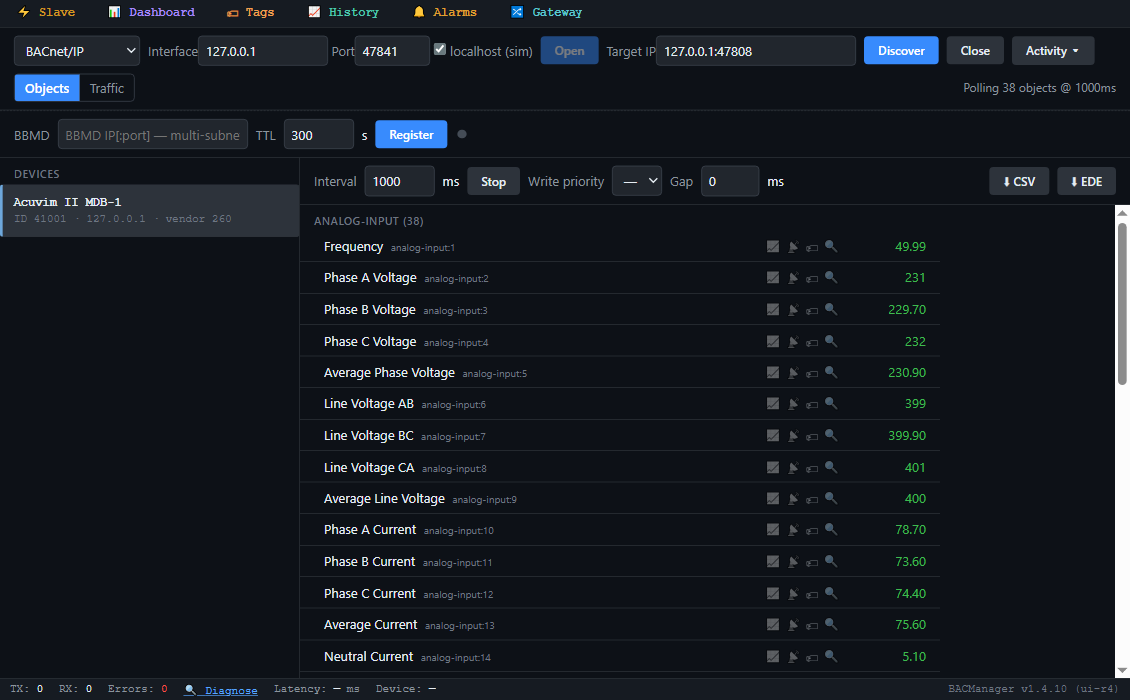
The meter's objects by name in BACManager (simulated meter built from Accuenergy's object table)
Object
Object name
Unit
AI1
Frequency
Hz
AI2–4 / AI5
Phase A/B/C Voltage / Average Phase Voltage
V
AI6–8 / AI9
Line Voltage AB/BC/CA / Average Line Voltage
V
AI10–12 / AI13 / AI14
Phase A/B/C Current / Average Current / Neutral Current
A
AI15–17 / AI18
Phase A/B/C Active Power / Total Active Power
kW
AI19–21 / AI22
Phase A/B/C Reactive Power / Total Reactive Power
kvar
AI23–25 / AI26
Phase A/B/C Apparent Power / Total Apparent Power
kVA
AI27–29 / AI30
Phase A/B/C Power Factor / Total Power Factor
—
AI31 / AI32
Voltage / Current Unbalance Factor
%
AI34–36 / AI37–39
Active / Reactive / Apparent Power Demand, Phase A/B/C Current Demand
kW, kvar, kVA, A
AI40 / AI41
Import / Export Active Energy
kWh
AI42 / AI43
Import / Export Reactive Energy
kvarh
AI44 / AI45, AI46 / AI47, AI48
Energy Total / Net, Reactive Energy Total / Net, Apparent Energy
kWh, kvarh, kVAh
AI49–63
per-phase import/export active and reactive energy, apparent energy
kWh, kvarh, kVAh
AI64–66 / AI67
Phase A/B/C Voltage THD / Average Voltage THD
%
AI68–70 / AI71
Phase A/B/C Current THD / Average Current THD
%
AI33 Load Type is in the list without its coding. The power factor sign follows the meter's VAR/PF convention (IEC or IEEE, set on the meter). On the AXM-BMS module the same quantities are AV0–AV55 in the same order, starting with AV0 Freq_rms; the BACnet user's manual 1040E2102 lists them, without units.
// free download
The Acuvim II workspace
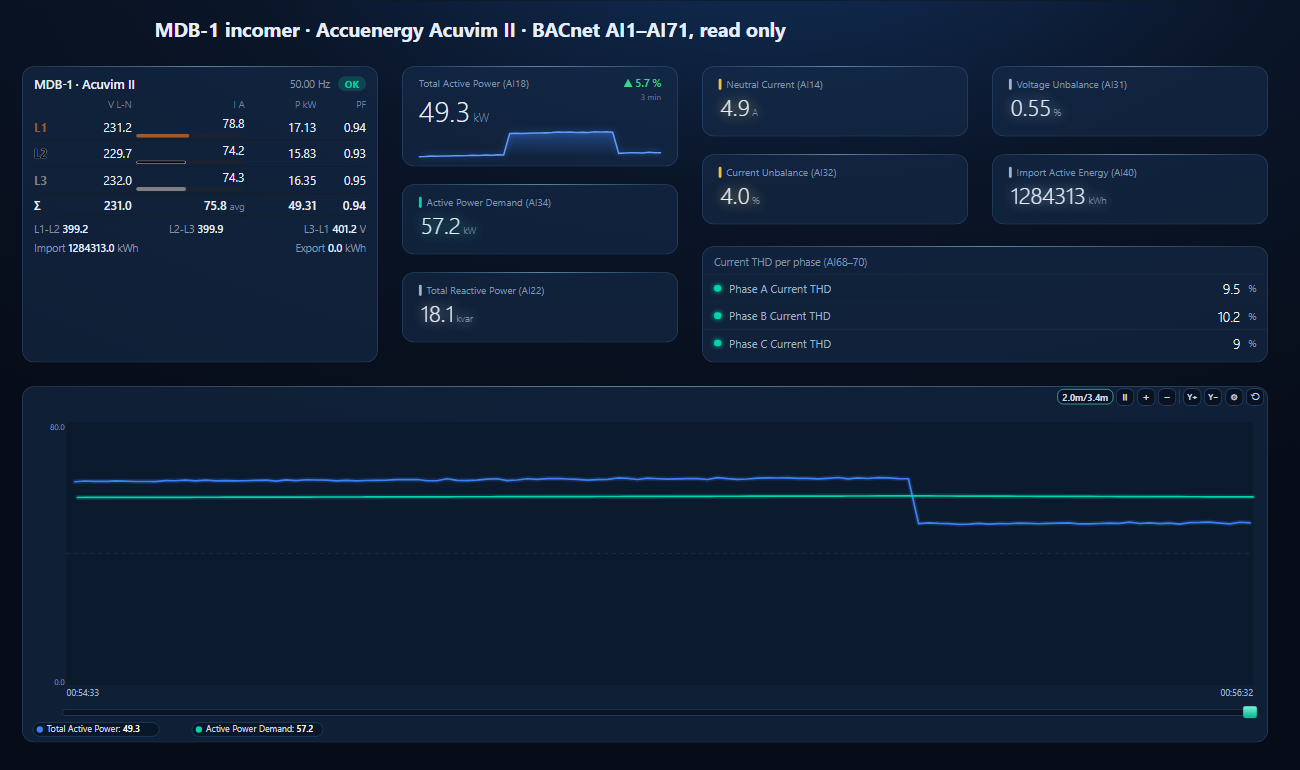
One dashboard page for an Acuvim II on a 400 V board: the three-phase meter element with voltages, currents, power, power factor and energy, total power against demand, neutral current, unbalance, current THD per phase and a trend.
Total power steps as a compressor stage cycles; the demand follows slowly (simulated meter)
1
Discover the meter
On the BACnet tab open MS/TP on the PC's RS-485 port at the meter's baud rate (or BACnet/IP for an AXM-WEB2) and press Discover. The meter appears with the ID from S52.
2
Open the workspace
Workspace → Open. The file reads device 41001; if yours has another instance, BACManager asks which discovered device takes its place and moves every point over.
3
Nothing to write
BACManager polls the meter by itself — the meter has no COV to subscribe to. Change the nominal voltage and rated current on the meter element to your board's.
In Settings → SYS: set the address in S01, the baud rate in S02, Protocol 1 = BACNET in S38, Max Info Frames in S51 and a unique device ID in S52, each accepted with V/A.
What are the Acuvim II BACnet objects?+
71 Analog Inputs, AI1 Frequency to AI71 Average Current THD: voltages, currents, power, power factor, demand, energy and THD, with units. Meters with the older AXM-BMS module serve AV0–AV55 instead.
Can I write to the Acuvim II over BACnet?+
No. The BTL listing gives it the Smart Sensor profile: reading and discovery only, no WriteProperty and no COV.
What is the default baud rate?+
19200 on the meter's own port. The older AXM-BMS module leaves the factory at 9600.
Does the Acuvim II support BACnet/IP?+
Through the AXM-WEB2 module (older meters: AXM-BIP), configured in its web page with port 47808 by default, a device instance and an optional BBMD registration.
// sources
Where this comes from
Accuenergy: Acuvim II Series Power Meter User Manual V3.2.17, section 6.4 and Table 6-85; BACnet for Acuvim II Series Power Meter User's Manual, document 1040E2102, V2.0.1 (August 2023); BTL listing BTL-30936 (Acuvim II series, version 6.08). Get them from accuenergy.com and check them against your meter's firmware. No factory device ID or Max Master setting is given for the native port. Accuenergy and Acuvim are trademarks of their owner; BACManager is not affiliated with Accuenergy. The pictures on this page are from BACManager connected to a simulated meter built from the published object table.