Every device. One tool. Pay once. Modbus · BACnet · Siemens S7 · one-time licence · also from us: ModbusManager ↗
// systemair · access controller · geniox, topvex · bacnet/ip

Systemair Access
BACnet Points List & Setup

How to bring a Systemair air handling unit with the Access controller onto a BMS over BACnet/IP: switching BACnet/IP on (it leaves the factory off), the device ID that Systemair gives no default for, the 1201-object EDE list for Access 5.5, the temperatures that arrive without a unit, the BMS watchdog — and which setpoint the unit actually uses. With a free BACManager workspace.

Download free trial Free Access AHU workspace

Sources: Systemair “Access 5.x Modbus variables and BACnet objects” (communication document 5.5-1-01 build 411) and the Access communication manual 153831-A011

// before you start

BACnet/IP is built into the Access controller

🔌

Ethernet, no gateway

The Access controller talks BACnet/IP on its own TCP/IP port. Access 4.0-1-05 brought BACnet as an application specific controller (B-ASC). From 4.3-1-00 it is an advanced application controller (B-AAC). Systemair's communication manual describes BACnet/IP only, with nothing on MS/TP.

i

Know your software version

Press the “i” button on the Access home page. The object lists for Access 4.x and 5.x are different, so download the zip that matches your unit. Systemair's download page also says that an upgrade to 5.5 from an earlier 5.x is not available yet; support is planned for the second half of 2026.

📋

What Systemair publishes

An EDE object list (1201 objects for 5.5-1-01) with state texts and unit codes, and a Modbus signal list that gives defaults. We found no PICS: BIBBs, segmentation, max APDU and protocol revision are not published. Older Systemair units with a Corrigo E controller are not covered here.

// setup

Configuration → Communication → BACnet

You change these in the controller's web interface, or through the NaviPad, which opens the same pages.

SettingOn deliverySet to
BACnet/IPNoYes. BACnet is switched off until you do this
BACnet device IDnot givenA device instance that no other device in the building uses. Systemair says the ID has to be unique but does not give a default
BACnet device namenot givenA name the BMS will list, e.g. the AHU tag
BACnet/IP UDP port number47808Leave it at 47808 unless the site uses a different port
BBMD address—Only when the BMS is on another IP subnet. Enter it as host:port, e.g. 10.100.50.99:47808, or name:47808 if DNS is set up
Communication → EthernetDHCP or static (not stated)A static IP, mask, gateway and DNS for a BMS network. With no DHCP server the controller falls back to an Auto-IP address, 169.254.x.y
System settings → Communication → BMS watchdogBMS protocol None, 60 sBACnet, with a timeout of 10–3600 s. Use it when the BMS writes values that the unit depends on

The EDE file that Systemair ships shows the instance 114112 in its device column and names the Device object “Access”. Treat that as the instance of the controller the file was exported from, not as a factory value: read the ID in the web interface or with a Discover. If the BMS reaches the unit through a router, the BBMD entry lets the controller be found from the other subnet. BACManager can also register itself as a foreign device with the site's BBMD.

// writing to the unit

Settings, not commands

Systemair's object list does not say which BACnet objects can be written: the EDE “settable” column is N for all 1201 rows. In the Modbus list the same signals are split into settings (S_ prefix: holding registers and coils) and actual values (A_: input registers). The table uses that split. Check every write on the unit.

ObjectObject nameDefaultWhat it does
MV12AirUnitAutoMode—Running mode: 1 OFF, 2 Manual, 3 AUTO (time schedule), 4 Low speed, 5 Normal speed, 6 High speed. It is in the EDE but not in the Modbus list
AV39SupplySetpoint18 °CThe supply air setpoint for constant supply air temperature control
MV14VentControl0 in the Modbus list = Const.supply airSelects the temperature control mode (nine choices: outdoor-compensated, cascade room, extract…). The mode decides which setpoint applies
MV31ExternalControlNo External controlExtended run at low/normal/high speed, external stop, free cooling, recirculation
MV32AirUnitServiceStop—No/Yes. Systemair describes it as a stop “with No 1 prio”
AV47–49 / AV50–52SAF… / EAFLow/Normal/HighSpeedPressure250 / 500 / 750 PaDuct pressure setpoints for each fan speed
AV170CO2Setpoint1000CO2 setpoint, ppm
AV466BMS_OutDoorTemp0 °COutdoor temperature written by the BMS. It is used only when the outdoor-temperature input is set to Device = BMS
BV8 / BV6AlaAcknowAll / FilterAlarmReset0Acknowledge all alarms; reset the filter alarm counter
SP

Read the setpoint in use

SupplySetpoint (AV39) only applies in constant supply air mode. In the other modes the unit works out its own setpoint, from outdoor compensation, a room or extract cascade, or a speed offset. Watch SupplyPID_SetP (AV273), the setpoint actually in use, and not only the one you wrote.

8

Priority: not given

Systemair does not say whether these objects have a priority array, or which priority a BMS should write at. BACManager writes at priority 8 unless you choose another. Read the value back after writing, and see the priority array explained for how to hand a point back.

⏱

Values from the BMS expire

Once the BMS watchdog is set to BACnet, a quiet period longer than the timeout makes every value written by the BMS invalid and raises a watchdog alarm (class C, no action, by default). The BMS outdoor temperature gets a sensor-error alarm too. BACManager's per-tag “Refresh (s)” can rewrite AV466 regularly.

// the rules that bite

Off on delivery, no units, two object lists

Off

BACnet/IP is off

A new unit does not answer Who-Is until BACnet/IP is set to Yes, however good the network is. It is the first thing to check when Discover finds nothing.

95

Temperatures carry no unit

In the EDE, temperatures, pressures and air flows have unit code 95, “no units”. The number follows the temperature, flow and pressure units chosen in the controller's preferences, so the BMS has to be told whether 18 means °C or °F, and whether the flow is in m³/h or l/s.

4/5

4.x and 5.x lists differ

The 4.x manual builds instances from the Modbus address (10XXX/20XXX binary, 30XXX/40XXX analogue and multistate). The 5.5 EDE uses plain instances (AI3 is supply air). A BMS mapped for one version shows wrong values on the other.

// points list

The Access points a BMS uses

Object names as in Systemair's Access 5.5-1-01 EDE. S = a setting in Systemair's Modbus list (writable over Modbus; BACnet write access is not stated), R = an actual value. Multistate values count from 1 in the order of Systemair's state texts.
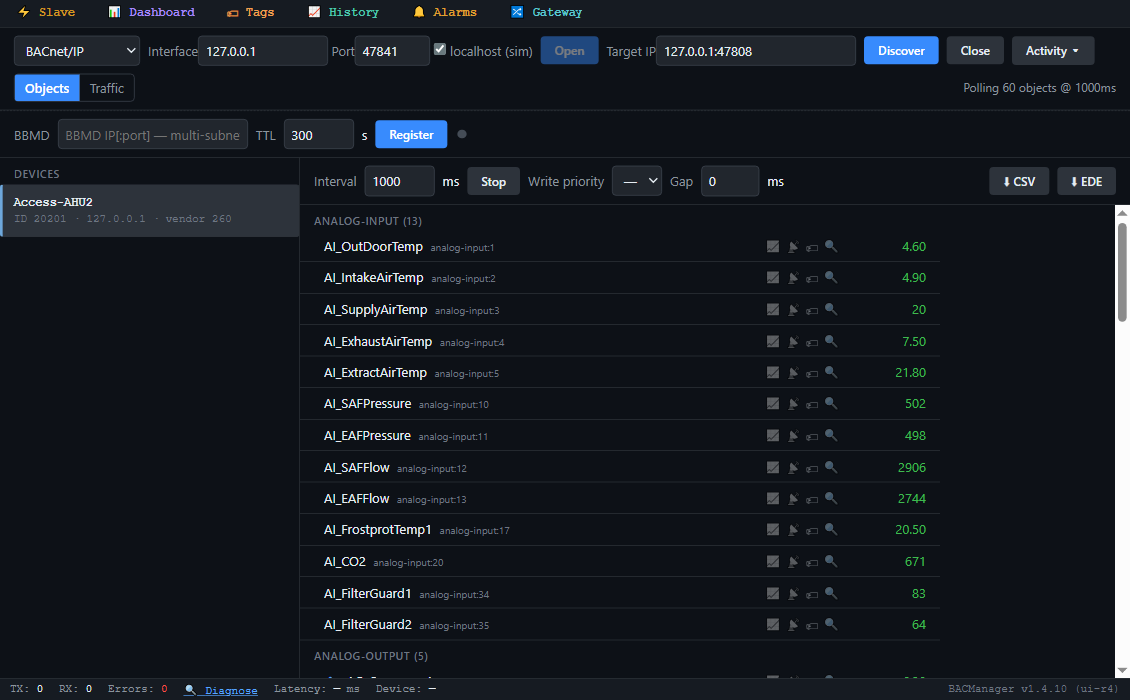
BACManager BACnet tab: device Access-AHU2, instance 20201, with its Access objects listed by name and polled: AI_OutDoorTemp, AI_SupplyAirTemp, AI_ExtractAirTemp, AI_SAFPressure, AI_SAFFlow, SupplySetpoint, SupplyPID_SetP, Efficiency, SequenceA, SequenceB, UnitMode, AirUnitAutoMode, SumAlarm and the others
The unit's objects by name in BACManager (a simulated unit built from Systemair's Access 5.5 EDE)
ObjectObject nameAccessWhat it is
MV12 / MV32 / MV31AirUnitAutoMode / AirUnitServiceStop / ExternalControlSRunning mode, service stop, external control (see above)
MV15UnitModeRUnit run mode: Stop, Starting up, Low/Normal/High speed run, support heating/cooling, CO2, free cooling, fire, smoke, de-icing… (16 states)
MV16UnitModeControlRWhat triggered the current run mode: time schedule, manual run, digital input, alarm, external control, service stop…
MV69 / MV70SAFSpeed / EAFSpeedROff, Low, Normal, High speed, Manual setpoint, Manual output
AI1 / AI2 / AI3AI_OutDoorTemp / AI_IntakeAirTemp / AI_SupplyAirTempROutdoor, intake and supply air temperature
AI5 / AI4AI_ExtractAirTemp / AI_ExhaustAirTempRExtract (from the rooms) and exhaust (to outdoors)
AI6–9 / AI20 / AI21AI_RoomTemp1… / AI_CO2 / AI_HumidityRoomRRoom temperatures, CO2 in ppm, room humidity
AI10 / AI11, AI12 / AI13AI_SAFPressure / AI_EAFPressure, AI_SAFFlow / AI_EAFFlowRFan duct pressure and air flow, supply and extract
AI17AI_FrostprotTemp1RFrost protection temperature 1 (the heater's water)
AI34 / AI35AI_FilterGuard1 / AI_FilterGuard2RSupply and extract air filter pressure
AV39 / AV273SupplySetpoint / SupplyPID_SetPS / RSetpoint written; setpoint actually used
AV274 / AV275SAFPID_SetP / EAFPID_SetPRFan setpoints actually used
AV427EfficiencyRHeat exchanger efficiency, %
AV467 / AV468 / AV469SequenceA / SequenceB / SequenceCRSequence outputs, % (Systemair's feedback inputs name A heating, B exchanger, C cooling)
AO1–10 / AO13 / AO14AO_SequenceA… / AO_SAF / AO_EAFRThe physical Y outputs and the fan control signals
AV283 / AV11 / AV12SFP / SAFRunTime / EAFRunTimeRSpecific fan power; fan running hours
AV287 / AV288 / AV286EnergyFanPwr / EnergyHeaterPwr / EnergyExchangerPwrRFans, heater, recovered by the exchanger. The EDE gives kWh as the unit, the Modbus list calls them actual power: check on your unit
BI1 / BI2DI_SAF / DI_EAFRFan feedback (motor protection / run indication)
BV9 / BV10 / BV11 / BV12SumAlarm / SumAlarmA / SumAlarmB / SumAlarmCRAny alarm; any A, B or C alarm
PIV5–7AlarmACount / AlarmBCount / AlarmCCountRNumber of A, B and C alarms
SCH2 / SCH3–6 / CAL1TC_FanSpeed / TC_Extra1–4 / Calendar—Time schedules and calendar; BACManager has a schedule and calendar editor
TL1–98TL_SupplyAirTemp, TL_SupplyAirTemp_Avg2min…R96 Trend Logs, many with a 2-minute average twin; BACManager reads Trend Logs

The full list also holds heat pump, humidity, damper and fan fault bitmask objects, digital inputs and outputs, and the alarm limits. The EDE lists notification classes 1–3 (alarm classes A, B and C) and 4 (event points), and every analog input refers to class 2, so the unit reports some alarms itself. Systemair does not document how. BACManager's device alarms show whatever the unit sends. The EDE marks COV support on the analog objects.
// free download

The Access AHU workspace

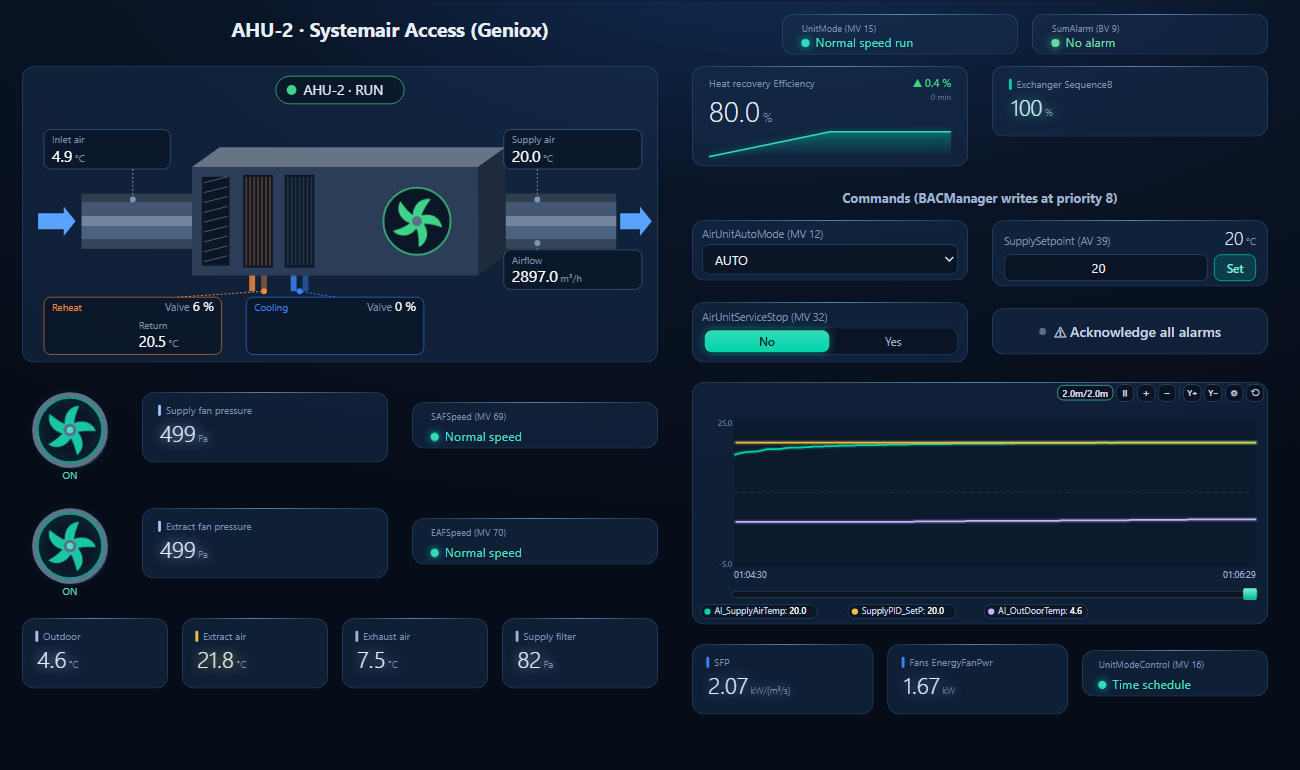
One dashboard page for a Systemair unit with heat recovery, a heater and a cooler: the AHU with intake air, supply air, air flow and coil valves, both fans with pressure and speed, outdoor, extract and exhaust air, filter pressure, exchanger efficiency, SFP, a trend, and the running mode, supply setpoint, service stop and alarm acknowledge as controls.

BACManager dashboard for a Systemair Access air handling unit: normal speed run on the time schedule, no alarm, the AHU with intake air near 4 degrees C, supply air at its setpoint, supply air flow and the heater and cooler valves, both fans running at normal speed with their duct pressure, outdoor, extract and exhaust air, exchanger efficiency, and a trend where supply air follows the setpoint from 18 to 20 degrees C
SupplySetpoint written from 18 to 20 °C: the exchanger goes to 100 % and the heater makes up the rest (simulated unit)
1

Discover the unit

On the BACnet tab open BACnet/IP on the PC's network card and press Discover. The unit appears with the device ID set in its web interface. If it is on another subnet, register with the site's BBMD first.

2

Open the workspace

Workspace → Open. The file reads device 20201. If your unit has another instance, BACManager asks which discovered device takes its place and moves every point over.

3

Run

BACManager starts reading the unit by itself. On the Dashboard press Run to use the controls. They write only in Run mode, and only once the unit has answered. Check that SupplyPID_SetP follows what you wrote.

Download workspace
// when it does not work

Typical problems

What you seeWhyWhat to do
Discover finds nothingBACnet/IP is still No, as deliveredConfiguration → Communication → BACnet: BACnet/IP = Yes
Found on the same switch, not from the BMS subnetWho-Is broadcasts do not cross IP routersEnter the BBMD address in the unit, or register the client as a foreign device
Two units answer with the same instanceThe device ID was copied or never setSet a unique BACnet device ID on every unit
Temperatures look wrong or have no unitUnit code 95; values follow the controller's unit preferenceCheck the preference setting and set the unit in the BMS
Object names do not match the list4.x and 5.x object lists differCheck the version with the “i” button; use the matching zip
SupplySetpoint written, supply air does not followVentControl is not constant supply airRead MV14 and SupplyPID_SetP (AV273)
Unit stays stopped in AUTOService stop, external stop, or the schedule says offRead UnitModeControl (MV16) and AirUnitServiceStop (MV32)
Watchdog alarm; BMS values ignoredNothing received within the watchdog timeoutPoll more often than the timeout, or set a longer timeout
Sensor error on BMS outdoor temperatureAV466 is not updated while the watchdog supervises itRewrite it regularly (Refresh (s) on the tag)
// questions

Systemair Access BACnet — FAQ

How do I enable BACnet on a Systemair Access controller?+
In the controller's web interface go to Configuration → Communication → BACnet and set BACnet/IP to Yes. Give the unit a unique BACnet device ID and a device name, keep UDP port 47808, and enter a BBMD address only if the BMS is on another subnet. BACnet is off on delivery.
What is the default BACnet device ID of an Access controller?+
Systemair does not state one; the manual only says the ID must be unique. The EDE file Systemair ships shows 114112, which looks like the instance of the controller it was exported from. Read the ID in the web interface or with a Discover, and set your own.
Where is the Systemair Access BACnet points list?+
On Systemair's Access software download page: “Access 5.x Modbus variables and BACnet objects” (or the 4.x zip for older units). For 5.5-1-01 it holds an EDE object list with 1201 objects, the state texts, the unit codes and the Modbus signal list.
Which object starts and stops the air handling unit?+
AirUnitAutoMode (MV12): 1 OFF, 3 AUTO on the time schedule, 4–6 a fixed speed. AirUnitServiceStop (MV32) and ExternalControl (MV31) can also stop it. UnitMode (MV15) shows what it is doing, and UnitModeControl (MV16) shows why.
Why do the temperatures come without a unit?+
The Access EDE exports temperatures, pressures and flows with unit code 95 (no units), and the value follows the units chosen in the controller's preference setting. Tell the BMS which unit that is.
Does the Access controller support BACnet MS/TP?+
Systemair's communication manual describes BACnet/IP over the controller's TCP/IP port and says nothing about MS/TP. For an MS/TP-only BMS, put a BACnet router between the two.
// sources

Where this comes from

Systemair: “Access 5.x Modbus variables and BACnet objects”, communication document 5.5-1-01 build 411 (BACnet EDE, object types, state texts, engineering units and the Access5ModbusSignals list), and Communication manual, Access software from 4.0-1-04, document 153831-A011, chapter 2 (BACnet, watchdog, BMS outdoor temperature, Ethernet). Get them from Systemair's Access software & tools download page and use the files for your unit's software version. Which BACnet objects accept writes, the command priority and the default device ID are not stated by Systemair. The S/R split is taken from the Modbus list and is our reading. Systemair, Geniox, Topvex and Access are Systemair names; BACManager is not affiliated with Systemair. The pictures on this page are from BACManager connected to a simulated unit built from the published object list.

// more device guides

Other BACnet devices

Chillers and rooftop units
Daikin MicroTech III chiller
Trane Symbio 700
Carrier AquaSnap 30RC
York YLAA chiller
AAON VCCX2
Lennox CORE
Air handling units
Swegon GOLD
VAV and room controllers
KMC Conquest VAV
Data centre cooling
Vertiv Liebert iCOM
Boilers
Lochinvar Crest boiler
VRF and split systems
Daikin iTM (VRV)
Mitsubishi AE-200
Drives
ABB ACH580
Schneider ATV600
Siemens SINAMICS G120P
Danfoss VLT FC 102
Yaskawa HV600
Pumps and valves
Grundfos MAGNA3 (CIM)
Wilo Stratos MAXO (CIF)
Belimo Energy Valve
Energy meters
Accuenergy Acuvim II
Routers
BASrouter (MS/TP to IP)

All BACnet device guides →

Commission the AHU from your laptop

Download the free trial, discover the unit and open the Access workspace — every point by name, setpoint and running mode on the page. No credit card.

Download free trial See pricing

Windows 10/11 · $149 one-time