// york · johnson controls · ylaa scroll chiller · bacnet ms/tp
York YLAA BACnet Points List & Setup
How to bring a York YLAA air-cooled scroll chiller onto a BMS over BACnet MS/TP: the native port on the IPU II micro panel and its keypad settings (where the device instance is an address times 100 plus an offset), the SC-EQ communication card that replaces E-Link, York's native data map — and the Local/Remote option that decides whether the chiller listens to the BMS at all. With a free BACManager workspace.
Source: York IOM form 150.72-NM1 (110), YLAA0070–0175 Style A, and Johnson Controls form 450.50-N1 (222), SC-EQ Communication Card
// before you start
Native port or SC-EQ card
🔌
Native on the micro panel
A YLAA with the IPU II board speaks BACnet MS/TP on port 1 (terminal TB1, + and −) and Modbus RTU on port 2 (TB2 RS-485 or TB3 RS-232). York's IOM says no microgateway or E-Link is needed for these two. For BACnet/IP put a BACnet router in front of the trunk, or read MS/TP from a PC — see BACnet MS/TP over RS-485.
📡
Or the SC-EQ card
The SC-EQ communication card supersedes the E-Link gateway. For a YLAA (02550 micro board) it goes into the panel with kit 392-41230-001, which includes a transformer. JCI notes that a chiller with native communications needs no SC-EQ when it only talks to a BAS and Connected Services is not installed.
📋
What the chiller serves
York's data map lists the object types the native port uses: analog and binary inputs, outputs and values, the device and notification. A PICS, BTL listing, segmentation or Max APDU for the native port or the SC-EQ: not found in these documents. Keep requests small; BACManager splits ReadPropertyMultiple by itself.
// setup
Native BACnet from the keypad
On the micro panel press PROGRAM, DOWN four times, then ENTER. Values from the IOM's Tables 28 and 29.
Setting
Factory
For BACnet MS/TP
DE MODIFIER ADDRESS
−1
0–41943; multiplied by 100
DE MODIFIER OFFSET
−1
0–99; added to it. Device instance = address × 100 + offset, e.g. 120 and 1 give 12001
P1 PROTOCOL
BACNET
BACNET (API is for YorkTalk 2)
P1 MANUAL MAC ADDRESS
−1
0–127, unique on the trunk
P1 BAUD RATE
4800
9600–76800 or AUTO — 4800 is not a BACnet MS/TP rate
P1 PARITY / STOP BITS
NONE / 1
NONE / 1
The panel needs a power cycle after the settings change. If BACnet does not come up, the same menu shows REAL TIME ERROR; error 15 is “BACNET SETUP FAILED”. Modbus RTU on port 2 needs operating software C.MMC.13.03 or later (P2 PROTOCOL MODBUS SVR, 19200, no parity, one stop bit, RS-485 or RS-232). The IOM gives no factory device name.
With an SC-EQ card instead
Setting
Where
What JCI gives
MAC address
8-way DIP switch SW-1 (switch 8 unused)
1–127, binary weighted; 0 if the BAS address is not known at commissioning. “The only user setting”
Protocol, baud, chiller model
Automatic
BACnet MS/TP, Modbus RTU or N2 detected on the BAS port J12; up to 120 s after power-up
Device instance
Automatic
5000 + MAC (MAC 6 = 5006). To change: SC-AP over Wi-Fi, BACNET DEVICE INSTANCE MODE = MANUAL, then SC-EQUIP BACNET INSTANCE ID; or BV65000 = 1 and AV65000 from the BAS
Device name, encoding
From the BAS
SV65000; MV65003 (0 UCS-2, 1 ASCII)
Units
SC-AP or MV65001
0 Imperial, 1 Metric — what the BAS sees, whatever the chiller displays
Chiller side (YLAA, IPU II)
Micro panel keypad
P1 PROTOCOL API, baud 4800, parity ODD, DE MODIFIER ADDRESS / OFFSET and P1 MAC −1; Local/Remote = Remote to send commands; cycle power
Turn the BAS EOL switch S2 on only when the SC-EQ is at an end of the RS-485 trunk. On a two-wire BAS, JCI calls for a 100 Ω 1 W resistor between J12 COM and J10 COM to ground. Reboot the SC-EQ after changing addresses. The SC-EQ exposes only the points that apply to the chiller it detected; JCI does not publish that list in 450.50-N1, so read the object list rather than reuse the native map below.
// writing to the chiller
Remote first, then the setpoint
York's write points, read/write in the native data map:
Object
Object name
Range
What it does
BV_1
START_STOP
0, 1
Stop / start command
AV_1
REM_SETP
40–70 °F
Remote cooling setpoint (water; glycol units go lower)
AV_3
LOAD_LIMIT
0, 1, 2
Load limit stage: on 2- and 4-compressor units stage 1 = 50 %, one compressor per system; stage 2 only on 3-, 5- and 6-compressor units (33 or 40 %)
AV_4
REM_CR
°F
Cooling range, discharge air (condensing unit) mode only
AV_2, AV_5, BV_2, BV_3
SP_REM_SP_S1/S2, SS_SYS1/2
—
Per-system suction pressure control units only
AV_6, AV_7
REM_SP_HEAT, HP_MODE
—
Heat pump models only
L/R
Local ignores the BMS
Option 5, Local/Remote Control Type: in LOCAL the panel runs on its own values and ignores commands from remote devices and the RS-485 inputs, while still sending data. Program REMOTE under OPTIONS for start/stop, setpoint and load limit to act. BI_20 CNTL_MODE reads which one is set.
5
Five minutes for ISN
York says that in REMOTE a unit with no valid ISN (YorkTalk) transmission for 5 minutes reverts to its local values. The IOM does not say the same of native BACnet writes. Writing the commands again every 2 minutes covers both; BACManager's per-tag Refresh (s) does it, and the free workspace sets 120 s.
8
Which priority
York's data map gives no priority array or recommended priority for the write points. BACManager writes at priority 8 unless you choose another; read COOL_SETP (AI_40) to see the setpoint actually in force.
// the rules that bite
4800 baud, −1, and a power cycle
4800
Factory baud is YorkTalk's
P1 BAUD RATE leaves the factory at 4800, the YorkTalk 2 rate. York's BACnet column asks for 9600–76800 or AUTO. A chiller left at 4800 never joins a BACnet trunk.
×100
The instance is built
The device instance is DE MODIFIER ADDRESS × 100 + DE MODIFIER OFFSET, both −1 from the factory. Two chillers set to the same address and offset collide on Who-Is; with an SC-EQ, the instance is 5000 + MAC instead.
⏻
Only a reboot applies it
Communication settings on the IPU II take effect only after the panel's power is cycled; the SC-EQ should be rebooted after address changes too, and keeps polling an old chiller Modbus address until it is.
The data map depends on the chiller's firmware. The one below is York's Table 31 dated 2/25/2009 for operating software C.MMC.13.xx–16.xx (Style A, IPU II board 031-02630 with 031-02550); newer Style B YLAA units have their own map, and York points to its Equipment Integration website for the latest one.
// points list
The YLAA points a BMS uses
Native BACnet, York's object names, English units (°F, PSIG). AI and BI are read only; AV and BV are the write points above.
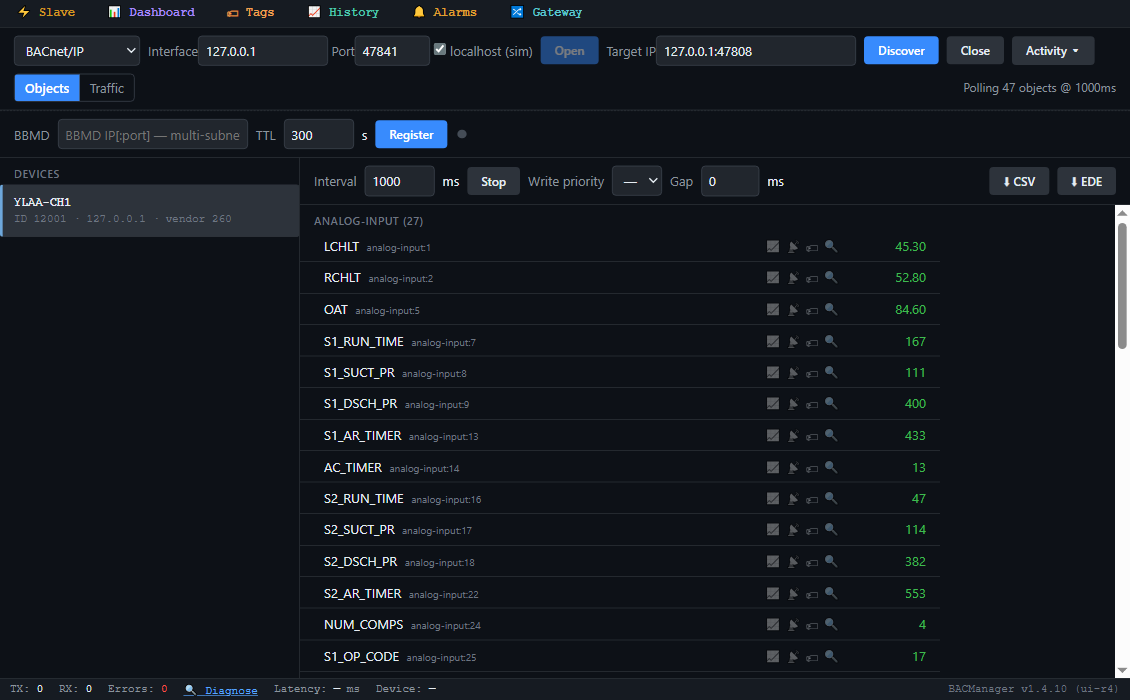
The chiller's objects by name in BACManager (simulated chiller built from York's native data map)
Compressor running (BI_16 / BI_17 for compressor 3)
BI_3 / BI_4
EVAP_HTR / EVAP_PUMP
0, 1
Evaporator heater and pump status
BI_7 / BI_13, BI_9
S1_LLSV / S2_LLSV, S1_HGBV
0, 1
Liquid line solenoids, hot gas bypass
BI_15 / BI_22
LEAD_SYS / AUTO_LL
0, 1
Lead system (0 sys 1, 1 sys 2); lead/lag manual or auto
BI_18 / BI_19
CH_LIQ_TYPE / AMB_MODE
0, 1
Water or glycol; standard or low ambient
BI_20 / BI_21
CNTL_MODE / DATA_UNIT
0, 1
Local or Remote; Imperial or SI
York's Modbus registers follow the same numbering: 513 + AI number, 1281 + BI number, 1025 + AV number, 1537 + BV number. In the IOM's PDF the units and descriptions of a few rows near the end of the analog list (AI_12, AI_22, AI_23) are shifted against their names; check those on the chiller. EEV, heat pump and R-407C points apply only to those models.
// free download
The YLAA workspace
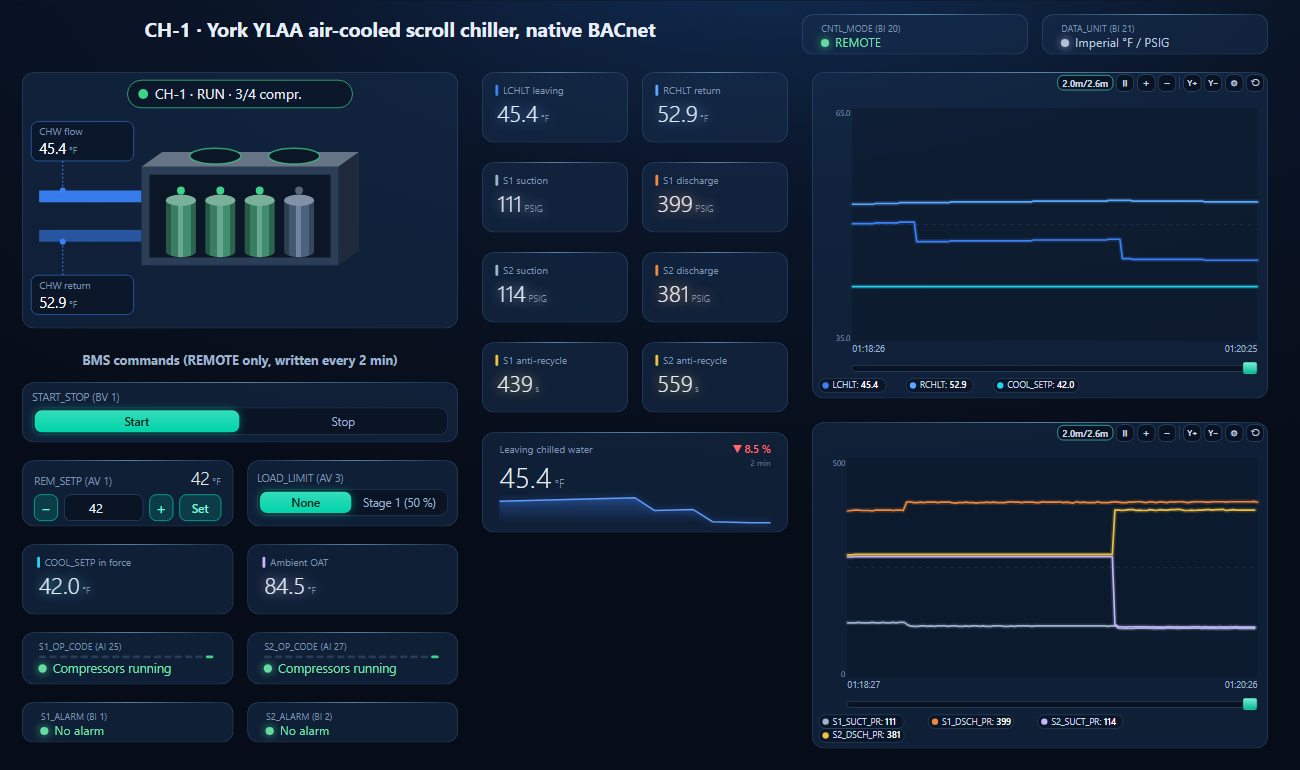
One dashboard page for a YLAA on its native BACnet port: Local/Remote, the chiller with leaving and return water and four compressors, start/stop, the remote setpoint and load limit written every 2 minutes, the operational codes and alarms of both systems, pressures, anti-recycle timers and two trends.
The remote setpoint lowered from the page: COOL_SETP follows, compressors stage on the leaving water and the anti-recycle timers count down (simulated chiller)
1
Discover the chiller
On the BACnet tab open MS/TP on the PC's RS-485 port at the trunk's baud rate (or BACnet/IP behind a router) and press Discover. The chiller appears with the instance built from the DE modifier address and offset, or 5000 + MAC behind an SC-EQ.
2
Open the workspace
Workspace → Open. The file reads device 12001; if yours has another instance, BACManager asks which discovered device takes its place and moves every point over. Behind an SC-EQ check the object list first: its points are the card's, not necessarily the native map's.
3
Remote, Run, set once
Check CNTL_MODE reads REMOTE. On the Dashboard press Run and set start/stop, setpoint and load limit once; they are written again every 2 minutes. After BACManager restarts, set them once more.
P1 BAUD RATE still 4800, MAC or DE modifier still −1, or no power cycle
9600–76800 or AUTO, MAC and instance set, then cycle power
REAL TIME ERROR 15
BACNET SETUP FAILED
Recheck the P1 settings and the instance, cycle power
Writes accepted, chiller ignores them
Panel in LOCAL (BI_20 = 0)
Program REMOTE under OPTIONS
Setpoint falls back to the panel's own
Remote values time out (stated for ISN after 5 minutes)
Write again every 2 minutes (Refresh 120 s)
Load limit 2 does nothing
Stage 2 exists only on 3-, 5- and 6-compressor units
Use stage 1 on 2- and 4-compressor units
Two chillers, one device instance
Same DE modifier address and offset (or same SC-EQ MAC)
Unique address/offset per chiller; SC-EQ instance 5000 + MAC or manual
SC-EQ points read unreliable
Commandable points stay unreliable until the BAS writes them
Write the setpoints once
After replacing an E-Link, many points offline
E-Link offered every possible point; the SC-EQ only the relevant ones
Delete the E-Link device and rediscover
Values in the wrong units through an SC-EQ
SC-EQ units (MV65001) differ from the chiller's
Match the SC-EQ units to the chiller's display units
// questions
York YLAA BACnet — FAQ
Does a York YLAA need a gateway for BACnet?+
Not one with the IPU II micro panel: it has native BACnet MS/TP on port 1 (TB1) and Modbus RTU on port 2. The SC-EQ communication card is the alternative that replaced E-Link, and is needed for JCI Connected Services.
How is the YLAA's BACnet device instance set?+
From the keypad (PROGRAM, DOWN four times, ENTER): DE MODIFIER ADDRESS × 100 + DE MODIFIER OFFSET. Both are −1 from the factory. Behind an SC-EQ the instance is 5000 + the card's MAC unless set manually.
What baud rate does the YLAA use for BACnet MS/TP?+
9600 to 76800 or AUTO, set in P1 BAUD RATE. The factory value is 4800, which is for YorkTalk 2, so it has to be changed before the chiller joins a BACnet trunk.
Which object sets the chilled water setpoint?+
AV_1 REM_SETP, 40–70 °F for water, with the panel in REMOTE. AI_40 COOL_SETP shows the setpoint in force; BV_1 START_STOP starts and stops the unit and AV_3 LOAD_LIMIT limits capacity.
Why does the chiller ignore BACnet writes?+
The Local/Remote option is set to LOCAL: the panel then ignores commands from remote devices and the RS-485 inputs but still sends its data. BI_20 CNTL_MODE shows the setting.
Is the data map the same on every YLAA?+
No. It depends on the firmware: this page follows York's 2009 map for Style A units (C.MMC.13–16). Newer Style B units have their own map in their IOM and on JCI's Equipment Integration website.
// sources
Where this comes from
Johnson Controls / York: YLAA0070–0175 Style A 60 Hz Air-Cooled Scroll Chillers, Installation, Operation and Maintenance, form 150.72-NM1 (110) — BACnet, Modbus and YorkTalk 2 communications, Tables 28–31 (native data map dated 2/25/2009), load limiting, setpoint limits and the Local/Remote option; and SC-EQ Communication Card Installation Instructions, form 450.50-N1 (222), issued 02/28/2022. Get the documents from docs.johnsoncontrols.com and check them against your chiller's style and firmware; the data map is marked as JCI's property and subject to change. A recommended write priority, a PICS and the SC-EQ's own point list for a YLAA are not in these documents. JCI prints the SC-EQ manual instance range as “1 to 4914302”, most likely meaning the BACnet maximum 4194302. York and Johnson Controls are trademarks of Johnson Controls; BACManager is not affiliated with Johnson Controls. The pictures on this page are from BACManager connected to a simulated chiller built from the published data map.
Download the free trial, discover the chiller and open the YLAA workspace — every point by name, setpoint and start/stop written again every 2 minutes. No credit card.