// messages
Every request, its answer, and how long it took
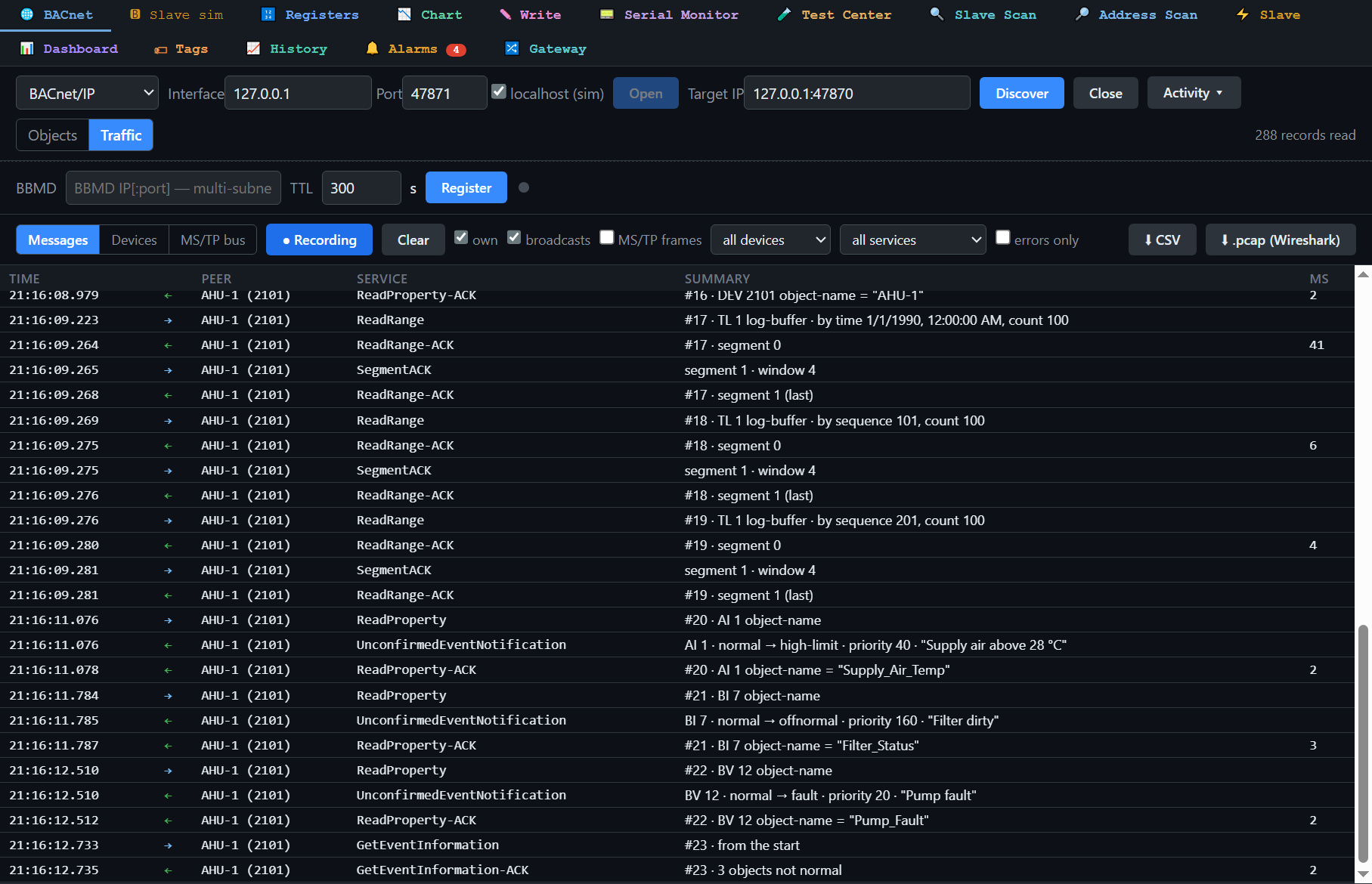
Traffic sits beside Objects on the BACnet tab. Each line is one message: time, direction, peer, service, a summary in words, and on an answer the milliseconds since its request.
The Traffic view in BACManager shows what goes over the wire, already decoded: every request and its answer, how many milliseconds each answer took, timeouts, Error, Reject and Abort with their reason by name. Per device: requests, answers, average and longest answer time. On MS/TP: every frame on the bus, the token and the stations. Export CSV, or .pcap when you do want Wireshark.
Windows 10/11 · one-time license · 14-day trial
Traffic sits beside Objects on the BACnet tab. Each line is one message: time, direction, peer, service, a summary in words, and on an answer the milliseconds since its request.
| View | What it shows | The question it answers |
|---|---|---|
| Messages | Who-Is/I-Am, ReadProperty, ReadPropertyMultiple, WriteProperty with value and priority, COV, event notifications, ReadRange… with the answer time; a request with no answer as a timeout; Error, Reject, Abort with the reason by name. Click a row for its decoded lines, its bytes and the message it answers. | “Why does this point show nothing?” — the reason is on the line |
| Devices | Per device: requests, answers, average and longest answer time, timeouts, errors, rejects and aborts with how many times each reason came | “Which controller is slow?” |
| MS/TP bus | Every frame on the bus, not only BACManager's: stations, who passes the token, frame counts, token round time, Poll-For-Master, frames with a bad header or data CRC, a station that stopped passing the token | “Why does the trunk keep dropping devices?” |
Filters narrow it down: own messages, broadcasts, MS/TP frames, one device, a service group, errors only. For the wiring side of MS/TP problems — termination, bias, baud mismatch — see MS/TP & RS-485.
BACManager's own requests and answers, everything broadcast on the network, every frame on an MS/TP bus it is connected to, and on BACnet/SC the messages through the hub — decoded after TLS, which Wireshark alone cannot do.
Other devices' unicast BACnet/IP traffic with each other: a switch does not send it to this PC. That needs a mirrored switch port and Wireshark.
Up to 10 000 messages in memory, the oldest go. Nothing is written to disk unless you export: CSV, or .pcap for Wireshark (BACnet/IP as IPv4, MS/TP as raw frames).
Download the free trial and open the Traffic view: the reason is on the line. No credit card.
Windows 10/11 · $149 one-time
We use Google Analytics cookies to see how the site is used. You can accept or decline — declining keeps analytics off.