How to put a Yaskawa HV600 drive on BACnet MS/TP through its built-in RS-485 terminals: H5-08 = 3, a device instance written in hexadecimal across two parameters (factory: 1), the run and reference sources that leave the factory on terminals and analog input — and the bitmapped objects that must not be mixed with the single-bit ones. With a free BACManager workspace.
Source: Yaskawa HV600 Drive Technical Reference SIEPC71061732F (revision 5, February 2024, drive software PRG 01018), section 6.3 “BACnet Communications”, with its PICS and BTL listing BTL-30529
The HV600 speaks BACnet MS/TP on terminal block TB6 as a B-ASC; up to 127 drives per MS/TP segment, more behind a router. BACnet/IP needs the JOHB-SMP3 option, which has its own, different object list — this page is about the embedded MS/TP port. For BACnet/IP without the option put a BACnet router in front of the trunk, or read MS/TP directly from a PC — see BACnet MS/TP over RS-485.
TB6: D+ and D− for the data pair, AC for signal ground. Shielded cable, shield to the drive's ground terminal, kept apart from power wiring. DIP switch S2 ON switches in the built-in terminating resistor — on the drives at both physical ends only, OFF on all others. Bias: not given.
Per the PICS and BTL-30529 (firmware 2.01, BACnet revision 14): ReadProperty, ReadPropertyMultiple, WriteProperty, WritePropertyMultiple, COV and COVP, dynamic binding, DeviceCommunicationControl, ReinitializeDevice, TimeSynchronization. The PICS gives no segmentation window, so plan for none; max APDU: not given.
| Parameter | Factory | Set to |
|---|---|---|
| H5-08 Communication Protocol Selection | 0 Modbus/MEMOBUS | 3 BACnet |
| H5-01 Drive Node Address | 1F hex (31) | A free MS/TP MAC address. Entered in hex: MAC 12 is 0C |
| H5-02 Communication Speed | 3 = 9600 | 3, 4, 5 or 7 = 9600, 19200, 38400, 76800 — the BACnet rates |
| H5-03 Parity | 0 no parity | Leave at 0; MS/TP frames have no parity |
| H5-14 / H5-15 Device Obj ID LOW / HIGH BITS | 0001 / 0000 | The device instance as a hex number split in two words: 6001 = 1771 hex → H5-14 = 1771, H5-15 = 0000. Range 0–4194302 |
| H5-23 BACnet Max Master | 7F (127) | The highest master MAC on the trunk, in hex |
| H5-24 BACnet Max Info Frames | 3 | 1–255; usually leave |
| H5-12 Run Command Method | 0 | 0 FWD/Stop, REV/Stop — the setting the BACnet section asks for |
| b1-01 / b1-02 | 1 Analog / 7 AUTO + Term Run | b1-01 = 2 Serial; b1-02 = 2 Serial, or 8 AUTO Command + Serial Run |
| H5-04 / H5-05 / H5-09 | 3 Alarm Only / 1 / 2.0 s | What a communication loss does — see the rules below |
Yaskawa's procedure: set the H5 parameters, then switch the drive off and wait until the keypad display is dark, or set H5-20 = 1 Reload Now — but H5-20 reloads only H5-01, H5-02, H5-03 and H5-06. The manual says other parameter changes and a new Device Object Name take effect only after the drive is de-energised, so power-cycle after setting the instance. The Device Object Name (20 characters) and Location are written over BACnet, not on the keypad.
The command objects are bits of the drive's command register 0001, as Yaskawa's object table lists. The frequency reference is in Hz (unit per o1-03), not in percent.
| Object | Object name | Register | To run |
|---|---|---|---|
| BV1 | Run FWD Cmd | 0001 bit 0 | RUN (1) forward; OFF stops |
| BV2 | Run REV Cmd | 0001 bit 1 | REV (1) reverse — never together with BV1 |
| AV2 | Frequency Cmd | 0002 | 0.00–600.00 Hz, limited by the drive's maximum frequency |
| BV4 | Fault Reset Cmd | 0001 bit 3 | RESET (1) resets a fault |
| AV1 | Operation Cmd | 0001 | The same register as one bitmap, 0–2047 |
Yaskawa: when you use AV1 Operation Cmd, do not use BV1–BV11 or AV5; when you use AV5 Reference Select Cmd, do not use AV1, BO4 or BV9–BV11; when you use AV4 MF Output Cmd, do not use BO1–BO3 or BV12. They write the same registers. The workspace uses the single bits.
The multi-function input commands from BACnet (AV1 bits 4–A, BV7–BV11) and the drive's terminals S1–S7 are combined with a logical OR. A terminal that is on cannot be switched off from BACnet.
With b1-02 = 8 the drive takes BACnet's run command in AUTO mode only; HAND on the keypad uses the keypad reference. BV43 Run Command Mode and BV42 Frequency Ref Mode read COM or LOCAL. AV39 Drive HOA Status exists, but its values are not given in the manual.
b1-01 is Analog Input and b1-02 AUTO Command + Term Run out of the box. BACnet reads everything, writes are accepted — and the motor follows terminals and analog input. Set b1-01 = 2 and b1-02 = 2 or 8.
H5-14 = 0001 and H5-15 = 0000 on every new HV600. The instance is entered in hex: typing “6001” into H5-14 gives instance 24577 (6001 hex). Convert first.
With H5-05 = 1 the drive flags CE when no data arrives from the master within H5-09 (2.0 s). H5-04 decides: 3 Alarm Only from the factory — the fan keeps running at the last command; 0 ramp, 1 coast, 2 fast stop (a fault); 4 run at H5-34. The manual calls it a Modbus error but lists these parameters in the BACnet setup.
The embedded MS/TP list from the Technical Reference. Object names as the network displays them (the manual also gives a longer name). C = commandable (priority array), W = writable, R = read only. The drive's Modbus register is in brackets.
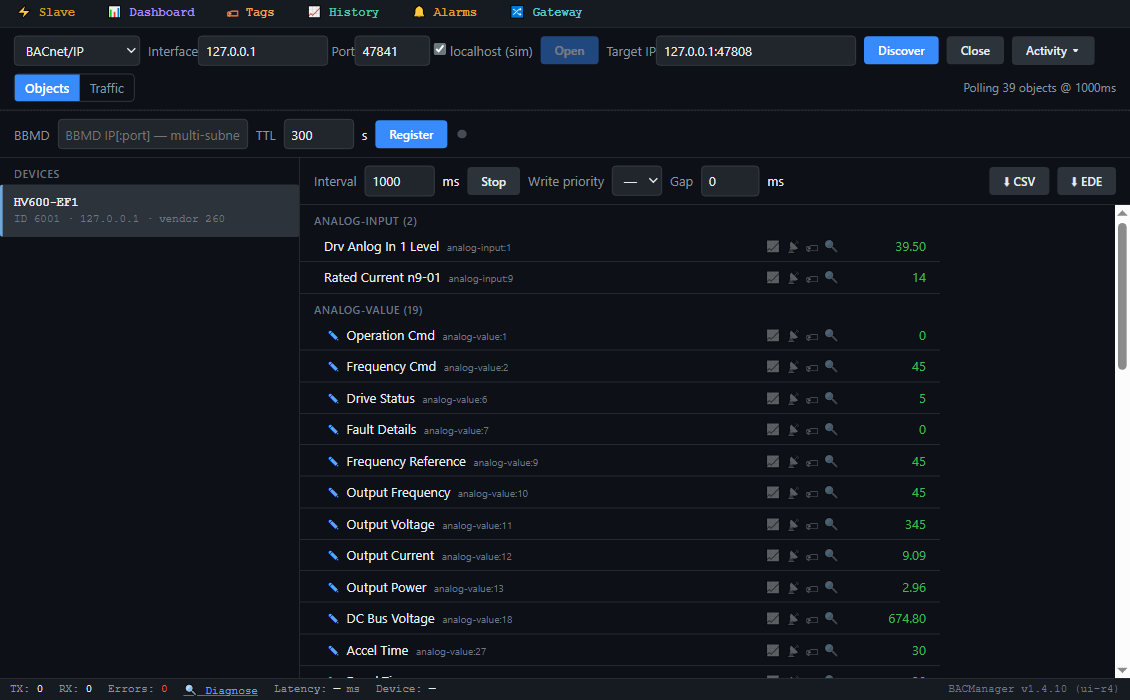
| Object | Object name | Access | What it is |
|---|---|---|---|
| BV1 / BV2 / BV4 | Run FWD Cmd / Run REV Cmd / Fault Reset Cmd | C | Run forward, reverse, reset (0001 bits 0, 1, 3) |
| BV3 | Ext Fault Cmd | C | External fault EF0 (0001 bit 2) |
| BV5 / BV6 | Com Net Cmd / Com Cntrl Cmd | C | Texts COM / LOCAL; what they switch is not described |
| AV2 / AV3 | Frequency Cmd / PI Setpoint Cmd | C | Hz (0002); PID setpoint 0–100.00 % (0006) |
| AV1 / AV4 / AV5 | Operation Cmd / MF Output Cmd / Reference Select Cmd | C | Bitmaps (0001 / 0009 / 000F) — see “bits or bitmap” |
| BV13 / BV14 / BV15 / BV16 | RUN-STOP / REV-FWD / READY / FAULT | R | Running, direction, ready, faulted (0020 bits 0–3) |
| BV33 / BV34 / BV35 | Operating / Zero Speed / Frequency Agree | R | 002C bits 0–2 |
| BV42 / BV43 | Frequency Ref Mode / Run Command Mode | R | LOCAL (active) or COM (002C bits 9, 10) |
| BV18–BV32 | OverCurrent- Gnd Flt … Communication Error | R | One fault group each (0021) |
| BI28 / BI29 | Drive Fault Status / Drive Alarm Status | R | Fault; minor fault / alarm (004B bits 7, 6) |
| AV10 / AV9 | Output Frequency / Frequency Reference | R | Hz (0041 / 0040) |
| AV36 / AV37 | Output Freq in % / Output Freq in RPM | R | % (003F), rpm (003E) |
| AV12 / AV13 / AV11 | Output Current / Output Power / Output Voltage | R | A (0026), kW (0047), V (0045) |
| AV18 / AV14 / AV38 | DC Bus Voltage / Torque Reference / Torque IQ (U6-01) | R | V (0031); % (0048 / 0051) |
| AV33 / AV35 | kWh Consumed / Drive Run Time | R | kWh (005C–005D), h (004C) |
| AV42 / AV40 | Current Sys Flt / Last Drive Fault | R | Fault code (0080 / 0081), table below |
| AV6 / AV7 / AV16 | Drive Status / Fault Details / Drive Status 2 | R | Bitmaps (0020 / 0021; Drive Status 2: register not given) |
| AV19 / AV20 / AV21 | PI Feedback Level / PI Input Level / PI Output Level | R | PID loop, % |
| AV27 / AV28 | Accel Time / Decel Time | W | C1-01 / C1-02, 0.1–6000.0 s (factory 30.0 s) |
| AV29 / AV30, BV55 / BV56 | Parameter Number / Parameter Data, Parameter Accept / Parameter Enter | W | Any drive parameter by its Modbus register — below |
| AI1 / AI2, AI9 | Drv Anlog In 1 Level / 2, Rated Current n9-01 | R | Analog inputs, %; drive rated current, A |
| BI1–BI7, BI8 / BI9 | Input Terminal 1…7, Multi Function Out 1 / 2 | R | The drive's own I/O |
| AO1 / AO2, BO1–BO3 | Drv Anlg Out1 Level…, MF Output, M1 - M2… | C | Outputs driven from BACnet |
| BV60 / BV63 | Em Over DRV REV CMD / Em Over DRV FWD CMD | C | Emergency override run |
| Code (hex) | As a number | Fault |
|---|---|---|
| 0002 / 0008 | 2 / 8 | Uv1 DC bus undervoltage / ov overvoltage |
| 0006 / 0007 | 6 / 7 | GF ground fault / oC overcurrent |
| 000A / 000B / 000C | 10 / 11 / 12 | oH1 heatsink overheat / oL1 motor overload / oL2 drive overload |
| 001C / 001E | 28 / 30 | LF output phase loss / oPr keypad connection |
| 0021 / 0022 / 0027 | 33 / 34 / 39 | CE communication error / bUS option error / EF0 external fault |
Fault codes from the Technical Reference's fault-trace table (a selection); that AV42 shows them as plain numbers is our reading. Parameters not in the list: write the Modbus register (decimal) to AV29, then read AV30; to write, put the value in AV30 and set BV55 (RAM) or BV56 (RAM and EEPROM — at most 100,000 times). COV works only on objects that are neither commandable nor writable. Commandable objects keep a priority array and the drive uses the highest-priority value; which priority a BMS should use, and the relinquish defaults, are not in the manual. BACManager writes at priority 8 unless you choose otherwise.
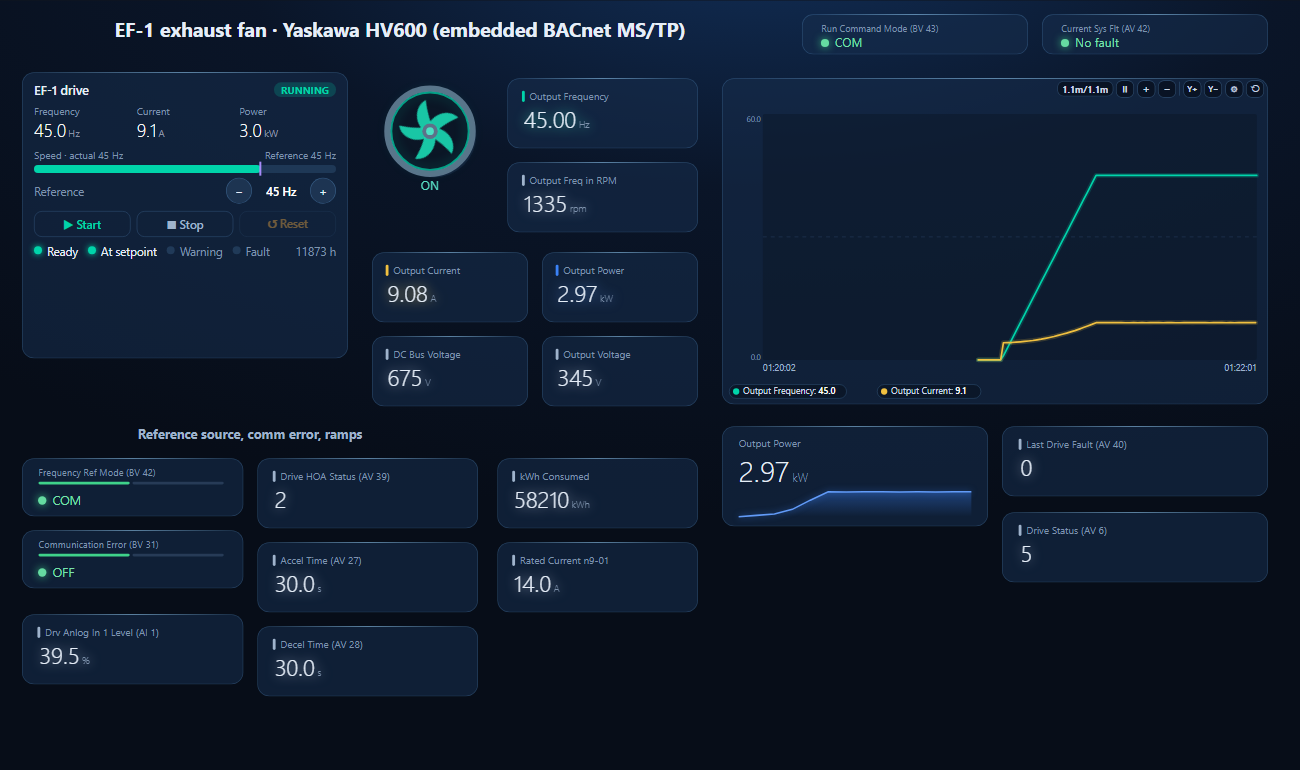
One dashboard page for an HV600 on an exhaust fan: the drive faceplate with run, fault and the Hz reference, the fan, frequency, speed, current, power, both voltages, reference and run source, the communication error, HOA status, ramps, energy and a trend.
On the BACnet tab open MS/TP on the PC's RS-485 port at the H5-02 baud rate (or BACnet/IP behind a router) and press Discover. The drive appears with the instance from H5-14/H5-15, and its objects by name.
Workspace → Open. The file reads device 6001; if yours has another instance, BACManager asks which discovered device takes its place and moves every point over.
With b1-01 = 2, b1-02 = 8 and the keypad in AUTO, press Run on the Dashboard, then Start and the frequency on the faceplate. Run Command Mode should read COM.
| What you see | Why | What to do |
|---|---|---|
| BV1 is RUN, the motor does not start | b1-02 still 7 (terminal run); keypad in HAND or OFF; BV43 reads LOCAL | b1-02 = 2 or 8, AUTO on the keypad |
| Frequency Cmd ignored | b1-01 still 1 (analog input) | b1-01 = 2; check BV42 reads COM |
| Two drives answer as instance 1 | H5-14/H5-15 factory value | Set the instance on every drive, in hex |
| Instance is not the number you typed | H5-14 is hexadecimal | Convert: 6001 decimal = 1771 hex |
| New instance or name not active | Applied after de-energising | Power off until the keypad is dark, then on |
| EF alarm, the motor ramps down | FWD and REV commanded together for more than 0.5 s | Use BV1 or BV2, never both |
| CE alarm or fault | No data from the master within H5-09 | Check wiring, S2 at both ends, baud and parity; H5-09 longer for a slow trunk |
| The drive never answers | Wiring or transceiver | Self-diagnostics: H1-06 = 67, jumper S6–SN, power on; the keypad shows PASS |
| A COV subscription is refused | COV only on objects that are not writable or commandable | Poll the command objects |
Yaskawa: HV600 Drive Technical Reference SIEPC71061732F, revision 5, February 2024, drive software PRG 01018 — section 6.3 “BACnet Communications” (objects, device object, parameter access, PICS) and the H5 and b1 parameter descriptions; BACnet PICS PICS.HV600.01 (07/25/2018, firmware 2.01); BACnet International listing BTL-30529 (Commercial HVAC Drive HV600, firmware 2.01, tested October 2018). The JOHB-SMP3 BACnet/IP option is described in SIEP C730600 0MB and is not covered here. Get the documents from yaskawa.com and check them against your drive's software. Notes marked as our reading are ours, not Yaskawa statements. Yaskawa is a trademark of Yaskawa Electric Corporation; BACManager is not affiliated with Yaskawa. The pictures on this page are from BACManager connected to a simulated drive built from the published object table.
Download the free trial, discover the drive and open the HV600 workspace — every point by name, run and Hz reference on the faceplate. No credit card.
Windows 10/11 · $149 one-time
We use Google Analytics cookies to see how the site is used. You can accept or decline — declining keeps analytics off.