Every device. One tool. Pay once. Modbus · BACnet · Siemens S7 · one-time licence · also from us: ModbusManager ↗
// trend log · trend log multiple · readrange

BACnet Trend Log
Reader for Windows

Most controllers already log their points: a Trend Log object holds days of records in the device itself. BACManager reads that buffer with ReadRange — all of it, the last n records, a time range or from a sequence number — and shows it as a chart and a table, with every record's status. Export it to CSV, or keep it in BACManager's History so a dashboard trend draws the device's own log, without gaps.

Download free trial How it reads

Windows 10/11 · one-time license · 14-day trial

BACnet Trend Log in BACManager: a room temperature log read from the controller with ReadRange, a time range, the table, History and the traffic view
▶ Watch it in under three minutes — a controller's room temperature log read, charted and kept in History
// the log the controller kept

Click the Trend Log, press Read

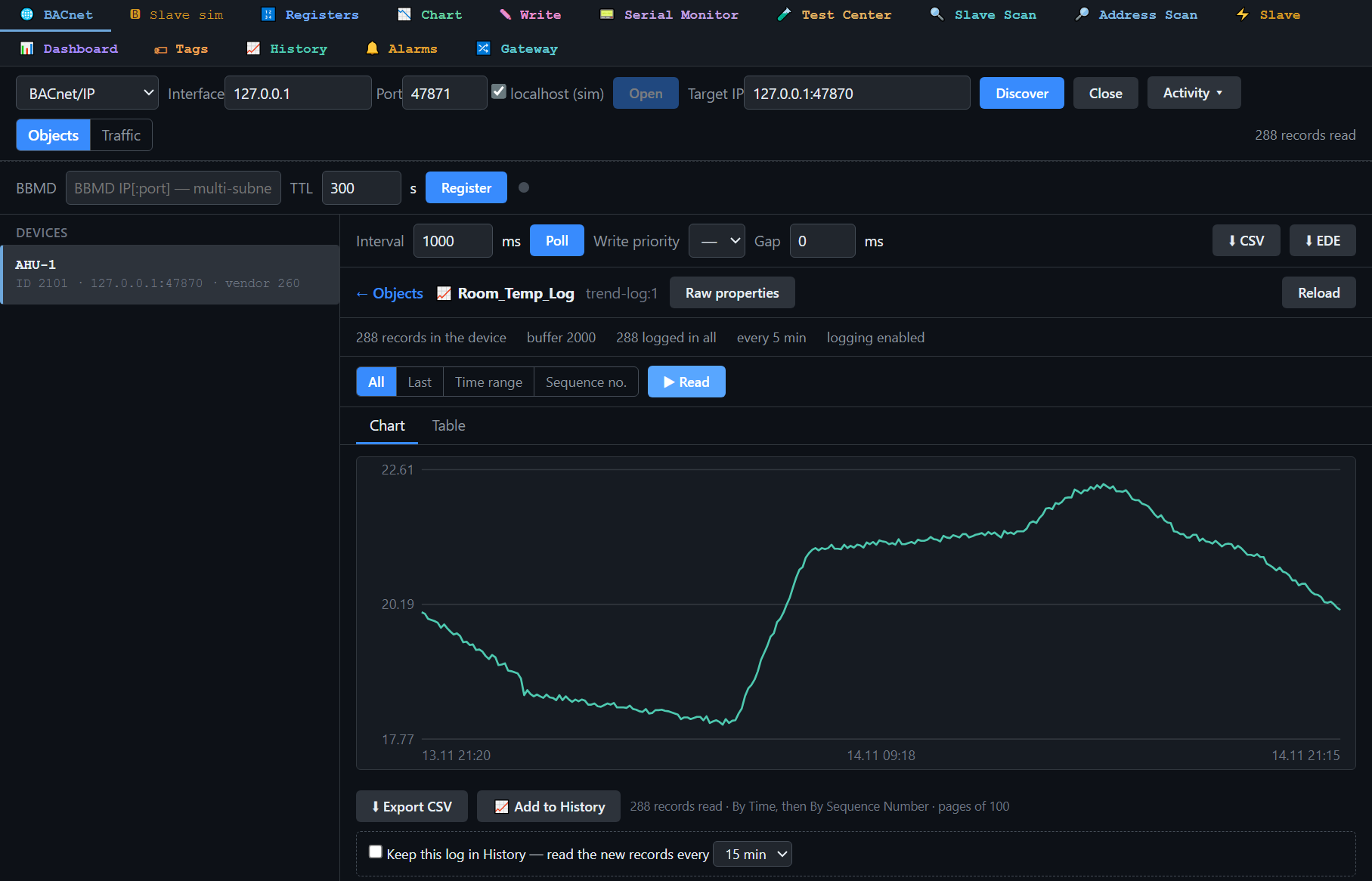
Trend Log and Trend Log Multiple objects are in the object list like any other object. A click opens the log: how many records the device holds, the buffer size, the interval and whether logging is enabled.

BACManager BACnet tab: Trend Log Room_Temp_Log (trend-log:1) of device AHU-1, 288 records every 5 minutes read with All; the chart shows an office room over 24 hours: night setback near 18 °C, heating from early morning to about 21.3 °C, a sunny afternoon peak at 22.6 °C and the evening setback
288 five-minute records of a room temperature read from the controller: the night setback, the morning heat-up and an afternoon of sun are all in the device's own log
// readrange, the way the device wants it

All, Last n, Time range, Sequence no.

You chooseWhat BACManager asks the deviceTypical use
Allthe whole buffer, page by pagea day of commissioning data, a complaint to investigate
Last nthe newest n records“what happened in the last hour?”
Time rangeReadRange By Timethe night the alarm came in
Sequence no.ReadRange By Sequence Numbercontinuing exactly where the last read ended

BACManager uses By Position, By Sequence Number or By Time — whichever the device supports — and joins segmented answers, with progress and Cancel. The Table shows each record's time, value and status: log disabled, buffer purged, clock changed, in alarm, fault, overridden, out of service. A Trend Log Multiple draws each of its points in its own colour.

// keep it

CSV, History, and a dashboard trend from the device's log

Export CSV

Every record read, with the device's timestamps, for Excel or a report.

Add to History

Stores the records as a History series with the device's own timestamps, so a dashboard Trend or Multi Trend draws them.

Keep this log in History

Reads the new records every 15 minutes (or as you set) from where the last read ended — no gaps and no doubles, even after BACManager was closed for less than the device's buffer holds.

That last one matters on a site where the PC is not always on: the controller keeps logging, and the next read fills the hole from its buffer. It works the same over BACnet/IP, MS/TP and BACnet/SC. To try it without a controller, BACManager's own BACnet simulator has a demo Trend Log.

// questions

BACnet Trend Log — FAQ

How do I read a BACnet Trend Log?+
Discover the device on the BACnet tab, click its Trend Log object, choose All, Last n, a time range or a sequence number, and press Read. BACManager reads the log buffer with ReadRange and shows a chart and a table.
Does it support Trend Log Multiple?+
Yes. A Trend Log Multiple object is read the same way, and each of its points is drawn in its own colour.
What if the device does not support ReadRange By Time?+
BACManager falls back to what the device does support — By Position or By Sequence Number — and joins segmented answers. The status line under the chart says which way the records were read.
Can I export a BACnet trend log to CSV?+
Yes. Export CSV writes every record read, with the device's timestamp, value and status.
Can BACManager collect the log continuously?+
Yes. Keep this log in History reads the new records on an interval you set (15 minutes by default), from the sequence number where the last read ended, so the History series has no gaps or doubles.
Which version has Trend Log reading?+
BACManager 1.4.9 and newer, included in the standard $149 one-time license.

Read the logs your controllers already keep

Download the free trial and open a Trend Log — or try the demo log in BACManager's own simulator. No credit card.

Download free trial See pricing

Windows 10/11 · $149 one-time