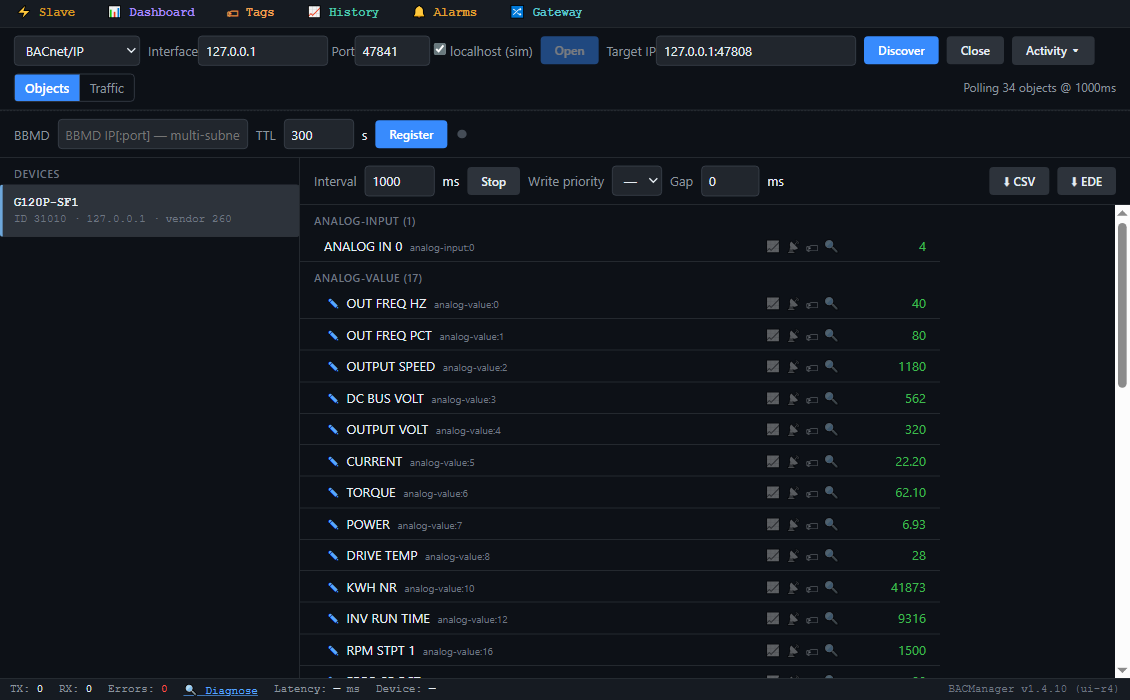
How to put a SINAMICS G120P drive on BACnet MS/TP through the CU230P-2's own RS-485 port: macro 110, the address switch, the device instance that every drive leaves the factory with (1), Max Master 32, the one-second fieldbus monitoring behind fault F01910 — and the control-word bits that have to be set before RUN STOP CMD does anything. With a free BACManager workspace.
The Control Units CU230P-2 HVAC and CU230P-2 BT speak BACnet MS/TP on their RS-485 port. Other G120 control units do not. For BACnet/IP put a BACnet router in front of the trunk, or read MS/TP directly from a PC — see BACnet MS/TP over RS-485.
⚡
Wiring
RS-485 up to 1200 m. Terminate the first and the last node with the Control Unit's terminating-resistor switch, and keep those two powered. An external 24 V supply on the Control Unit keeps the bus alive when the mains is off. The connector pins and switch position are in the CU230P-2 operating instructions.
📋
What the drive serves
B-ASC: ReadProperty, ReadPropertyMultiple, WriteProperty, SubscribeCOV (32 at most, lost on a restart), dynamic device and object binding, DeviceCommunicationControl. Max APDU 480, no segmentation. BTL-listed (BTL-30064).
// setup
Macro 110, then the address and the instance
Parameter
Factory / macro 110
Set to
p0015
—
110 “BT Mac 10: BACnet MS/TP fieldbus” (BOP-2: MAc PAr P15 → P_F bAc). It sets p2030 = 5 (BACnet), p2020 = 8 (38400 bit/s), p2040 = 1000 ms
Address switch / p2021
0
A free MS/TP MAC, 1–127. The DIP switch wins; p2021 can only be changed with the switch at 0
p2025[0] Device instance
1
A device instance unique in the building. Every drive leaves the factory as instance 1
p2025[3] Max Master
32
The highest master MAC on the trunk. A drive at MAC 40 is never polled for while this stays 32
p2020 Baud rate
8 = 38400
9600–76800, the trunk's rate
p2040 Fieldbus monitoring
1000 ms
0–1999999 ms. Longer than the gap between your BMS's messages to the drive, with margin; 0 switches it off
p2025[1] / [2], p2024[0]
5 / 3, 6000 ms
Max Info Frames, APDU retries, APDU timeout — usually leave
A new address or device name takes effect only after a full power cycle: switch off, wait until every LED is dark, switch on. The device name is preset at first power-up and kept in p7610 (also writable through Object_Name). p2027 picks German or English object texts, also after a power cycle. Siemens notes that the drive's “unit switchover” function is not permitted with BACnet.
// control
The command objects are control-word bits
Each BACnet command object is one bit of the drive's control word r0054, as Siemens' object table lists. Setpoint 1 comes as a percentage in AV17.
Object
Object name
Bit
To run
BV93
CTL OVERRIDE
r0054.10
1 — control via the fieldbus
BV27
OFF2
r0054.1
1 — no coast stop
BV28
OFF3
r0054.2
1 — no quick stop
BV26
RUN ENA CMD
r0054.3
1 — enable operation
BV20
RUN STOP CMD
r0054.0
1 — ON; 0 — stop on the ramp
AV17
FREQ SP PCT
setpoint 1
−199.99…199.99 %
BV22
FAULT RESET
r0054.7
0 → 1 acknowledges a fault
!
Our reading, check it
Siemens lists the bits but does not write out the order for BACnet. The “To run” column is how a SINAMICS control word works: without bit 10 the drive ignores the fieldbus, and bits 1–3 must be 1 before ON is accepted. Try it on the drive with the motor safe before you rely on it.
%
AV17 is a percentage
Of the reference speed p2000, which BACnet shows as RPM STPT 1 (AV16). With p2000 = 1500 rpm on a 4-pole 50 Hz motor, 100 % is 50 Hz. Check OUT FREQ HZ (AV0) against the drive's own display.
✋
Hand wins
The operator panel's “Manual” mode has a higher priority than the BACnet override control. BV4 MANUAL AUTO reads AUTO or LOCAL; BV90 LOCAL LOCK can stop the panel from taking over.
// the rules that bite
One second, instance 1, Max Master 32
1 s
Fieldbus monitoring
Macro 110 sets p2040 to 1000 ms. If no process data reaches the drive within that time it stops with F01910. A BMS that polls a trunk of many drives every few seconds will trip it: Siemens says the more nodes, the longer p2040 must be.
#1
Every drive is instance 1
Out of the box, two G120Ps on one network answer Who-Is with the same device instance. Set p2025[0] on each one before the BMS discovers them.
32
Max Master 32
MS/TP masters pass the token only up to Max Master. With the factory 32 a drive at MAC 33 or above can be invisible to the others; set p2025[3] to the trunk's highest MAC.
// points list
The G120P points a BMS uses
Object names as Siemens lists them. C = commandable (priority array), W = writable, R = read only. The drive's parameter is in brackets.
The drive's objects by name in BACManager (simulated drive built from Siemens' object table)
Object
Object name
Access
What it is
BV20 / BV21 / BV22
RUN STOP CMD / FWD REV CMD / FAULT RESET
C
ON, reverse, acknowledge (r0054.0 / .11 / .7)
BV26 / BV27 / BV28 / BV93
RUN ENA CMD / OFF2 / OFF3 / CTL OVERRIDE
C
The other control-word bits (r0054.3 / .1 / .2 / .10)
AV17
FREQ SP PCT
C
Setpoint 1, %
BV0 / BV1
RUN STOPPED / FWD REV
R
Running; direction, whatever the command source (r0052.2 / .14)
BV2 / BV3
FAULT / WARN
R
Fault; warning (r0052.3 / .7)
BV4 / BV8 / BV10
MANUAL AUTO / AT SETPOINT / DRIVE READY
R
AUTO or LOCAL; setpoint reached; ready
AV0 / AV1 / AV2
OUT FREQ HZ / OUT FREQ PCT / OUTPUT SPEED
R
Hz, %, rpm
AV5 / AV6 / AV7
CURRENT / TORQUE / POWER
R
A, N·m, kW (r0027 / r0031 / r0032)
AV3 / AV4
DC BUS VOLT / OUTPUT VOLT
R
V
AV8 / AV9
DRIVE TEMP / MOTOR TEMP
R
Heat sink and motor, °C
AV10 / AV12
KWH NR / INV RUN TIME
R / W
Energy, kWh (cannot be reset); motor hours (write 0 to reset)
AV18 / AV19–22
ACT FAULT / PREV FAULT 1–4
R
Fault numbers, e.g. 1910
AV39 / AV40–41
ACT WARN / PREV WARN 1–2
R
Alarm numbers
AV16 / AV30 / AV31
RPM STPT 1 / MIN Speed / MAX Speed
W
Reference speed p2000; p1080 / p1082, rpm
AV32 / AV33
ACCEL TIME / DECEL TIME
W
Ramp times p1120 / p1121, s
MSI0–7 / MSI8–15
fault 1–8 / warning 1–8
R
Fault and alarm buffers as multistate values
AI0–1, BI0–5, BI10–12
ANALOG IN 0…, DI0 ACT…, DO0 ACT…
R
The drive's own I/O
BO0–2, AO0–1
DO0 CMD…, ANALOG OUT 0…
C
Relays and analog outputs driven from BACnet
BV50–53, AV5000–5307
ENABLE PID…, PROP GAIN…
C / W
The drive's technology controllers
With BACnet the drive's analog outputs follow AO0/AO1 from the bus. To put a drive value on an output instead, connect it with p0771 — then writing that AO returns an error. Which BACnet priority a BMS should command at, and the relinquish defaults, are not in the manual; BACManager writes at priority 8 unless you choose otherwise.
// free download
The G120P workspace
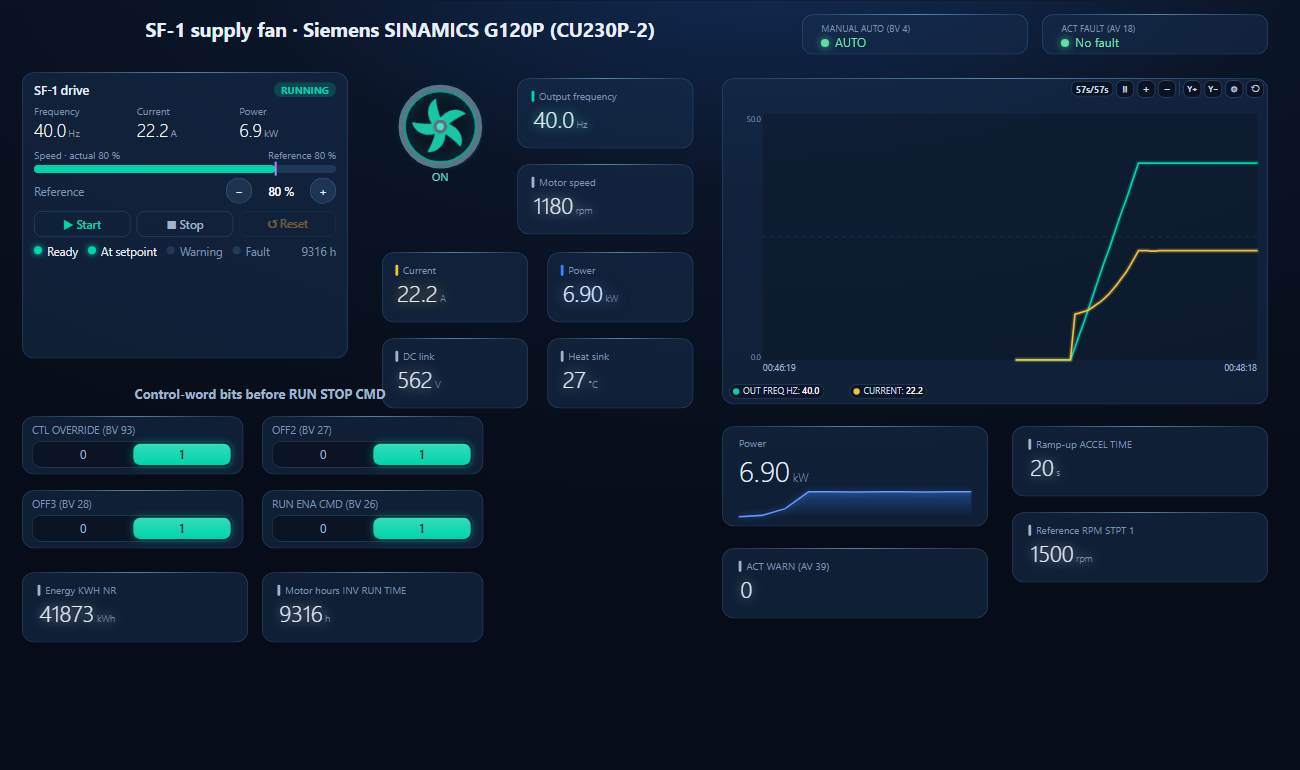
One dashboard page for a G120P on a supply fan: the drive faceplate with run, fault and setpoint, the four control-word switches, frequency, speed, current, power, DC link, energy and a trend.
CTL OVERRIDE, OFF2, OFF3, RUN ENA CMD set to 1, then Start and the setpoint from the faceplate; the drive ramps on ACCEL TIME (simulated drive)
1
Discover the drive
On the BACnet tab open MS/TP on the PC's RS-485 port at the trunk's baud rate (or BACnet/IP behind a router) and press Discover. The drive appears with the instance from p2025[0].
2
Open the workspace
Workspace → Open. The file reads device 31010; if yours has another instance, BACManager asks which discovered device takes its place and moves every point over.
3
Bits first, then Start
On the Dashboard press Run, set the four control-word switches to 1, then Start and the setpoint on the faceplate. BACManager keeps reading the drive, so p2040 sees a message at least every poll.
No process data within p2040 (1000 ms after macro 110)
p2040 above the BMS's poll gap, with margin; or 0 if the BMS monitors the drive itself
RUN STOP CMD written, nothing happens
CTL OVERRIDE, OFF2, OFF3 or RUN ENA CMD still 0; or the panel is in Manual
Set BV93, BV27, BV28, BV26 to 1; check BV4 reads AUTO
Two drives answer as instance 1
p2025[0] factory value
Set the device instance on every drive
A drive at a high MAC never appears
Max Master 32 on the other masters
p2025[3] = the trunk's highest MAC, on every master
New address or name ignored
Only a full power cycle applies them
Power off until all LEDs are dark, then on
Address p2021 cannot be changed
The address switch is not at 0
Use the switch, or set it to 0 first
A large ReadPropertyMultiple is refused
Max APDU 480, no segmentation
Fewer properties per request (BACManager splits by itself)
COV updates stop after a drive restart
Subscriptions are not kept
Subscribe again, or poll those points
// questions
Siemens G120P BACnet — FAQ
How do I enable BACnet on a SINAMICS G120P?+
Select macro 110 (p0015 = 110, “BT Mac 10: BACnet MS/TP fieldbus”), set the MS/TP address on the address switch or in p2021, set a unique device instance in p2025[0], and power the drive off until all LEDs are dark and on again.
What is the default BACnet device instance of a G120P?+
1, on every drive (p2025[0]). Max Master is 32 and the baud rate after macro 110 is 38400.
Why does the G120P trip F01910 on BACnet?+
Fieldbus monitoring p2040 is 1000 ms after macro 110: when no process data reaches the drive within that time it faults with F01910. Set p2040 longer than the gap between your BMS's messages to the drive.
Which object starts the drive?+
BV20 RUN STOP CMD is the ON bit of the control word. It works together with BV93 CTL OVERRIDE, BV27 OFF2, BV28 OFF3 and BV26 RUN ENA CMD, which need to be 1; the setpoint is AV17 FREQ SP PCT in percent.
Does the G120P support BACnet/IP?+
The CU230P-2 speaks BACnet MS/TP on its RS-485 port. Reach it from BACnet/IP through a BACnet router; BACManager also reads MS/TP directly from a USB RS-485 adapter.
Which other G120 control units have BACnet?+
The function manual describes BACnet MS/TP only for the CU230P-2 HVAC and CU230P-2 BT control units.
// sources
Where this comes from
Siemens AG: SINAMICS G120, G120P, G120C, G110M, G115D — Fieldbuses, Function Manual, edition 11/2020, firmware V4.7 SP13, A5E34229197B AG, section 5.5 “Communication via BACnet MS/TP”, and BTL listing BTL-30064 for the CU230P-2 HVAC and BT. Get the manual from Siemens Industry Online Support and check it against your drive's firmware. The run order of the control-word bits is our reading of the control word, not a Siemens statement. Siemens and SINAMICS are trademarks of Siemens AG; BACManager is not affiliated with Siemens. The pictures on this page are from BACManager connected to a simulated drive built from the published object table.