// one list
The device's alarms beside your own
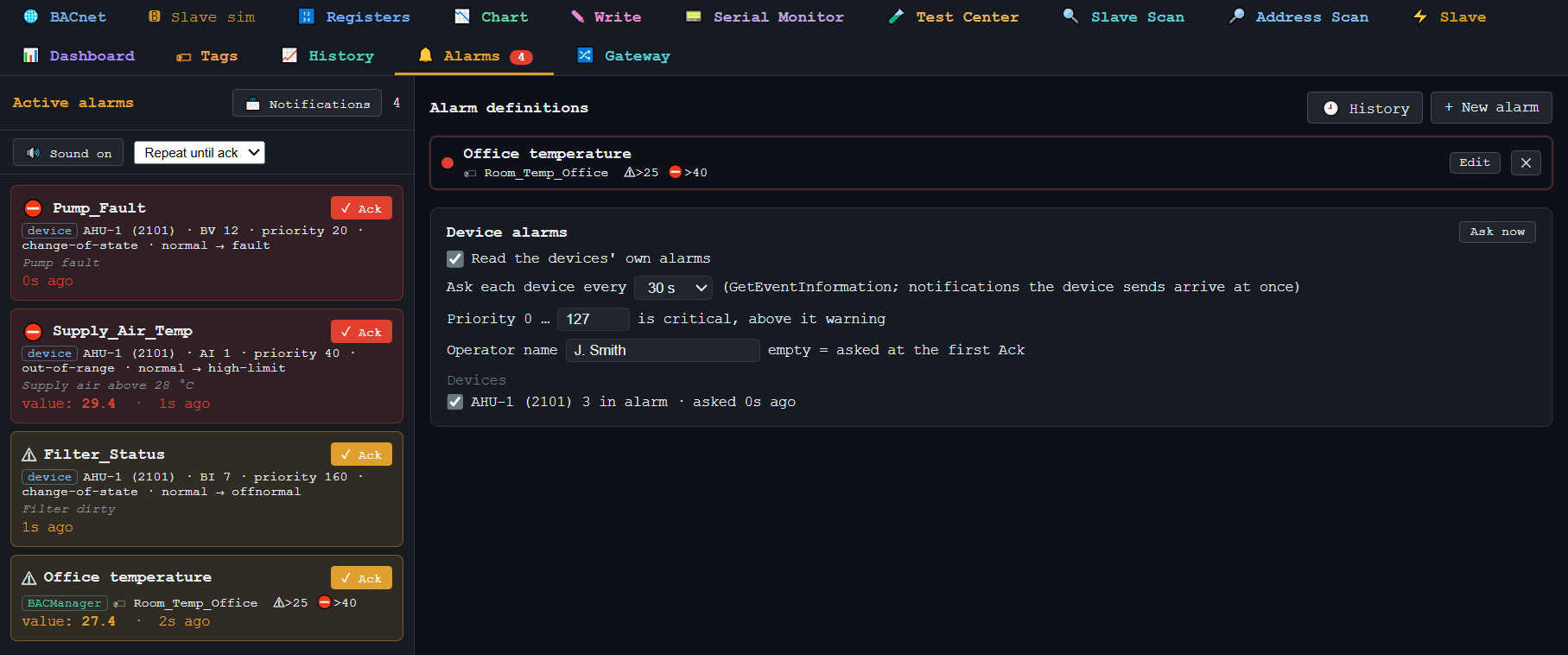
Each row says where it came from: device or BACManager. A device alarm shows the device, the object, the priority, the transition and the device's own message.
Controllers raise their own alarms — a supply air temperature out of range, a dirty filter, a pump fault — and send them to whoever is in their Notification Class. BACManager receives those event notifications, asks each device for what is not normal, and acknowledges an alarm in the device with the operator's name. The device's alarms stand in the same list as BACManager's own alarms on values, with the same history, sound and notifications.
Windows 10/11 · one-time license · 14-day trial
Each row says where it came from: device or BACManager. A device alarm shows the device, the object, the priority, the transition and the device's own message.
| Way | BACnet service | When it matters |
|---|---|---|
| The device tells | Confirmed / UnconfirmedEventNotification — BACManager confirms the confirmed ones | the alarm appears the moment it happens |
| BACManager asks | GetEventInformation, or GetAlarmSummary on older devices, every 30 s (or as you set) | alarms of a class that does not list this computer, and alarms already active when BACManager started |
| Ack | AcknowledgeAlarm, with the operator name as its source | the device, and anyone else watching it, sees who acknowledged |
BACnet priorities run from 0 (most urgent) to 255. You set up to which priority an alarm counts as critical — 0…127 by default, everything above is a warning. The operator name is asked at the first Ack and then kept; a Runtime machine asks at every start. The alarm history records who acknowledged what, and when.
A device sends its alarms only to the recipients in its Notification Class. Open the class on the BACnet tab and press 📨 Send alarms to BACManager: after a question, BACManager adds this computer to the class's Recipient_List.
A dashboard Alarm List and the Annunciator lamp block acknowledge device alarms the same way — the Ack goes to the device.
Device alarms go out through the same notifications as BACManager's own, also with the window closed and on a Runtime machine.
The gateway's Publish alarms sends every alarm, device alarms included, to your broker — see BACnet to MQTT.
Adding a recipient writes to the controller, which is why BACManager asks first. On a site with a BMS, check with whoever runs it: some sites keep the Recipient_List under change control. Asking every 30 seconds needs no change in the device at all.
Download the free trial, discover the site, and the devices' active alarms appear within 30 seconds. No credit card.
Windows 10/11 · $149 one-time
We use Google Analytics cookies to see how the site is used. You can accept or decline — declining keeps analytics off.