Every device. One tool. Pay once. Modbus · BACnet · Siemens S7 · one-time licence · also from us: ModbusManager ↗
// swegon · gold air handling unit · iqlogic · bacnet/ip

Swegon GOLD
BACnet Points List & Setup

How to bring a Swegon GOLD air handling unit onto a BMS through the BACnet/IP that is built into its IQlogic control: the External Port B address every unit leaves the factory with (10.200.1.1), the Device ID that is 0 on every unit, the one object that starts, stops and switches speed (MV 793), the points a BMS uses — and which generation the published object list belongs to. With a free BACManager workspace.

Download free trial Free GOLD workspace

Sources: Swegon BACnet IP GOLD RX/PX/CX/SD, Generation E (GOLD_E_BACnet_150316, 2015-03-16), Swegon GOLD BACnet PICS Version E (2014-04-29) and the GOLD version F/G function manual GB.GOLDSKFFI.20260610 (program 2.47)

// before you start

BACnet/IP is in the unit — the list is Generation E

🔌

No gateway

GOLD RX, PX, CX and SD units speak BACnet/IP on the control unit's Ethernet port, which the menus call External Port B. The PICS lists BACnet/IP as the only data link: there is no BACnet MS/TP. The unit's EIA-485 port offers Modbus (factory), EXOline, Metasys N2 Open or LON instead. Swegon's “BACnet gateway” documents are for other products, not GOLD.

E

Which generation

GOLD has been sold as version E (2013–2017), F (from 2017) and now F/G. Swegon's published BACnet object list is for Generation E, program version 1.10 and newer. We found no public object list or EDE file for F or G. The points below are from the Generation E list; on a newer unit, read the unit's own object list and compare, or ask Swegon for the EDE file of your program version.

📋

What the unit serves

Swegon calls GOLD a B-AAC. ReadProperty(Multiple), WriteProperty(Multiple), COV, alarm and event notifications with acknowledge and GetEventInformation, an internal schedule, time synchronisation and reinitialize. Segmented requests and responses, window 32. Vendor ID 300, protocol revision 12. Max APDU and a BTL listing: not given in the documents we found.

// setup

Communication menu: the address and the Device ID

On the IQnavigator hand-held terminal or the unit's web page, under Communication. Factory settings as the F/G function manual (program 2.47) lists them.

SettingFactorySet to
External Port B → DHCPOffUsually off: a BMS wants a fixed address
External Port B → IP address10.200.1.1A free address in the BMS network. Every unit leaves the factory with this one
Net mask / Default GATEWAY255.255.255.0 / 0.0.0.0The BMS network's mask; a gateway when the BMS is in another subnet
BACnet IP → Device ID0A device instance unique in the building
BACnet IP → Port number47808Leave, unless the site uses another UDP port
BACnet IP → Network number Ext. B / Internal network number A0 / 0Listed without an explanation in the manual; leave unless your BACnet network plan gives numbers
Operation level communicationInactiveThe same choices as MV 793, with Inactive in place of Auto; whether it is the same setting is not stated — see below
Time and date → Time source—Manual, SNTP or BACnet

The manual has no separate on/off switch for BACnet/IP, and does not say whether a changed address needs a restart — check the address answers before you leave the unit. Base setting saves and loads both the unit's settings and its communication settings (internal memory, SD card or USB stick). On units with program 2.47 delivered after August 2025 the local and installation logins of the web page are off by default; the service password is on a label on the control board and differs for every unit.

// control

One object runs the unit: MV 793

Communication operation level is a commandable multi-state value. Operation level (MI 592) reads back what the unit actually does and why.

MV 793 stateMeaningMI 592 then reads
1 AutoDefault. The BMS does not command the speedWhatever the timer or another source decides, e.g. 24 Time channel low speed
2 Total stopStopped; no internal automatic function or external command can start it5 Communication total stop
3 Low speedRuns at the low speed set points23 Communication low speed
4 High speedRuns at the high speed set points30 Communication high speed
5 Normal stopStopped, but internal and external automatic functions may start it6 Communication normal stop
6 Extended normal stopAs normal stop, except summer night cooling7 Communication extended normal stop
!

Auto is our reading

The Generation E list calls state 1 “Auto”; the F/G terminal menu calls the factory setting “Inactive”. Neither document says in words what it hands control back to. We read it as “communication does not decide”; watch MI 592 after writing it.

8

Which priority

The analog, binary and multi-state values carry a priority array and a relinquish default, but Swegon gives no recommended priority. BACManager writes at priority 8 unless you choose otherwise. A value written stays until it is relinquished — see the priority array explained.

⚙

Set points depend on each other

The low speed air flow set point (AV 3) can go no higher than the high speed one (AV 5), which can go no higher than the max speed one (AV 7). Raise high speed first. Supply air temperature set point AV 132: 10–40 °C, default 21, used in SA regulation mode (MV 115 = 4).

// the rules that bite

Device ID 0, 10.200.1.1, Total stop

#0

Every unit is Device ID 0

Two GOLD units on one network answer Who-Is with the same device instance until someone sets it. Give each unit its own Device ID before the BMS discovers them.

IP

Every unit is 10.200.1.1

External Port B is static 10.200.1.1/24 from the factory. A second new unit on the same switch is an address conflict, and a BMS in another subnet will not find either one. Set the address first.

■

Total stop means total

Written from the BMS, Total stop also keeps the unit's own automatic functions from starting it. Use Normal stop when night heating or cooling should still run, and remember a value at priority 8 outlives the BMS that wrote it.

// points list

The GOLD points a BMS uses

From Swegon's Generation E list (program version 1.10 and newer), object names as Swegon writes them. C = commandable (priority array), R = read only. On F or G units, check each one against the unit's object list.
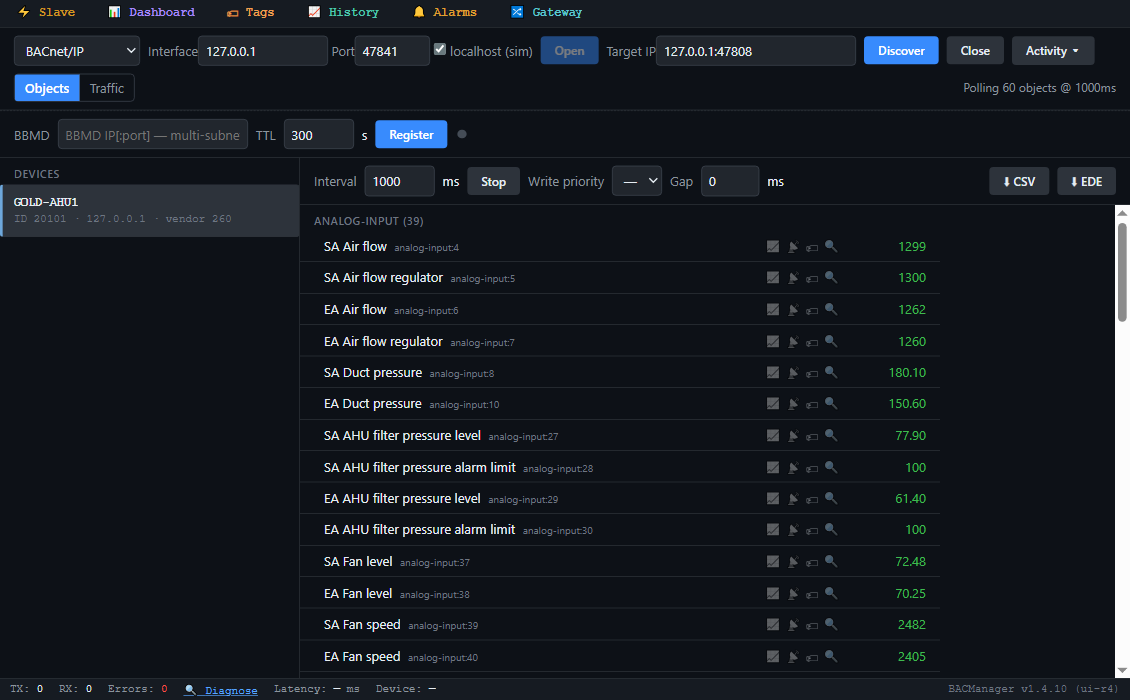
BACManager BACnet tab: device GOLD-AHU1, instance 20101, with its Swegon GOLD objects listed by name and polled: SA Temperature, EA Temperature, Outdoor temperature, SA Air flow, EA Air flow, SA Fan level, Heat exchanger regulator level, Operation level, Communication operation level, A-alarm active and the others
The unit's objects by name in BACManager (simulated unit built from Swegon's Generation E object list)
ObjectObject nameAccessWhat it is
MV 793Communication operation levelC1 Auto, 2 Total stop, 3 Low speed, 4 High speed, 5 Normal stop, 6 Extended normal stop
MI 592Operation levelRWhat the unit runs at and why, 41 states (manual, external, communication, time channel…)
BI 1 / 2 / 3 / 4Operation active / Damper operation active / Low speed operation active / High speed operation activeRRun and speed status
BI 13 / BI 14A-alarm active / B-alarm activeRAny alarm of priority class A / B
AI 604–613Triggered alarm #1…#10R(group − 1) × 15 + number in group; 0 = none
BV 1Alarm resetCResets all active alarms
AI 64 / 66 / 68SA Temperature / EA Temperature / EA Regulation temperatureR°C, −55…125
AI 73 / 74Outdoor temperature / Outdoor regulation temperatureR°C
AV 132SA temperature set pointC10–40 °C, default 21 (SA regulation mode)
AV 135 / 136 / 137EA/Room temperature set point / SA min temp set point / SA max temp set pointCEA/room regulation: default 21, 16, 28 °C
MV 115Temperature regulation modeC1 Inactive, 2 ERS-1, 3 ERS-2, 4 SA (default), 5 EA, 6 ORS, 7 ORE
AI 4 / AI 6SA Air flow / EA Air flowRl/s
AV 3 / 4, AV 5 / 6SA / EA low speed air flow set point, SA / EA high speed air flow set pointCl/s; low ≤ high ≤ max (AV 7 / 8)
AI 8 / 10, AV 19–22SA / EA Duct pressure, low / high speed pressure set pointsR / CPa, for pressure regulation
MV 1 / MV 2SA / EA Fan regulation modeC1 Air flow reg., 2 Pressure reg., 3 Demand reg., 4 Slave controlled
AI 37–46SA / EA Fan level, Fan speed, Voltage, Fan current, Fan powerR%, rpm, V, A, kW
AI 47 / 48 + AI 49 / 50SA / EA Fan kWh + SA / EA Fan MWhRkWh counts 0–9999; read MWh with it
AI 63SFPRSpecific fan power, kW/(m³/s)
AI 27 / 28, AI 29 / 30SA / EA AHU filter pressure level / alarm limitRPa; settings AV 103 / 104, 30–500, default 100
AI 91 / 94 / 101Heat exchanger regulator level / Reheat regulator level / Cool regulator levelRHeat recovery, reheat and cooling, %
AI 105 / 106RHX operation level / RHX efficiencyRRotary heat exchanger, %
BI 38 / 43 / 44Re-heat output / Cool output 1 / Cool output 2RRelay outputs
BI 501…Alarm group:numberROne object per alarm, e.g. BI 892 Alarm 27:2, AHU filter supply air dirty
Schedule 0, Calendar 0 / 1Schedule #1, Calendar #1 / #2CValues 1 Total stop, 2 Low, 3 High, 4 Normal stop, 5 Extended normal stop; 6 times a day, 2 exceptions; 10 dates per calendar
Notification Class 0 / 1 / 3 / 10 / 11NC 00 A-Alarm, NC 01 B-Alarm…—A-alarm, B-alarm, alarms in BACnet objects, info message, events

The full Generation E list runs to 60 pages: pre-filters and end filters, pre-heat, extra regulation sequences, Xzone, ReCO2, humidity, COOL DX, SMART Link and MIRU zone controls. Much of it concerns optional functions. BACManager reads the schedule and calendars into its editor, and can receive the unit's alarm notifications and acknowledge them; the PC must be a recipient in the notification class for that.
// free download

The GOLD workspace

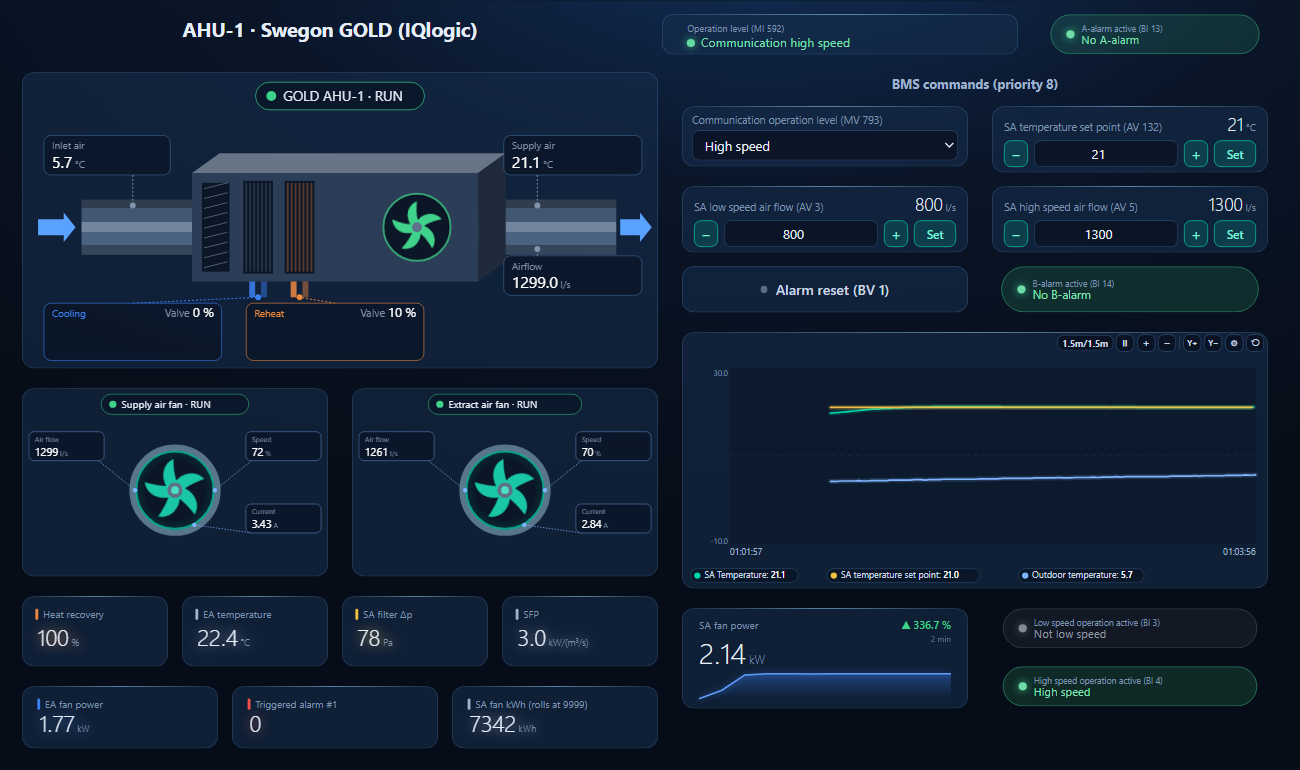
One dashboard page for a GOLD with heat wheel, reheat and cooling: the unit with outdoor and supply air, air flow, cooling and reheat levels; both fans with flow, level and current; operation level, A- and B-alarm; and the BMS commands at priority 8.

BACManager dashboard for a Swegon GOLD air handling unit: operation level Communication high speed, no A-alarm, the AHU drawing with outdoor and supply air temperature, supply air flow and the cooling and reheat levels, the supply and extract air fans running with air flow, fan level and current, Communication operation level, temperature and air flow set points at priority 8, and a trend of supply air, its set point and the outdoor temperature
Communication operation level set to High speed from the page: the fans ramp to the high speed air flow set points while the supply air holds its set point (simulated unit)
1

Discover the unit

On the BACnet tab open BACnet/IP on the PC's network card in the unit's subnet and press Discover. From another subnet, register with the site's BBMD as a foreign device. The unit appears with its Device ID.

2

Open the workspace

Workspace → Open. The file reads device 20101; if yours has another instance, BACManager asks which discovered device takes its place and moves every point over.

3

Run

On the Dashboard press Run. The commands write at priority 8 only in Run mode and only after the unit has answered. Set MV 793 back to Auto to hand the unit back to its own timer.

Download workspace
// when it does not work

Typical problems

What you seeWhyWhat to do
Discover finds nothingExternal Port B still on 10.200.1.1/24, the BMS in another subnetSet the unit's address, mask and gateway; across routers use a BBMD
Two units answer as instance 0Device ID factory valueSet the Device ID on every unit
Address conflict when the second unit is connectedBoth are 10.200.1.1Address each unit before it goes on the shared network
Unit will not start, from the BMS or its timerMV 793 left at Total stop, or a stop from the terminal or a digital inputRead MI 592: 3 manual, 4 external, 5 communication, 8 time channel total stop
Low speed air flow will not go higherAV 3 is limited by the high speed set point AV 5Raise AV 5 first (and AV 7 above it if needed)
An object from this list is missingFunction not configured, or an F/G unit whose list differsRead the unit's object list by name; ask Swegon for the EDE of your program version
Fan energy drops back to a small numberThe kWh object counts only to 9999Read the MWh object with it
Web page login refused on a new unitProgram 2.47, delivered after August 2025: local and installation logins offUse the service password from the label on the control board
// questions

Swegon GOLD BACnet — FAQ

How do I enable BACnet on a Swegon GOLD?+
BACnet/IP is built in. In the Communication menu (hand-held terminal or web page) give External Port B an address in the BMS network and set a unique Device ID under BACnet IP; the port is 47808. The manual lists no separate BACnet on/off setting.
What are the GOLD's default IP address and device instance?+
External Port B is 10.200.1.1 with mask 255.255.255.0 and DHCP off; the BACnet Device ID is 0 and the UDP port 47808 — the same on every unit.
Which BACnet object starts and stops a GOLD?+
MV 793 Communication operation level: 1 Auto, 2 Total stop, 3 Low speed, 4 High speed, 5 Normal stop, 6 Extended normal stop. MI 592 Operation level shows the state the unit is actually in and its source.
Is there a BACnet points list for GOLD version F or G?+
We found none published. Swegon's public list is for Generation E, program version 1.10 and newer. On an F or G unit, read the object list from the unit and compare, or ask Swegon for the EDE file of your program version.
Does the GOLD support BACnet MS/TP?+
No. The PICS lists BACnet/IP as the only data link. The unit's EIA-485 port speaks Modbus, EXOline, Metasys N2 Open or LON.
How do I read and reset GOLD alarms over BACnet?+
BI 13 and BI 14 show any A- or B-class alarm, AI 604–613 the triggered alarm numbers, and each alarm also has its own binary input from BI 501. BV 1 Alarm reset resets all active alarms. The unit also sends alarm notifications through notification classes 0 (A) and 1 (B).
// sources

Where this comes from

Swegon AB: BACnet IP GOLD RX/PX/CX/SD, Generation E — applicable to program version 1.10 and newer versions, GOLD_E_BACnet_150316 (16 March 2015); Swegon GOLD BACnet PICS Version E, 29 April 2014 (application software 1.11); and GOLD Air Handling Unit, Function manual, installation, GOLD RX/PX/CX/SD version F/G, program version 2.47 and newer, GB.GOLDSKFFI.20260610. Get the documents from swegon.com and check them against your unit's program version. The points list is Generation E; for F and G units no public object list was found. What MV 793 “Auto” hands back to is our reading, not a Swegon statement. Swegon, GOLD and IQlogic are trademarks of Swegon AB; BACManager is not affiliated with Swegon. The pictures on this page are from BACManager connected to a simulated unit built from the published Generation E object list.

// more device guides

Other BACnet devices

Chillers and rooftop units
Daikin MicroTech III chiller
Trane Symbio 700
Carrier AquaSnap 30RC
York YLAA chiller
AAON VCCX2
Lennox CORE
Air handling units
Systemair Access (Geniox, Topvex)
VAV and room controllers
KMC Conquest VAV
Data centre cooling
Vertiv Liebert iCOM
Boilers
Lochinvar Crest boiler
VRF and split systems
Daikin iTM (VRV)
Mitsubishi AE-200
Drives
ABB ACH580
Schneider ATV600
Siemens SINAMICS G120P
Danfoss VLT FC 102
Yaskawa HV600
Pumps and valves
Grundfos MAGNA3 (CIM)
Wilo Stratos MAXO (CIF)
Belimo Energy Valve
Energy meters
Accuenergy Acuvim II
Routers
BASrouter (MS/TP to IP)

All BACnet device guides →

Commission the GOLD from your laptop

Download the free trial, discover the unit and open the GOLD workspace — every point by name, start, stop and speed at priority 8. No credit card.

Download free trial See pricing

Windows 10/11 · $149 one-time