Every device. One tool. Pay once. Modbus · BACnet · Siemens S7 · one-time licence · also from us: ModbusManager ↗
// vertiv · liebert icom · crac / crah · intellislot unity

Liebert iCOM
BACnet Points List & Setup

How to bring a Vertiv Liebert cooling unit with the iCOM controller onto a BMS over BACnet: the IntelliSlot Unity card that does the talking, the write-access switch that blocks every write until you enable it, BACnet/IP or MS/TP, the data map the card builds for your unit, object names that are data IDs, a relinquish that changes nothing — and two writes a second at most. With a free BACManager workspace for a data-centre room.

Download free trial Free iCOM workspace

Sources: Vertiv IntelliSlot Unity card guide SL-52645 REV11, BACnet PICS SL-52647 and SL-70399, Liebert IntelliSlot reference guide SL-28170 REV9 (iCOM v4 object tables)

// before you start

The card speaks BACnet, not the iCOM

🔌

An IntelliSlot card

In Vertiv's documents BACnet comes from an IntelliSlot card in the unit. The IS-Unity-DP has an Ethernet port for BACnet/IP and an RS-485 port for BACnet MS/TP, Modbus RTU or YDN23. The IS-Unity-SNMP has Ethernet only. Older units used the IS-IPBML web card (BACnet/IP). The iCOM “High Definition” display has its own PICS describing the same Unity BACnet implementation.

2

Two protocols per card

A Unity card runs at most two protocols at once, and only one kind of BACnet: IP or MS/TP. Only one protocol may use the RS-485 port, so MS/TP and Modbus RTU cannot share it. The card's own Velocity Protocol also uses UDP 47808.

📋

What the card serves

ReadProperty, ReadPropertyMultiple, WriteProperty, WritePropertyMultiple, SubscribeCOV (COV_Increment writable, default 0.5), dynamic device and object binding, and time synchronisation. No segmentation. No alarm and event services, no schedules, no Trend Logs. The PICS state BTL testing.

// setup

Communications → Protocols → BACnet

You do all of this in the card's web interface. The card takes an address from DHCP by default; with no DHCP server, connect a PC directly and use the link-local address in Vertiv's guide. Change the factory user names and passwords first, as Vertiv recommends.

SettingDefaultSet to
Protocols: BACnetoffTicked, and no more than one other protocol
Managed Device Write Accessnot statedEnabled (read/write) if the BMS is to write anything. It decides whether the BACnet server may write to the unit at all
BACnet Interface—BACnet IP or BACnet MSTP
Device Object Instance Numbernot stated0–4194302, unique in the building
Device Object Namecard defaultA unique name, e.g. the unit tag
APDU Timeout / Retries3000 ms / 3Usually leave
BACnet IP: Port Number47808The site's BACnet port
BACnet IP: Register as Foreign Device, BBMD, Time-to-Live—Only when the card sits on another subnet than the BMS
BACnet MSTP: Node ID10–127, unique on the RS-485 trunk
BACnet MSTP: Data Rate, Max Master, Max Info Framesnot statedThe trunk's baud rate; Max Master at least the highest MAC on the trunk

Save, then restart the card: Communications tab → Support → Enable → Restart. For MS/TP the Unity-DP takes the RS-485 trunk on its RJ-45 “485” port through Vertiv's adapter cable with a terminal block (see the guide for the colours). The card discovers the unit behind it and creates the BACnet objects itself. The Device object stands for the card, not for the cooling unit.

// writing to the unit

Write access, two a second, and a relinquish that does nothing

Vertiv's PICS: Present_Value can be written on outputs, and on value objects whose data point in the unit is writable. Those objects carry a priority array.

ObjectObject nameAccessWhat it does
MSV1155143_1RWSystem On/Off Control: 1 Off, 2 On
AV205331_1_1RWSupply Air Temperature Set Point
AV325333_1_1RWReturn Air Temperature Set Point (the air at the unit's inlet)
AV1 / AV2 / AV35008_1 / 5325_1 / 5011_1RWAir Temperature Set Point, Proportional Band, Dead Band
AV61 / AV625029_1 / 5339_1RWHumidity Set Point; Return Humidity Set Point
AV2115050_1RWFan Speed Maximum Set Point
AV2685075_1RWBMS Timeout Period: the time within which the BMS must talk to the unit
MSV12 / MSV23 / MSV825324_1 / 5332_1_1 / 5373_1RWAir Temperature Control Type; Supply Air Temperature Sensor Control (Disabled, Limit, Control, Temp Only); Fan Control Mode
W

Write access first

With Managed Device Write Access not enabled on the card, the BACnet server does not write to the unit. Check this before you look for anything else when writes go nowhere.

2/s

Two writes a second

Some BMSs resend the same setpoint over and over. Vertiv asks for no more than two writes per second on average, so the unit can catch up after a burst. If you use BACManager's per-tag “Refresh (s)” re-write, keep its interval long.

8

Relinquish keeps the value

On these objects Relinquish_Default always equals Present_Value. Writing NULL to every priority therefore leaves the last value in place. To hand a setpoint back, write the value you want, not NULL. BACManager writes at priority 8 unless you choose another; Vertiv names no priority.

// the rules that bite

A generated map, data IDs for names, three set points

.txt

The map belongs to your unit

The card builds its object list from the unit it finds. Download it from the Managed Device tab → Summary → Downloads → BACnetDataMap.txt. The only published table is SL-28170 from 2012, for iCOM v4. Treat its instances as a starting point and check them against your map.

#

Names are data IDs

In SL-28170 the Object_Name is a numeric data ID such as 5002_1_1 (Supply Air Temperature), and the readable text is the data description. A BMS that imports by name gets a column of numbers, so label the points from the map.

SP

Which set point applies

The map has three temperature setpoints: Air Temperature Set Point (AV1), supply (AV20) and return (AV32). Which one the iCOM controls to depends on how the unit is set up, for example Supply Air Temperature Sensor Control (MSV23). SL-28170 does not explain it, so check the unit's configuration before writing.

// points list

The iCOM points a BMS uses

From SL-28170 REV9 Tables 69–71 (Liebert iCOM v4 on Challenger 3000/ITR, CW, Deluxe System/3, DS, HPM, PeX). RW = read/write, RD = read only. The table gives no units. Multistate values count from 1.
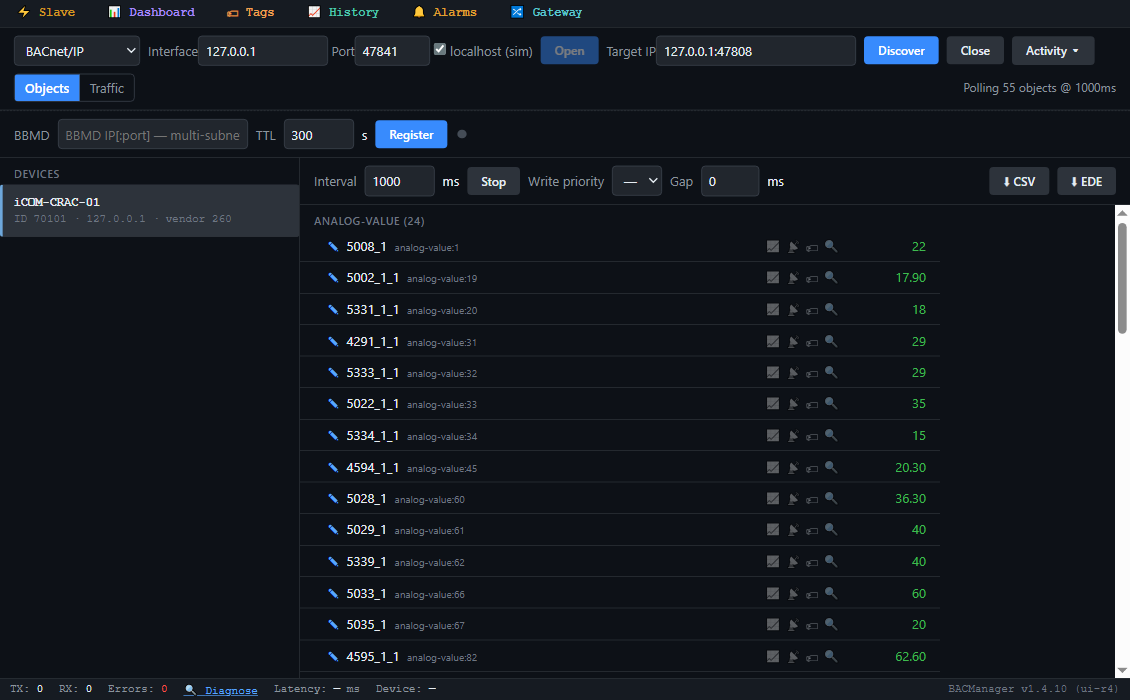
BACManager BACnet tab: device iCOM-CRAC-01, instance 70101, with its objects listed by their Liebert data-ID names and polled: 5002_1_1, 5331_1_1, 4291_1_1, 5333_1_1, 5028_1, 5029_1, 5077_1, 5078_1, 5143_1, 4123_1 and the others
The objects as the card names them: data IDs, not words (simulated unit built from SL-28170's iCOM v4 tables)
ObjectObject nameAccessData description
AV19 / AV315002_1_1 / 4291_1_1RDSupply Air Temperature (outlet); Return Air Temperature (inlet)
AV605028_1RDReturn Humidity
AV45–47 / AV82–844594_1_1… / 4595_1_1…RDExt Air Sensor A, B, C temperature / humidity
AV33 / AV34, AV66 / AV675022_1_1 / 5334_1_1, 5033_1 / 5035_1RWReturn air over/under temperature and high/low humidity thresholds
AV280 / AV2815077_1 / 5078_1RDFan Speed, % of maximum rated speed; Compressor Utilization, % of rated capacity
AV282 / AV1245379_1 / 5358_1RDFree Cooling Valve Open Position; Free Cooling Fluid Temperature
AV286–2895380_1, 5080_1, 5081_1, 5079_1RDHot water / hot gas valve position; reheat, humidifier, dehumidifier utilization
AV97 / AV110 / AV2125267_1_1 / 5267_1_2 / 5374_1RWCompressor 1 and 2 hours; fan hours
MSV934123_1RDSystem Status: Normal Operation, StartUp, Normal with Warning, Normal with Alarm, Abnormal Operation
MSV94 / MSV95 / MSV964706_1 / 4707_1 / 5074_1RDSystem Operating State (Off, On, Standby); Control Mode (Internal/External); Operating State Reason
MSV45 / MSV575264_1_1 / 5264_1_2RDCompressor 1 / 2 State, Off/On
MSV107–1145381_1 … 5388_1RDFan, Cooling, Free Cooling, Maintenance, Hot Water/Hot Gas, Electric Reheat, Dehumidifier, Humidifier state
BV1 / BV2, BV14 / BV155015_1_1 / 5019_1_1, 5023_1_1 / 5335_1_1RDSupply and return air over/under temperature events
BV41 / BV425034_1 / 5036_1RDHigh / Low Return Humidity
BV77–86, BV97–1065269_1_1…RDCompressor 1 / 2 events: hours, high head pressure, low suction pressure, short cycle, thermal overload…
BV206 / BV207 / BV2635376_1 / 4729_1 / 5053_1RDMain Fan Overload; Fan Issue; Loss of Air Flow
BV2605115_1RDBMS Communications Timeout
BV262 / BV269 / BV2755118_1 / 4720_1 / 4723_1RDClogged Air Filter; Smoke Detected; Water Under Floor
BV310–3145110_1_1 … 5111_1_1RDUnit Off, Unit On, Unit Partial Shutdown, Unit Shutdown, Unit Standby
MSV126 and up4718_1…RWEvent Control (Disabled/Enabled) and Event Type (Message, Warning, Alarm) for each event

The events arrive as binary values, not as BACnet alarms: the card has no alarm services. Poll them or subscribe with COV. The Event Control objects can disable an event. Vertiv's glossary says a disabled event goes into no active list and no history, so check them before you trust a quiet unit. Liebert SN sensors on the card are not available over BACnet.
// free download

The iCOM data-centre workspace

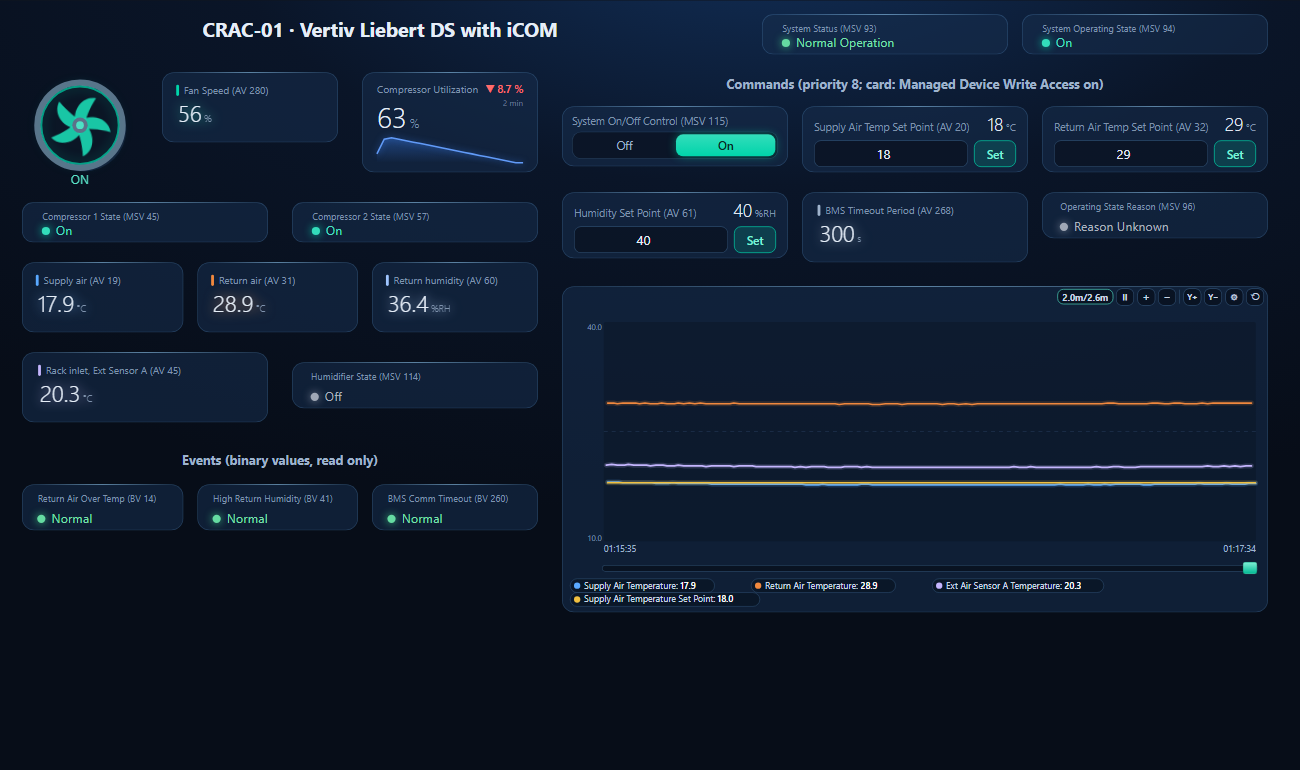
One dashboard page for a Liebert DS cooling a computer room: fan state and speed, compressor utilization and states, supply, return and rack-inlet air, return humidity, humidifier, three events, system status and operating state, a trend, and on/off, supply, return and humidity set points as controls.

BACManager dashboard for a Vertiv Liebert iCOM CRAC unit: Normal Operation, operating state On, the fan running, fan speed and compressor utilization, both compressors on, supply air near 18 degrees C, return air near 29 degrees C, return humidity, rack inlet temperature, events all normal, set points as controls, and a trend where supply air follows its set point down from 20 to 18 degrees C
Supply Air Temperature Set Point written from 20 to 18 °C: supply air follows, and the fan slows while the return air holds its own set point (simulated unit)
1

Discover the card

On the BACnet tab open BACnet/IP (or MS/TP on the PC's RS-485 port) and press Discover. The card appears with its Device Object Instance Number. If it is on another subnet, register with the site's BBMD first.

2

Open the workspace

Workspace → Open. The file reads device 70101; if yours has another instance, BACManager asks which discovered device takes its place and moves every point over. Then compare the instances with your BACnetDataMap.txt.

3

Run

BACManager starts reading the unit by itself. On the Dashboard press Run to use the controls, which write only in Run mode and only after the unit has answered. Writes need Managed Device Write Access on the card.

Download workspace
// when it does not work

Typical problems

What you seeWhyWhat to do
Reads work, every write fails or does nothingManaged Device Write Access is not enabledEnable it under Protocols → BACnet, save, restart the card
BACnet cannot be tickedTwo protocols are already enabledSwitch one off; a card runs two at most
MS/TP silent while Modbus RTU worksOnly one protocol may use the RS-485 portChoose MS/TP or Modbus RTU for the 485 port
Instances do not match the published tableThe card builds the map for the unit it findsDownload BACnetDataMap.txt from the Managed Device tab
Points show up as numbers onlyObject names are data IDsName the points from the data map's descriptions
Relinquished, value stayedRelinquish_Default equals Present_ValueWrite the value you want instead of NULL
Unit slow to answer after setpoint burstsThe BMS rewrites setpoints continuouslyTwo writes per second at most, on average
BMS Communications Timeout (BV260) activeNo BMS traffic within BMS Timeout Period (AV268)Poll more often than AV268, or lengthen it
A large ReadPropertyMultiple failsNo segmentationFewer properties per request (BACManager splits by itself)
Card not found from the BMS subnetWho-Is broadcasts do not cross routersRegister the card as a foreign device with the BBMD
// questions

Liebert iCOM BACnet — FAQ

How do I get BACnet on a Liebert unit with iCOM?+
Through an IntelliSlot card, e.g. the IS-Unity-DP. In its web interface tick BACnet under Communications → Protocols, set Managed Device Write Access, the interface (IP or MS/TP), a unique Device Object Instance Number and name, then restart the card.
Where is the Liebert iCOM BACnet points list?+
The card generates it for your unit: Managed Device tab → Summary → Downloads → BACnetDataMap.txt. The published reference is Vertiv's SL-28170, whose Tables 69–71 list the iCOM v4 objects.
Why can't I write setpoints to the Liebert unit?+
Usually Managed Device Write Access is not enabled on the card. Only objects whose data point is writable in the unit (RW in the map) accept writes.
What is the default BACnet device instance of a Unity card?+
Vertiv's guide gives the range, 0–4194302, but not a default. Set a unique instance on every card. The MS/TP node ID defaults to 1.
Does the Liebert card send BACnet alarms?+
No. The PICS lists no alarm and event services. Events such as Return Air Over Temperature or Water Under Floor are binary values; poll them or subscribe with COV.
Which object turns the unit on and off?+
In the iCOM v4 table, MSV115 System On/Off Control (5143_1): 1 Off, 2 On. MSV94 shows the operating state and MSV96 the reason for it.
// sources

Where this comes from

Vertiv: Liebert IntelliSlot Unity Card Installer/User Guide SL-52645 REV11; BACnet PICS Reference Guide — Liebert IntelliSlot Unity Card IS-UNITY-DP SL-52647 REV1; BACnet PICS Reference Guide — iCOM High Definition SL-70399 REV0; Liebert IntelliSlot Modbus 485, Modbus IP and BACnet IP Reference Guide SL-28170 REV9 (10-12), section 4.2, Tables 69–72. Get the guides from Vertiv and the PICS from BACnet International. The object tables date from 2012 (iCOM v4); current cards generate the map per unit. Default device instance, max APDU, units per object, the iCOM's behaviour after a BMS timeout, and which temperature set point is in control are not stated in these documents. Vertiv, Liebert, iCOM and IntelliSlot are Vertiv names; BACManager is not affiliated with Vertiv. The pictures on this page are from BACManager connected to a simulated unit built from the published tables.

// more device guides

Other BACnet devices

Chillers and rooftop units
Daikin MicroTech III chiller
Trane Symbio 700
Carrier AquaSnap 30RC
York YLAA chiller
AAON VCCX2
Lennox CORE
Air handling units
Swegon GOLD
Systemair Access (Geniox, Topvex)
VAV and room controllers
KMC Conquest VAV
Boilers
Lochinvar Crest boiler
VRF and split systems
Daikin iTM (VRV)
Mitsubishi AE-200
Drives
ABB ACH580
Schneider ATV600
Siemens SINAMICS G120P
Danfoss VLT FC 102
Yaskawa HV600
Pumps and valves
Grundfos MAGNA3 (CIM)
Wilo Stratos MAXO (CIF)
Belimo Energy Valve
Energy meters
Accuenergy Acuvim II
Routers
BASrouter (MS/TP to IP)

All BACnet device guides →

Commission the CRAC unit from your laptop

Download the free trial, discover the Unity card and open the iCOM workspace — supply, return, humidity and set points on one page. No credit card.

Download free trial See pricing

Windows 10/11 · $149 one-time