Every device. One tool. Pay once. Modbus · BACnet · Siemens S7 · one-time licence · also from us: ModbusManager ↗
// kmc controls · conquest bac-9000a · vav controller-actuator

KMC Conquest VAV
BACnet Points List & Setup

How to bring a KMC Conquest BAC-9001A VAV controller-actuator onto a BMS over BACnet MS/TP or BACnet/IP: the NetSensor COMM menu, the Restore menu that wipes your setpoints when you change the units, the factory object list of the single-duct VAV application in °F and cfm — and why a BMS should write the occupied setpoints, not the active ones that KMC's own program keeps recalculating. With a free BACManager workspace.

Download free trial Free Conquest VAV workspace

Source: KMC Conquest Gen6 Controller Application Guide AG250415B and data sheet 925-035-02C (BAC-9000A series)

// before you start

Which Conquest, which port

🔌

BAC-9000A is the VAV family

The BAC-9001A is the pressure-independent VAV controller-actuator (single or dual duct), the BAC-9021A the pressure-dependent one. The “A” suffix marks KMC's Gen6 hardware. The BAC-9300A series is the unitary controller, not covered here. Each model comes with an MS/TP port or, on “E” models such as the BAC-9001ACE, two Ethernet ports.

⚡

MS/TP wiring

One EIA-485 port, 9.6 to 115.2 kbaud, up to 1200 m of 18 AWG shielded twisted pair. Turn the EOL switch on only in the two end controllers (they ship off). KMC allows 128 masters per network but recommends about 30 controllers; beyond 31 devices or 1220 m use a repeater or a router. More in BACnet MS/TP over RS-485.

📋

What the controller serves

B-AAC: ReadProperty, ReadPropertyMultiple, WriteProperty and WritePropertyMultiple, COV, alarms and events, schedules, trend logs, segmentation (window 7). That is from KMC's 2017 PICS and BTL listing BTL-30013, which cover the earlier Gen5 models; the Gen6 data sheet says BTL-certified as a B-AAC.

// setup

Address from the NetSensor, IP from a tool

SettingWhereWhat KMC gives
Device instanceNetSensor: Configuration → COMM → D IDFactory value not given in the guide or data sheet — read it from the controller and make it unique
MS/TP MACCOMM → MACFactory value not given
Baud rateCOMM → BAUD9.6, 19.2, 38.4, 57.6, 76.8 or 115.2 k; the same on every controller of the trunk. Factory value not given
Max MasterA configuration tool only (KMC Connect, TotalControl, Converge)“Just” above the highest MAC on the trunk
IP address (“E” models)KMC Connect, TotalControl, Converge or the controller's web pages — not the NetSensor192.168.1.251, mask 255.255.255.0, gateway 192.168.1.1. BACnet/IP, Foreign Device or Ethernet 802.3
Application and unitsNetSensor: Configuration → RSTRSingle or dual duct VAV …; English, Metric or mixed units

The NetSensor's configuration menus open with the Up and Down buttons held together for six seconds and the level 2 password; KMC hands out the default password in a technical bulletin for logged-in users. The same settings can be made with the KMC Connect Lite app over NFC while the controller is unpowered. Never plug the Ethernet cable into the Room Sensor jack: it powers the NetSensor and can damage a switch. Across IP subnets you need a BBMD or foreign-device registration — see BBMD and foreign devices.

// writing setpoints

Write the occupied setpoints, read the active ones

KMC's factory programs decide the setpoint in force from the occupancy. A BMS that writes the wrong object sees its value replaced.

StateActive cooling AV3Active heating AV4What a BMS writes
Occupied= AV5 OCC CL STPT (74)= AV6 OCC HT STPT (70)AV5 / AV6 to move the comfort setpoints
StandbyAV5 + AV12 STBY_OFFSET (3)AV6 − AV12AV12 for a wider standby band
Unoccupied= AV7 UNOCC CL STPT (80)= AV8 UNOCC HT STPT (64)AV7 / AV8 for night setback
↺

The program overwrites

The guide says the controller places AV5–AV8 into AV3/AV4 whenever the occupancy changes, and that a setpoint entered at the NetSensor (through AV3/AV4) lasts only for a limited time or until the next occupancy change. So treat AV3/AV4 as read-only from the BMS. Values in °F are the factory defaults in English units.

4°

Minimum differential

AV11 MIN STPT DIFF (4 °F) keeps heating below cooling. KMC's example: with heating at 70, lowering the occupied cooling setpoint to 71 makes the controller move occupied heating to 67. Write cooling and heating as a pair and read both back.

8

Which priority

KMC's PICS gives the value objects a priority array and relinquish default, but no document we found says which priority a BMS should use. BACManager writes at priority 8 unless you choose another. A cold start returns every present value to its relinquish default.

Occupancy normally comes from the controller's own BACnet Schedule object, which a BMS can edit like any other — see the schedule editor. KMC also says occupancy “can be commanded” by another BACnet device, without naming the object; MSV1 OCCUPIED MODE is the obvious candidate, and the free workspace writes it, but try it on your controller first.

// the rules that bite

Units, applications, and the K factor

°F

Units reset the box

The factory objects are in °F and cfm. Switching to Metric — or changing the application — in RSTR restores the Setpoint, System and Balance menus to factory defaults (communication settings and passwords stay). Choose application and units first, let the controller restart for at least 30 s, then commission.

K

The K factor makes the flow

Airflow is calculated from the box's differential pressure and the K factor in AV18 PRI K FACT (904 from the factory). With the wrong K factor every cfm reading is wrong. KMC's guide lists K factors per box in an appendix; balancing with a flow hood then sets the correction factors.

?

Read the object list

The objects depend on the model and the application chosen in RSTR, and can be created and deleted with KMC's tools. Read the device's object list instead of assuming a table, and don't reuse KMC's default objects for custom programs: a firmware upgrade can overwrite them.

// points list

The Conquest VAV points a BMS uses

BAC-9001A, pressure independent, single duct, English units. Object names and factory defaults as KMC's table lists them; the table has no access column.
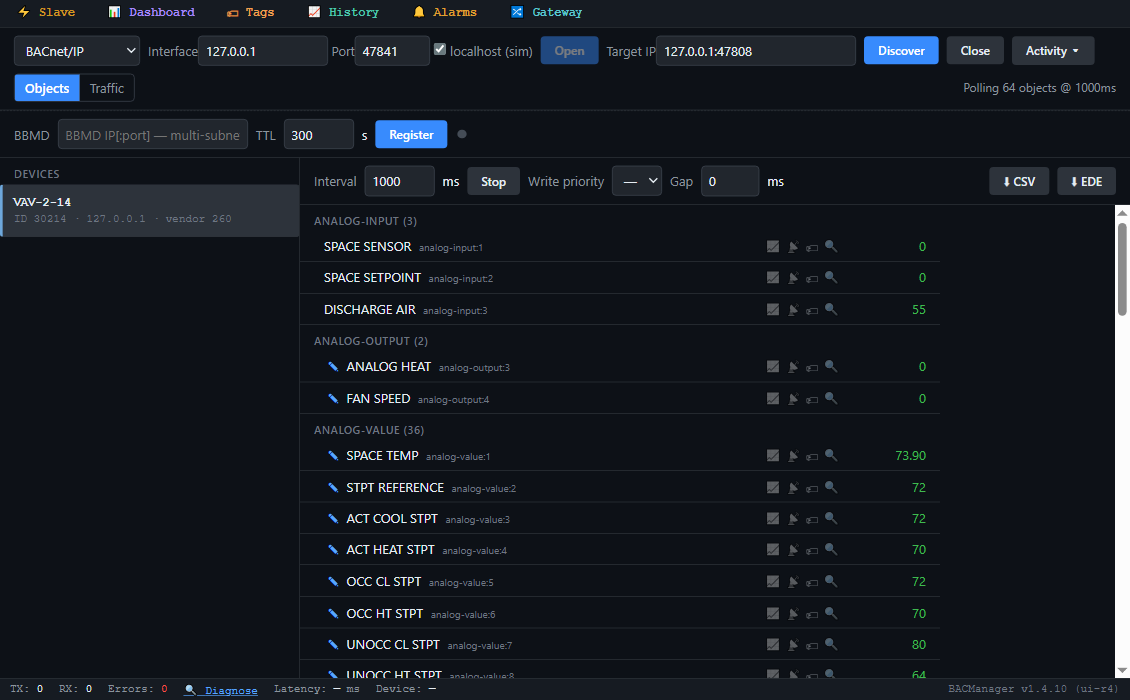
BACManager BACnet tab: device VAV-2-14, instance 30214, with its KMC Conquest objects listed by name and polled: SPACE TEMP, ACT COOL STPT, ACT HEAT STPT, OCC CL STPT, MIN COOL FLOW, PRI FLOW STPT, PRI ACTUAL FLOW, DAMPER POSITION, DISCHARGE AIR, NEED AHU, OCCUPIED MODE and the others
The controller's objects by name in BACManager (simulated controller built from KMC's object table)
ObjectObject nameDefaultWhat it is
AV1SPACE TEMP—Space temperature the loops use, °F (from the NetSensor or AI1)
AV3 / AV4ACT COOL STPT / ACT HEAT STPT74 / 70Setpoints in force, recalculated by the program
AV5 / AV6OCC CL STPT / OCC HT STPT74 / 70Occupied setpoints
AV7 / AV8UNOCC CL STPT / UNOCC HT STPT80 / 64Unoccupied setpoints
AV9 / AV10 / AV11MIN CL STPT / MAX HT STPT / MIN STPT DIFF68 / 76 / 4Setpoint limits and the minimum heating–cooling gap
AV2 / AV12STPT REFERENCE / STBY_OFFSET72 / 3Setpoint reference; standby offset (also the range of an STE-6014/6017 dial)
AV13 / AV14MIN COOL FLOW / MAX COOL FLOW100 / 400Cooling airflow range, cfm
AV15 / AV16 / AV17MIN HEAT FLOW / MAX HEAT FLOW / AUXILLARY FLOW100 / 400 / 200Heating airflow range; airflow during reheat (KMC's spelling)
AV22 / AV23 / AV24PRI FLOW STPT / PRI RAW FLOW / PRI ACTUAL FLOW—Airflow setpoint, uncorrected and corrected airflow, cfm
AV18–AV21PRI K FACT, PRI CORR SLOPE, PRI CORR OFFST, PRI LO FLOW CORR904, 1, 0, 1K factor and balancing corrections
AV50DAMPER POSITION—Damper position, %
AV36 / AV47 / AV37DAT RESET / DAT MAXIMUM / SAT CHANGEOVER90 / 90 / 72Discharge air setpoint and limit; supply air changeover temperature, °F
AV41 / AV57REL_HUMIDITY / ROOM CO2—From NetSensors that have the sensor, % RH and ppm
AI3DISCHARGE AIR—Discharge air temperature (optional sensor, needed for heating and changeover)
AI1 / AI2SPACE SENSOR / SPACE SETPOINT—Only for analog STE-6010/6014/6017 sensors; unused with a NetSensor
AO3 / AO4ANALOG HEAT / FAN SPEED0 / 0Modulating reheat and fan speed outputs, %
BO1 / BO2, BO6, BO7–BO9PRI DAMPER CW / CCW, FAN, HT STAGE 1–3InactiveActuator drive, fan, heating stages
BV1 / BV2 / BV3 / BV7NEED AHU / NEED COLDER SPLY / NEED MORE STATIC / NEED HOTTER SPLYInactiveRequests to the air handler (below)
BV4 / BV5 / BV6LOCAL OVRD / MOTION OVRD / MOTION SENSORInactiveOverride and motion states
BV11 / BV12AUTO OCCUPANCY / BALANCE MODEInactiveAutomatic occupancy enabled; balancing running
MSV1OCCUPIED MODEOCCUPIED1 Occupied, 2 Standby, 3 Unoccupied, 4 Local override, 5 Motion override
MSV8OCCUPIED STATEOCCUPIED1 Occupied, 2 Standby, 3 Unoccupied, 4 Local override
MSV2 / MSV3 / MSV10FAN CONFIG / REHEAT / WALL SENSORNONE / NONE / STE-9001Box configuration: fan type, reheat type, sensor type

The four AHU flags, as the guide defines them: NEED AHU is on when the box is occupied or in standby, or unoccupied with a loop at 100 %, and off when both loops fall below 5 %. NEED COLDER SPLY and NEED HOTTER SPLY come on with the damper fully open and the cooling (or heating) loop above 95 % for 30 minutes, and go off below 90 %. NEED MORE STATIC means the damper is fully open and the airflow still cannot reach its setpoint. The dual-duct application adds secondary duct objects, and the BAC-9021A pressure-dependent application has its own table.
// free download

The Conquest VAV workspace

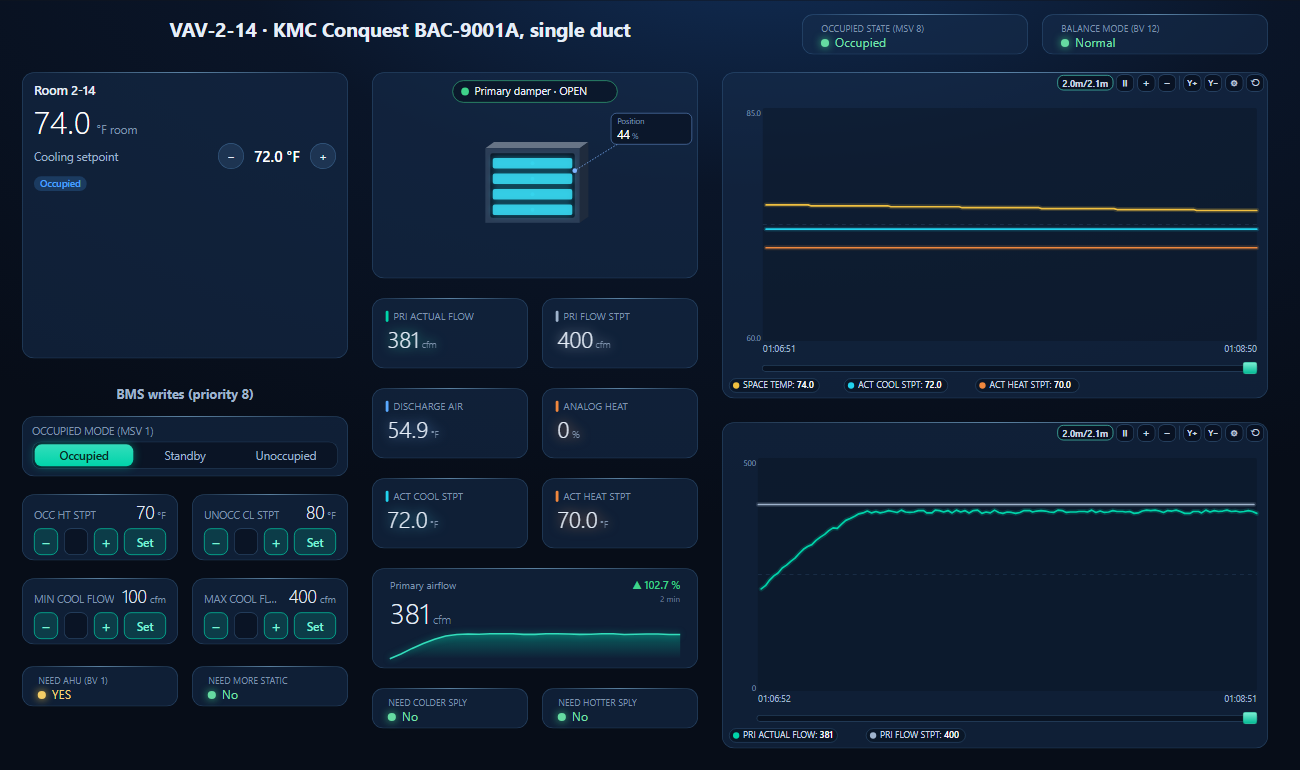
One dashboard page for a single-duct VAV box: the room faceplate with space temperature, the occupied setpoints and occupancy, the damper, airflow against its setpoint, discharge air, reheat, the active setpoints, the AHU flags, the writable airflow range and two trends.

BACManager dashboard for a KMC Conquest BAC-9001A VAV box: occupied state and normal balance mode at the top, the room faceplate with space temperature, the occupied cooling setpoint and occupancy, the occupancy switch and setpoints for heating, unoccupied cooling and the cooling airflow range, the primary damper position, actual and setpoint airflow, discharge air, analog heat, active setpoints, the AHU request flags, and trends of space temperature against the active setpoints and of airflow against its setpoint
The occupied cooling setpoint lowered from the faceplate: the active setpoint follows, the cooling loop raises the airflow setpoint and the damper opens (simulated controller)
1

Discover the box

On the BACnet tab open BACnet/IP for an “E” model, or MS/TP on the PC's RS-485 port at the trunk's baud rate (or through a router), and press Discover. The controller appears with the instance set in D ID.

2

Open the workspace

Workspace → Open. The file reads device 30214; if yours has another instance, BACManager asks which discovered device takes its place and moves every point over.

3

Run, then write

On the Dashboard press Run. The faceplate's + and − write the occupied setpoints AV5/AV6 at priority 8; the active setpoints next to the damper show what the program made of them. If the controller was restored to Metric, change the unit labels on the elements and the trend ranges to match.

Download workspace
// when it does not work

Typical problems

What you seeWhyWhat to do
A setpoint written to AV3/AV4 springs backThe program places AV5–AV8 into the active setpoints on every occupancy changeWrite AV5/AV6 (occupied) or AV7/AV8 (unoccupied)
Heating setpoint moved by itselfAV11 minimum differential: the controller keeps heating 4 °F below coolingWrite the pair; read both back
All setpoints and airflows back at factory valuesApplication or units changed in RSTRChoose application and units first, then commission
Values look like °F although the site is metricThe controller is still in English unitsRSTR → Metric before commissioning (it restores defaults)
Airflow readings wrong by a constant factorWrong K factor in AV18, or the box not balancedEnter the box's K factor and balance with a flow hood
Box stops answering BMS changes for a whileBalancing (BLNC) running: it locks out all other functionsWait for BV12 BALANCE MODE to clear
Controllers at high MACs missing on MS/TPMax Master below the highest MAC, or mixed baud ratesMax Master just above the highest MAC; one baud rate per trunk
Box goes Unoccupied and the damper opens fullyAutomatic occupancy enabled and primary airflow lost (under 25 % of the request for 5 minutes)Check the air handler; automatic occupancy is off from the factory
AI1 / AI2 read nothingA digital NetSensor is fitted; they serve analog sensors onlyRead AV1 for the space temperature
// questions

KMC Conquest VAV BACnet — FAQ

How do I set the BACnet address of a KMC Conquest VAV controller?+
With an STE-9000 series NetSensor: hold Up and Down for six seconds, enter the level 2 password, then Configuration → COMM sets D ID (device instance), MAC and BAUD. KMC Connect, TotalControl, Converge or the KMC Connect Lite NFC app do the same; Max Master needs one of the tools.
What is the default IP address of a Conquest “E” controller?+
192.168.1.251 with mask 255.255.255.0 and gateway 192.168.1.1. It is changed with KMC's software or the controller's web pages, not from the NetSensor. KMC's guide does not give a factory device instance or MS/TP MAC.
Which object should a BMS write to change the room setpoint?+
The occupied setpoints AV5 OCC CL STPT and AV6 OCC HT STPT (and AV7/AV8 for unoccupied). AV3/AV4, the active setpoints, are recalculated by KMC's program when the occupancy changes.
Where is the airflow in the object list?+
AV24 PRI ACTUAL FLOW is the corrected airflow, AV22 PRI FLOW STPT its setpoint and AV50 DAMPER POSITION the damper, all in the single-duct BAC-9001A application. The range comes from AV13–AV16, in cfm unless the controller was set to Metric.
Can I switch the controller to °C?+
Yes, in the NetSensor's RSTR menu (English, Metric or mixed). Changing units — or the application — restores the Setpoint, System and Balance settings to factory defaults, so do it before commissioning.
Is the BAC-9001A BTL listed?+
KMC's data sheet says the BAC-9000A series is BTL-certified as a B-AAC. The BTL listing we found, BTL-30013 from 2017, covers the earlier BAC 9001 and BAC 9021 models.
// sources

Where this comes from

KMC Controls: KMC Conquest Gen6 Controller Application Guide AG250415B (2025; MS/TP and Ethernet connections, NetSensor menus, VAV sequences, BAC-9001A object tables), data sheet BAC-9000A Series BACnet VAV Controller-Actuators 925-035-02C (2024), and the PICS KMC Conquest Controllers Combined Rev B and BTL listing BTL-30013 (both February 2017, firmware R1.1.0.0). Get the documents from kmccontrols.com and check them against your controller's firmware and application. Where the guide disagrees with itself we followed the object table: two passages map the NetSensor setpoints to AV4/AV5 while the table, the sequences and a third passage use AV3/AV4, and the text gives a 74 °F changeover default where AV37 lists 72. The factory device instance, MAC, baud rate and a recommended write priority are not in these documents; the occupancy object is our reading. KMC Conquest is a trademark of KMC Controls, Inc.; BACManager is not affiliated with KMC Controls. The pictures on this page are from BACManager connected to a simulated controller built from the published object table.

// more device guides

Other BACnet devices

Chillers and rooftop units
Daikin MicroTech III chiller
Trane Symbio 700
Carrier AquaSnap 30RC
York YLAA chiller
AAON VCCX2
Lennox CORE
Air handling units
Swegon GOLD
Systemair Access (Geniox, Topvex)
Data centre cooling
Vertiv Liebert iCOM
Boilers
Lochinvar Crest boiler
VRF and split systems
Daikin iTM (VRV)
Mitsubishi AE-200
Drives
ABB ACH580
Schneider ATV600
Siemens SINAMICS G120P
Danfoss VLT FC 102
Yaskawa HV600
Pumps and valves
Grundfos MAGNA3 (CIM)
Wilo Stratos MAXO (CIF)
Belimo Energy Valve
Energy meters
Accuenergy Acuvim II
Routers
BASrouter (MS/TP to IP)

All BACnet device guides →

Commission the Conquest VAV from your laptop

Download the free trial, discover the box and open the Conquest VAV workspace — every point by name, the occupied setpoints on the room faceplate. No credit card.

Download free trial See pricing

Windows 10/11 · $149 one-time