Every device. One tool. Pay once. Modbus · BACnet · Siemens S7 · one-time licence · also from us: ModbusManager ↗
// carrier · aquasnap 30rc · carrier controller · bacnet/ip

Carrier AquaSnap 30RC
BACnet Points List & Setup

How to put a Carrier AquaSnap 30RC air-cooled chiller with the Carrier Controller on BACnet/IP: the BACNET menu that is off from the factory, the Ethernet port and its 169.254.1.1 default, the device ID 1600001, the Network control method without which every command is ignored — and the metric units BACnet uses even when the display shows °F. With a free BACManager workspace.

Download free trial Free 30RC workspace

Covers 30RC 010–060, also with Greenspeed Intelligence · source: Carrier Form 30RC-100T, Catalog No. 04-53300249-01 (3-24)

// before you start

BACnet is in the Carrier Controller

🔌

No card, one Ethernet port

The Carrier Controller display is the chiller's controller and its BMS interface. Its RJ45 port J5 (ETH0) carries BACnet, Modbus TCP and the web interface. The BACNET menu offers BACnet/IP or BACnet MS/TP; the form does not say which terminal MS/TP uses on this chiller.

⚙

Off from the factory

The BACNET menu's bacena is 0 (disabled), and the factory configuration has bac_opt “Enable BacNet Option” = No. The form lists both without saying how they relate; the factory menu needs the Factory access level. If BACnet stays silent, ask Carrier service to check bac_opt.

🔑

Network control method

On the display's Start/Stop screen pick Network. In Local On, Local Schedule or Remote the chiller reads fine but ignores every network command except Emergency Stop. Start/stop from the web interface is not allowed at all, for security.

// setup

Network menu, then the BACNET menu

The IP address of Ethernet 0 (J5) is set under System Menu → Network; its default is 169.254.1.1. BACnet itself is under Main Menu → Configuration → BACNET (User access).

PointSettingFactorySet to
bacenaBACnet Enable Option0 Disabled1 BACnet IP (or 2 BACnet MS/TP)
bac_idDevice ID Manual1600001A device instance unique in the building (1–4194302)
auid_optDevice ID Auto OptionDisabledLeave, unless your site uses the automatic scheme
networkNetwork16001–40000; leave unless your BACnet network plan gives a number
udpportUDP Port Number4780847808–47823
bacunitMetric Units?YesYes = °C and kPa over BACnet; No = °F and psi
balmenaAlarm ReportingEnabledLeave
mng_occBACnet Manage OccupancyNoYes when the BMS sends occupancy through BACnet_BMS_OCC (AV 66)
conifnamIP Port Interface Name0 = J5 / J151 = J16
mstpaddr / mstpbaudMS/TP MAC / baud1 / 2 = 38400MS/TP only: a free MAC 1–127; 9600…115200
maxmastr / maxinfofMax Master / Max Info Frames10 / 5MS/TP only: Max Master = the trunk's highest MAC

Two read-only objects tell you what the controller really uses: BACnet_ident (AV 63) “Device Id Actually Used” and BACnet_bacunit (BV 61). The display's own units are separate and default to US Imperial, so the screen can show 44.6 °F while BACnet reads 7.0 °C.

// control

The _wr objects command, the _rd objects read back

Each network command exists twice: an RW object ending in _wr at 10000 + the instance of the read-only _rd object that shows the value in force.

WriteObject nameRead backWhat it does
BV 10012GENUNIT_CHIL_S_S_wrBV 12Net.: Cmd Start/Stop, 1 = enable
BV 10058GENUNIT_CHIL_OCC_wrBV 58Net.: Cmd Occupied
AV 10006GENUNIT_CTRL_PNT_wrAV 6Control point, −4…153 °F in the table (−20…67 °C)
AV 10008GENUNIT_DEM_LIM_wrAV 8Demand limit, 0–100 %
AV 10024GENUNIT_SP_SEL_wrAV 24Setpoint select: 0 Auto, 1 Setpoint 1, 2 Setpoint 2
AV 10023GENUNIT_HC_SEL_wrAV 23Heat/cool select: 0 Cool, 1 Heat, 2 Auto
BV 10013GENUNIT_EMSTOP_wrBV 13Emergency Stop — acts in every control method
BV 10050 / 10051 / 10053PUMPSTAT_PUMP_1_wr / _2_wr, PROTOCOL_PUMP_CBV 50 / 51Evaporator pumps, condenser pump
2

Start needs two things

Carrier's start/stop table lists the Network method as running only with Start/Stop enabled and the time schedule occupied. If BV 12 reads 1 and the chiller still stays off, check BV 58 — and write BV 10058 = 1, or occupancy through AV 66 with mng_occ = Yes.

°

Setpoint or control point

The chiller controls to the control point: the current setpoint plus any reset. SETPOINT_csp1 (AV 900, default 44.6 °F = 7.0 °C) is a plain read-write setting; GENUNIT_CTRL_PNT_wr forces the control point directly while Network is active.

8

Which priority

The form marks the _wr objects RW but does not say whether they carry a priority array or which priority a BMS should use. BACManager writes at priority 8 unless you choose otherwise; a commanded value stays until it is relinquished — see the priority array explained.

// the rules that bite

Network, 1600001, metric

NET

Only Network obeys

Local On, Local Schedule and Remote ignore BACnet start/stop, setpoint and demand limit writes. Read GENUNIT_CTRL_TYP (AV 21: 0 Local, 1 Network, 2 Remote) before blaming the BMS. Changing the method passes through Off, with the on-to-off delay.

#

Every chiller is 1600001

The manual device ID is 1600001 on every controller. Two 30RCs on one network answer Who-Is with the same instance until bac_id is changed on one of them (or the automatic scheme is set up).

°C

Metric by default

Metric Units? = Yes from the factory: BACnet reads °C and kPa while the display and the form's point tables give °F and PSI. A BMS that expects °F reads 7 as freezing. Pick one and label the points.

// points list

The 30RC points a BMS uses

Object names as Carrier lists them in Form 30RC-100T Appendix D. RW = written by the BMS, R = read only. Which points answer depends on the unit's options; circuit B and the third compressor exist only where fitted.
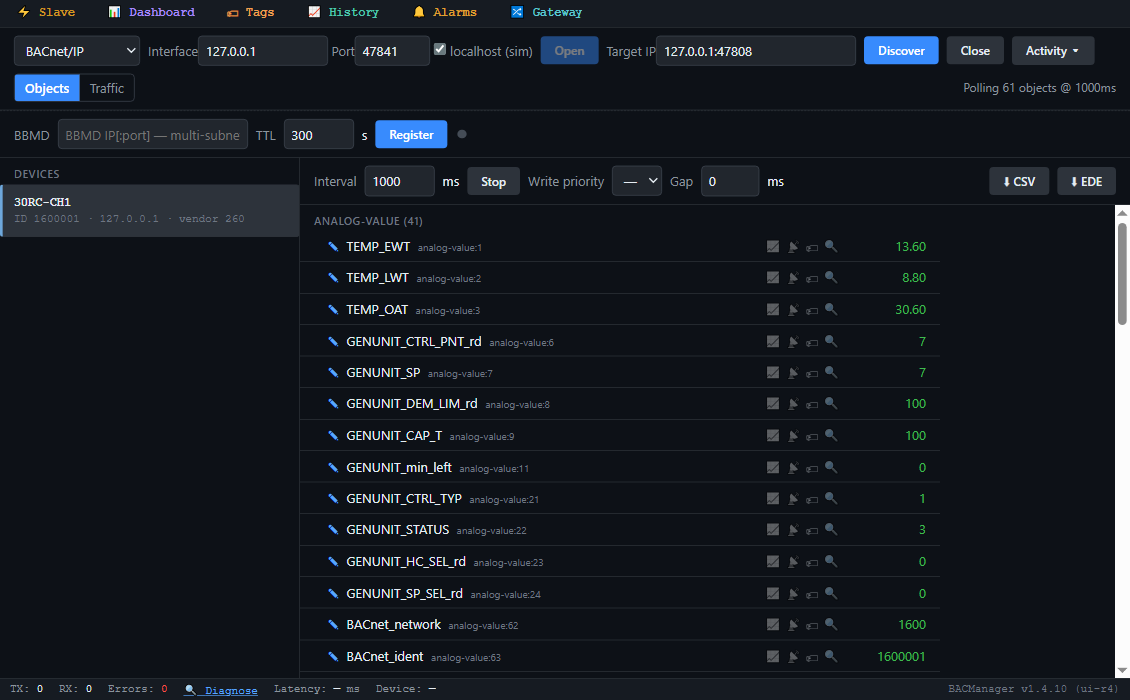
BACManager BACnet tab: device 30RC-CH1, instance 1600001, with its Carrier objects listed by name and polled: TEMP_EWT, TEMP_LWT, TEMP_OAT, GENUNIT_CAP_T, GENUNIT_CTRL_TYP, OUTPUTS_CP_A1, GENUNIT_CHIL_S_S_wr, SETPOINT_csp1 and the others
The chiller's objects by name in BACManager (simulated controller built from the 30RC-100T BACnet table)
ObjectObject nameAccessWhat it is
AV 1 / AV 2TEMP_EWT / TEMP_LWTREntering and leaving water
AV 3TEMP_OATROutdoor air
AV 6 / AV 7GENUNIT_CTRL_PNT_rd / GENUNIT_SPRControl point in force; current setpoint
AV 9GENUNIT_CAP_TRPercent total capacity
AV 1017 / AV 2017GENUNIT_CAPA_T / GENUNIT_CAPB_TRCircuit A / B capacity, %
AV 21GENUNIT_CTRL_TYPR0 Local, 1 Network, 2 Remote
AV 22GENUNIT_STATUSRRunning status (Off, Delay, Running, Ready, Tripout…; the numbers are not listed)
AV 11GENUNIT_min_leftRMinutes left for start
BV 15 / BV 16OUTPUTS_RUN / INPUTS_ONOFF_SWRRunning relay; remote on/off contact
BV 50 / 51 / 52PUMPSTAT_PUMP_1_rd / _2_rd, INPUTS_FLOW_SWRWater pumps; flow switch interlock
AV 900 / 901SETPOINT_csp1 / SETPOINT_csp2RWCooling setpoints 1 and 2, −20…68 °F in the table
AV 903 / 904SETPOINT_hsp1 / SETPOINT_hsp2RWHeating setpoints
AV 905–907SETPOINT_lim_sp1…3RWSwitch limit setpoints, %
AV 66BACnet_BMS_OCCRWBMS occupancy: 0 unoccupied, 1 occupied, 2 none (with mng_occ = Yes)
BV 1032, 1033, 1034 / 2032, 2033OUTPUTS_CP_A1, A2, A3 / B1, B2RCompressors running
AV 1000 / 1001, AV 2000 / 2001PRESSURE_DP_A / SP_A, DP_B / SP_BRDischarge and suction pressure
AV 1005 / 1006, AV 2005 / 2006TEMP_SCT_A / SST_A, SCT_B / SST_BRSaturated condensing and suction temperatures
AV 1009 / 2009, AV 1011 / 2011TEMP_DGT_A / B, LOADFACT_SH_A / BRDischarge gas temperature; suction superheat
AV 1015OUTPUTS_VFANRVariaFan speed
AV 960 / 961RUNTIME_hr_mach / RUNTIME_st_machRMachine hours and starts; per compressor AV 1960… / 1964…
AV 980–984 / 985–989ALARMRST_alarm_1c…5c / alarm_1…5RCurrent alarms 1–5 (code, e.g. 10031) and their index
AV 990 / BV 5012ALARMRST_ALM / OUTPUTS_ALARMRAlarm state; alarm relay
BV 1xxxxxALM_…_FROne object per alarm, e.g. BV 115002 ALM_COOL_LWT_F, BV 110001 ALM_COOLER_FREEZE_F
AV 62 / AV 63 / BV 61BACnet_network / BACnet_ident / BACnet_bacunitRThe BACnet settings in force

The full table, with every alarm object, the pump configuration and the model-specific 5000-range points, is Appendix D of Form 30RC-100T (pages 142–147); Appendix E gives the same data as Modbus TCP registers. The table's limits are written in °F; over BACnet with Metric Units? = Yes the values arrive in °C. With Alarm Reporting enabled, BACManager can receive the alarm notifications the chiller sends; the form does not describe its alarm services or how the recipients are set.
// free download

The 30RC chiller workspace

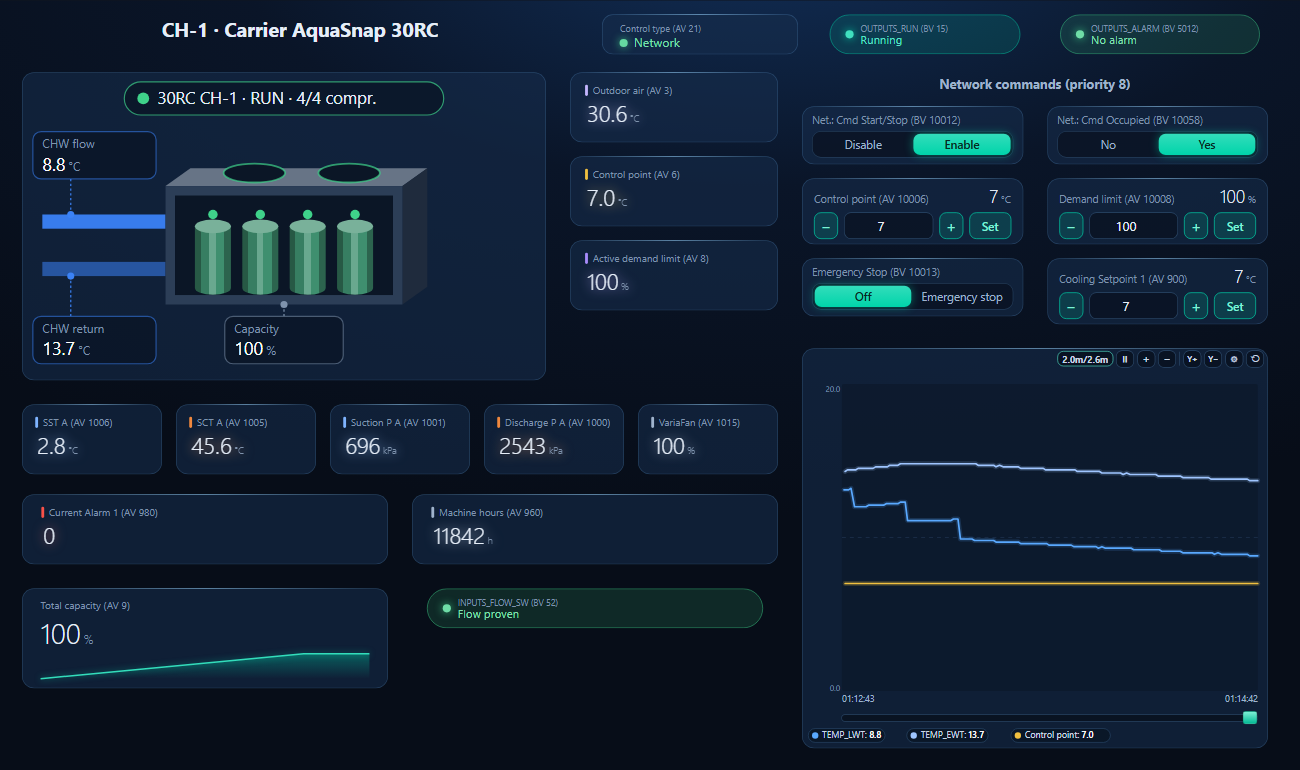
One dashboard page for the chiller: the unit with compressors A1, A2, B1, B2, leaving and entering water and capacity; control type, running and alarm relay; circuit A refrigerant values; and the network commands at priority 8 — start/stop, occupied, control point, demand limit, emergency stop and cooling setpoint 1.

BACManager dashboard for a Carrier AquaSnap 30RC chiller: control type Network, running, no alarm, the chiller drawing with its four compressors, leaving and entering water and capacity, outdoor air, control point and demand limit, the network commands at priority 8, circuit A suction and condensing values, and a trend where the leaving water comes down to the control point
Net.: Cmd Start/Stop enabled from the page at priority 8: the chiller waits out its start delay, stages its compressors and pulls the leaving water down to the control point (simulated controller)
1

Discover the chiller

On the BACnet tab open BACnet/IP on the PC's network card and press Discover — from another subnet through the site's BBMD as a foreign device, or MS/TP on a USB RS-485 adapter if the chiller is set to MS/TP.

2

Open the workspace

Workspace → Open. The file reads device 1600001, the factory bac_id; if yours has another instance, BACManager asks which discovered device takes its place and moves every point over.

3

Network, then Run

Check the control type reads Network. On the Dashboard press Run: the commands write only in Run mode and only after the chiller has answered.

Download workspace
// when it does not work

Typical problems

What you seeWhyWhat to do
Discover finds nothingbacena still 0, bac_opt No, or J5 on 169.254.1.1Set the IP address, then bacena = 1; have Carrier service check bac_opt
Writes succeed, nothing changesMachine Control Method is Local or RemoteSelect Network on the display; read AV 21 = 1
Start/Stop enabled, chiller stays offNetwork also needs the schedule occupiedWrite BV 10058 = 1, or occupancy via AV 66 with mng_occ = Yes
Temperatures look wrong by a lotBACnet in metric, the BMS expects °F (or the reverse)Check BV 61 and bacunit; label the points
Two chillers answer as 1600001bac_id factory valueSet a unique Device ID on each
Chiller stopped, Current Alarm 1 = 10031Emergency Stop written over the networkWrite BV 10013 = 0 (it resets automatically)
On MS/TP the chiller ignores masters above MAC 10Max Master factory value 10maxmastr = the trunk's highest MAC
A point from this list is missingOption not fitted, or another software versionRead the object list from the chiller by name
// questions

Carrier 30RC BACnet — FAQ

How do I enable BACnet on a Carrier 30RC?+
Give Ethernet 0 (J5) an address under System Menu → Network, then set Main Menu → Configuration → BACNET → bacena = 1 (BACnet IP) and a unique bac_id. The factory configuration also has an “Enable BacNet Option” (bac_opt, default No) that needs Factory access.
What is the default BACnet device ID of the Carrier Controller?+
1600001 (bac_id), with network number 1600 and UDP port 47808. The default IP address of J5 is 169.254.1.1.
Why does the 30RC ignore my BACnet start command?+
The Machine Control Method must be Network, and in Network the chiller runs only when Net.: Cmd Start/Stop is enabled and the schedule is occupied. Read GENUNIT_CTRL_TYP (AV 21) and GENUNIT_CHIL_OCC_rd (BV 58).
Which object is the chilled water setpoint?+
SETPOINT_csp1 (AV 900) and SETPOINT_csp2 (AV 901) are the cooling setpoints; GENUNIT_CTRL_PNT_wr (AV 10006) forces the control point directly in Network. AV 7 shows the current setpoint and AV 6 the control point in force.
Are the BACnet values in °F or °C?+
°C and kPa by default: the BACNET menu's Metric Units? is Yes from the factory, even though the display defaults to US Imperial. Set bacunit = No for °F.
Does the 30RC support BACnet MS/TP?+
The BACNET menu offers MS/TP (bacena = 2) with MAC 1, 38400 baud and Max Master 10 as defaults. The form does not show which terminal it uses on the 30RC; BACManager reads MS/TP from a USB RS-485 adapter.
// sources

Where this comes from

Carrier: AquaSnap 30RC 010–060 Air-Cooled Chillers (with Greenspeed Intelligence) and Carrier Controller — Controls, Start-Up, Operation, Service and Troubleshooting, Form 30RC-100T, Catalog No. 04-53300249-01, 3-24: the BACNET and Network menus (Appendix A and H), Machine Control Methods and Table 24, and Appendix D “BACnet IP points”. Get it from carrier.com and check it against your unit's software. Not in the form: the BACnet PICS, the priority to command at, the numbers behind GENUNIT_STATUS, and how bacena and bac_opt relate. Carrier and AquaSnap are trademarks of Carrier; BACManager is not affiliated with Carrier. The pictures on this page are from BACManager connected to a simulated controller built from the published BACnet table.

// more device guides

Other BACnet devices

Chillers and rooftop units
Daikin MicroTech III chiller
Trane Symbio 700
York YLAA chiller
AAON VCCX2
Lennox CORE
Air handling units
Swegon GOLD
Systemair Access (Geniox, Topvex)
VAV and room controllers
KMC Conquest VAV
Data centre cooling
Vertiv Liebert iCOM
Boilers
Lochinvar Crest boiler
VRF and split systems
Daikin iTM (VRV)
Mitsubishi AE-200
Drives
ABB ACH580
Schneider ATV600
Siemens SINAMICS G120P
Danfoss VLT FC 102
Yaskawa HV600
Pumps and valves
Grundfos MAGNA3 (CIM)
Wilo Stratos MAXO (CIF)
Belimo Energy Valve
Energy meters
Accuenergy Acuvim II
Routers
BASrouter (MS/TP to IP)

All BACnet device guides →

Commission the 30RC from your laptop

Download the free trial, discover the chiller and open the 30RC workspace — every point by name, start/stop and setpoints at priority 8. No credit card.

Download free trial See pricing

Windows 10/11 · $149 one-time